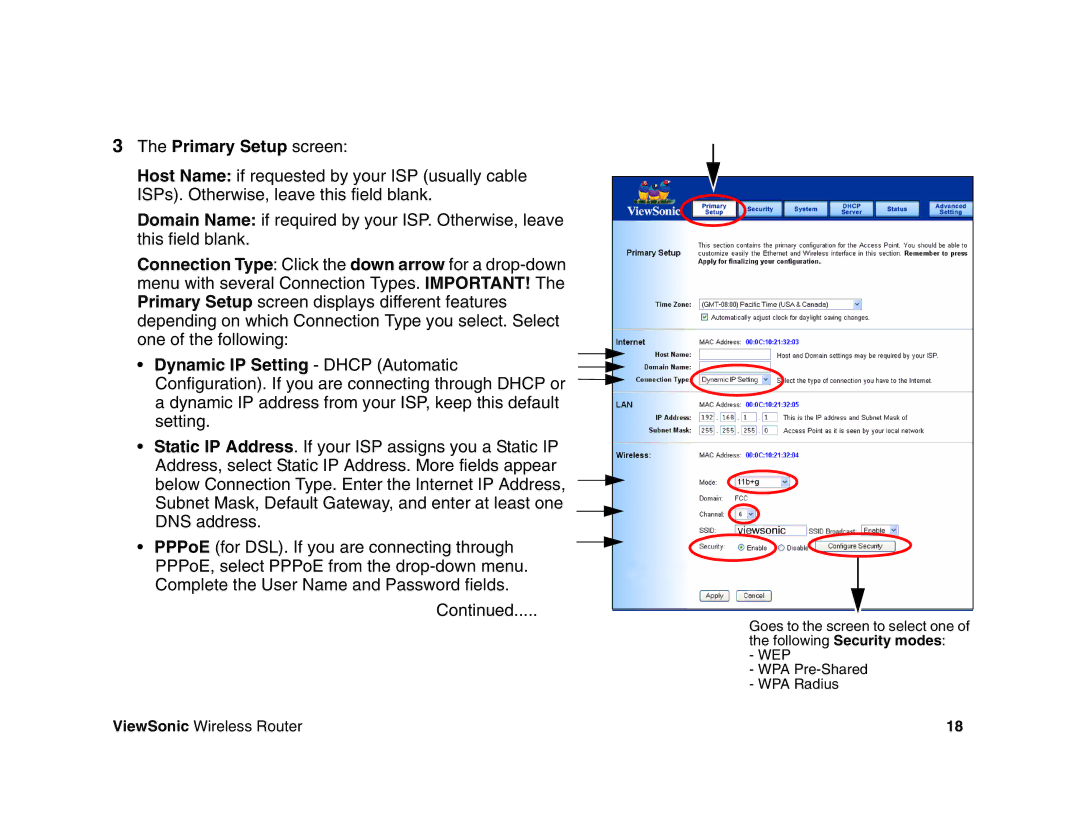
3The Primary Setup screen:
Host Name: if requested by your ISP (usually cable
ISPs). Otherwise, leave this field blank.
Domain Name: if required by your ISP. Otherwise, leave this field blank.
Connection Type: Click the down arrow for a
• Dynamic IP Setting - DHCP (Automatic Configuration). If you are connecting through DHCP or a dynamic IP address from your ISP, keep this default setting.
•Static IP Address. If your ISP assigns you a Static IP Address, select Static IP Address. More fields appear
below Connection Type. Enter the Internet IP Address, Subnet Mask, Default Gateway, and enter at least one DNS address.
• PPPoE (for DSL). If you are connecting through PPPoE, select PPPoE from the
Continued.....
Goes to the screen to select one of the following Security modes:
- WEP
- WPA
ViewSonic Wireless Router | 18 |