User’s Manual
Scan Tool Information
Safety Precautions
Safety
Battery acid is a highly corrosive sulfuric acid
Risk of electric shock
Risk of explosion
Risk of poisoning
Risk of flying particles
Risk of burns
Risk of equipment or circuit damage
Risk of injury
Risk of unexpected vehicle movement
Safety Table of Contents ---------- Using this Manual
Page
Safety Messages
Check Note
Equipment Tips and Lists
Equipment Damage
Functions and Selections
Menus
Questions and Responses
Manual References
Table of Contents
GM Historic OBD I Diagnostics
GM Enhanced OBD II Diagnostics
Print Data
Code Lookup
Ford Enhanced OBD II Diagnostics
Ford Historic Self-Test Routines
Manual Info Read Koeo Codes
Iii
Chrysler Diagnostics
Import Enhanced OBD II Diagnostics
How to Use On-Line Help -1Scan Tool Does Not Power Up
Using Non-OBD II Adapter Cables
Using J1962 OBD II or Chrysler LH Adapter Cable
Error Messages
ToC
Vehicle Service Information
Domestic Vehicles Web Site
General Motors
Ford
European Vehicles
Asian Vehicles Web Site
Other Manuals
Repair Information Programs
Ford On-Board Diagnostics
Introduction to ON-BOARD Diagnostics
Diagnostic Link Connectors DLC on GM On-Board Diagnostics
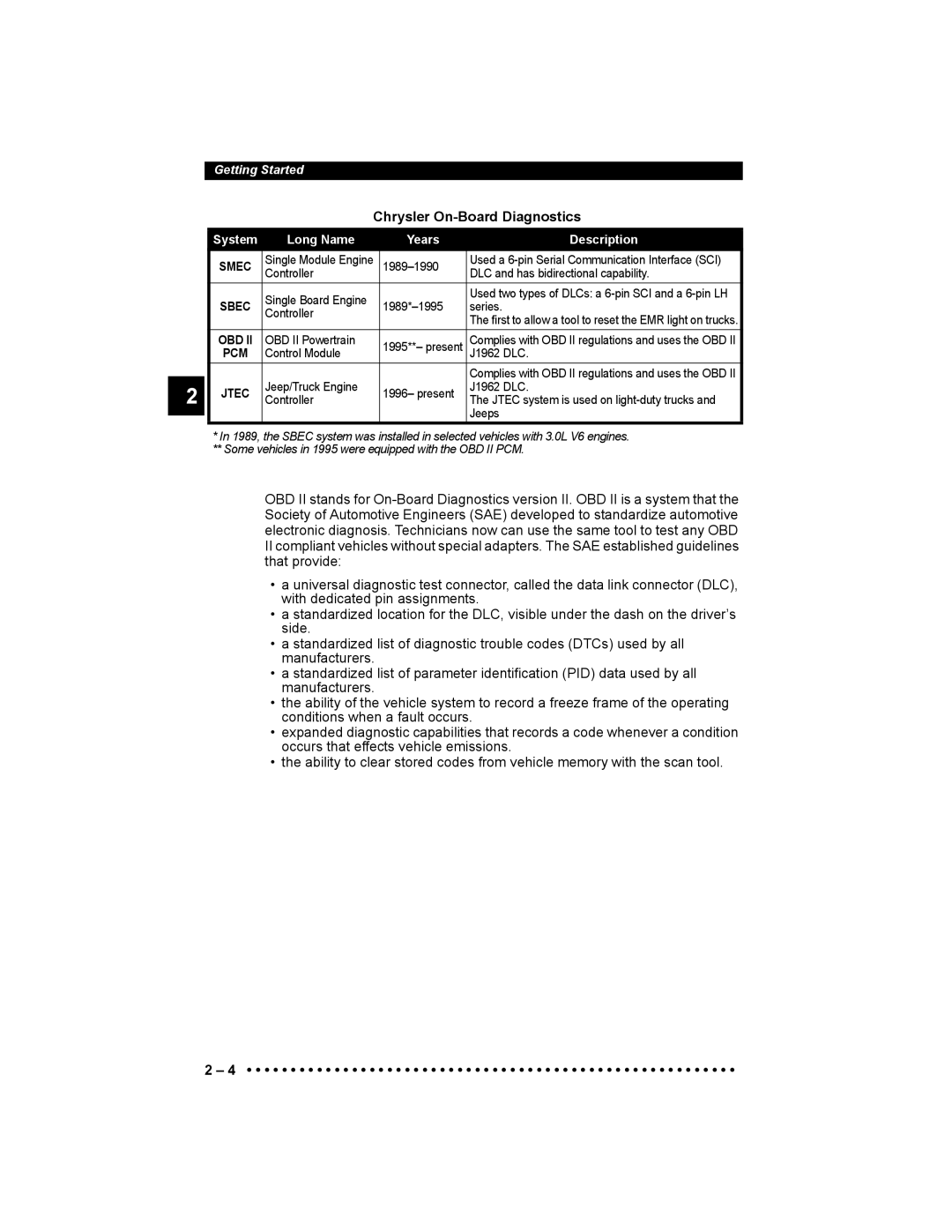
Chrysler On-Board Diagnostics
System Long Name Years Description
Diagnostic Link Connectors DLC
OBD II J1962
Ford Historic
EEC-IV/MCU
Mecs
Cable Adapter Vehicle DLC
Cable Adapter Vehicle DLC
Vehicle DLC
Do not USE
GM Historic
Pin Mecs
Use the Battery Power cable to provide 12V to the tool when
Using the SCI adapter cable
Chrysler Historic
SCI
Diagnostic Trouble Codes DTCs
Lower Upper Assigned DTC System
Scan Tool
12V Power Jack
Battery compartment cover
Specifications
Accessories
Display
Keyboard
Power
Vehicle Power
AC Power Adapter
Internal Batteries
Scan Tool Setup
Changing the Printer Settings
Printer end
Use the Back key to return to the previous menu
Printout of the test looks similar to the example shown
Keep Current Vehicle
Connecting the Scan Tool
Vehicle Selection
GM Typical VIN
Changing the Vehicle
Picking New Vehicle Erases All Stored Data. Continue?
SFI Keep
Obdii
VIN
Viewing Data
User Interface
User Responses
View Data Setup
Entire Data List
Custom Data List
YES
Covers Global Obdii Diagnostics
Manual Info
Readiness
EPA. Not all monitors are supported by all vehicles
This Driving Cycle
Misfire Monitor Fuel System Mon Catalyst Mon Inc ~
Since Dtcs Cleared
Misfire Monitor Fuel System Mon Catalyst Mon Inc~
Read Codes
Function List ?
1I/M Readiness ` 2Read Codes 3Pending Codes
MAP/BARO
Pending Codes
1I/M Readiness 2Read Codes ` 3Pending Codes
System Pass
Select Pending Codes and press Enter key
Command Sent
Erase Codes
Press Enter To Cont~
Enter key to continue
View Data
MIL STATUS$10 MIL STATUS$1A OFF ENGINE$10
256
ENGINE$1A
Calc LOAD%
View Freeze Data
Troub Code
O2 Monitor Test
Obdii Function List
` 7O2 Monitor Test 8Diag Mon Test 9On-Board Systems ~
Bank 2 has prefix 2y
Diagnostic Monitor Tests
RICH-LN
ID Meas Spec STS
OK~
Select On-Board Systems from
ON-BOARD Systems
` 10Record Data 11Vehicle Info 12Modules Present ~
Pick Trigger Method `1Manual Trigger 2Trigger On Codes
Record Data
Cannot Record. Old Recording Filled Up Memory. Erase Old?
Initializing Pretrig Frame
Back To Exit
Recording Data Frame 14 Press Enter to Stop ~
Press Back key twice to return to Obdii Function List
Vehicle Info
Abbrieviated Name Expanded Name
Modules Present
Global Obdii Diagnostics
Review Data
Playback
MIL STATUS$10 MIL STATUS$1A
Abslt TPS%$10 Frame 1 TM
OK?
Print Data
Printing Data except Playback
Sending Frame To Printer
Printing Playback Data
All Data Has Been Sent To Printer Press Enter To Cont. ~
Code Lookup
Read Codes
GM Historic OBD I Diagnostics
Manual Info
Erase Codes
ESC
Manual Erase Methods
Erase Codes? Are You Sure? Yes No
Turn Ign Key On Engine Can Be Off Or Running Press Enter To
View Data
Multiple Group Vehicles
1ST Gear SW Ratio
18.8~
Record Data
Pick Trigger Method ` 1Manual Trigger 2Trigger On Codes
Select Record Data from the GM
Can be performed with the ignition key On-Engine Off or
GM Function List 4Record Data ` 5Review 6Field Service
Review Data
DTC Codes
` 1DTC Codes 2Playback
Playback
1DTC
Codes Present YES
Frame
Enter
Field Service
Check
Koeo Procedure
Code 12 will look like
FLASH-pause-FLASH-FLASH long pause
Code 23 will look like
Print Data
Koer Procedure
Code Lookup
GM Enhanced OBD II Diagnostics
This system. Refer to Appendix a Data Link Connectors. GM
Readiness
Trans Hist P1800
List 1I/M Readiness ` 2Read Codes 3Pending
Pending Codes
ENG Curr
ENG Curr P0201
MIL Requested
ENGINERPM$1A
Select Pid Group ` Analog Misfire
MIL STATUS$10 MIL STATUS$1A OFF ENGINERPM$10
Diagnostic Monitor Test
Fault Data
View Freeze Data
O2 Monitor Test
Vehicle Info
Select
Powertrain List 11Vehicle Info 12Review Data ` 13Print
Global Obdii Diagnostics for
` Trans
Digital
GM Enhanced OBD II Diagnostics
Ford Historic SELF-TEST Routines
Read Koeo Codes
Koeo
Read Koer Codes
Ford Function List 1Read
Codes ` 2Read
Koer
Fast or Slow Codes
Select Code Type
` 1Fast Codes
2Slow Codes 3Computed Timing
PFE/DPFE EGR
Computed Timing Check 1984-1991 EEC-IV Vehicles
3IVSC Koeo
Review Codes
2KOER
EEC-IV Erase Codes
Only Memory Codes Are Erasable Press Enter to Cont~
Ford Function List 3Review Codes 4Erase ` 5Wiggle Test
Wiggle Test EEC-IV Vehicles
Mecs Erase Codes
Wiggle Test Running Status Circuit OK Fault Present
Select Wiggle Test
` 1KOEO Wiggle Test
Wiggle Test
Output Switch Test EEC-IV Vehicles
5Wiggle Test
` 6Output Test 7DCL Data
Than 3 Minutes
Cylinder Cyl Balance Test EEC-IV Vehicles
Keep hands and tools away from fan and engine during test
Correct All Faults Rerun Test View Codes?
Stage 1 Completed. Failed Cylinders Press Enter To Cont~
Ivsc Koeo Code Read Turn Ign Key Off Press Enter To Cont~
IVSC-Speed Ctrl EEC-IV Vehicles
Reading Ivsc Koeo Codes
Scvac
Reading Ivsc Koer Codes
Ivsc
Star Test Mode EEC-IV, Mecs and MCU Vehicles
STO
Test/Hold On Hold Enter To Test
Stolow
When done, press Back to return to the Ford Function List
Lookup Code 000 Use Arrow Keys Select Or Press Enter To 058
Three-Digit DTC 214 will Flash as follows
Two-Digit DTCs 12, 42 will Flash as follows
DCL Data Functions EEC-IV Vehicles
VAT
CKT
Vvat
Method works
Select Data To View ` 1Entire Data List 2Custom Data List
Record Data
Stops Automatically
Is Full. ~
Playback Data
DCL Function List 1View Data 2Record Data ` 3Playback Data
Canst Purge ECT Sensorv Frame16 Time 24.7~
BOO-Brake
ON?
MIL DTC
Ford Enhanced OBD II Diagnostics
Read MIL DTC
Read All DTC
Data Group ` Standard Info O2 Sensor Misfire Info
Ford arranges the PIDs in six groups
Three Quick Tests are performed on all Ford vehicles
Quick Tests
Module $1F is not Responding Continue Without it? Yes No ~
Following system components are tested
Ford Function List ? 6View Data 7View Freeze ` 8Quick Test
Koeo On Demand
Koer On Demand
Unable to Run Test ?
Verify Key
Running
Koeo Output State
Quick Tests
Demand
` Koeo
Quick Tests 7.3L Powerstroke Diesel Only
Koeo Inj. Buzz
Inj Buzz
Output State~
Koer Cyl.
Koer Glow Plug
` Koer
Glow Plug ` Cyl Cont
Koer Switch
On Demand
Test Progress
Approximate
Time Left 300
Back
Pending Codes Playback Freeze Frame Vehicle Info
Diagnostic Monitor Tests
On-Board Systems
Chrysler Diagnostics
Chrysler Diagnostics
Read Temporary Codes
ENG
Trans
Evap
Follow the instructions and press
ENG 14/P0107 MAP Voltage Too Low
Chrysler Functions 1Read Codes 2Read Temp Codes ` 3Erase
Chrysler Functions 2Read Temp Codes 3Erase ` 4View Data
Adpt FUEL% Baro
29.2
Batt
Tpsv RPM
Freeze Frame
Select Frame
Chrysler Functions 4View Data ` 5Record 6Switch Test
Initializing Pretrig FRAME-5
Custom Data Lists
Method. Manual Trigger allows
Switch Test
Testing Switch
Clutch REL Switch is High
Select SW To Test ` A/C
Clch REL
Actuator Test
Clch REL ALL SOLS/RELS AIS SW SOL
RPM ~
Idle Speed Test
Sensor Test
Reset EMR Lamp
Controller Info
Viewing Sensor
Adpt FUEL%
SET Basic Time
Chrysler Functions ` 12Set Basic Time 13Review Data 14Print
Coolantv Coolantof
Enginerpm
14Print Data ` 15Code Lookup 16Manual Info
IAT
Import Diagnostics
Import Enhanced OBD II Diagnostics
Function List?
Import Enhanced Read Codes reads DTC’s from modules
Refer to View Data on page 4-6 of Global Obdii Diagnostics
Print Data
HOW to USE ON-LINE Help
Scan Tool does not Power UP
Using Non-OBD II Adapter Cables
Using J1962 OBD II or Chrysler LH Adapter Cable
Error Messages
Vehicle Communication Fault
Operating Error or Erroneous Data
Operating Error Check Connections Try Again?
Battery Replacement
Check the following if an error message displays
Follow these steps to replace the batteries
Place the Scan Tool with
Main Menu Vehicle Diagnosis Tool Setup ` Tool Self-Test
Tool SELF-TESTS
Display Test
Keyboard Test
Memory Test
Printer Test
Memory Test Memory Test Failed SW ID = 50AD Press Enter To
Ascii Character Set Will Be Printed Once Press Enter To
Program Mode
Main Menu Tool Setup Tool Self-Test ` Program Mode
Technical Support
Print Test
Appendix a Data Link Connectors
GM Cars, Light Trucks & Vans
Series
Series 4x4, Small Van
OBD II J1962 DLC
Ford, Lincoln & Mercury Cars, Light Trucks & Vans
Mecs 6-Pin DLC Mecs 17-Pin DLC
SHP
GVW
Chrysler Cars, Light Trucks & Vans
Chrysler Cars, Light Trucks & Vans
Smec
Data Link Connectors
ABS
APP
ASR
Baro
BCM
CAM
Can
Carb
CTS
Cvrtd
Deps
DI/DIS
EFI
EGR
EOP
EOT
IAC
IAT
ICM
Imrc
MAP
MAT
MIL
OBD