IP Forwarding
Configuring IP
page 14-6
OmniSwitch 6600 Family Network Configuration Guide
April 2006
IP Forwarding
Network device traffic is bridged (switched) at the Layer 2 level between ports that are assigned to the
same VLAN. However, if a device needs to communicate with another device that belongs to a different
VLAN, then Layer 3 routing is necessary to transmit traffic between the VLANs. Bridging makes the deci-
sion on where to forward packets based on the packet’s destination MAC address; routing makes the deci-
sion on where to forward packets based on the packet’s IP network address (e.g., IP - 21.0.0.10).
Alcatel switches support routing of IP traffic. A VLAN is available for routing when at least one router
interface is defined for that VLAN and at least one active port is associated with the VLAN. If a VLAN
does not have a router interface, the ports associated with that VLAN are in essence firewalled from other
VLANs.
IP multinetting is also supported. A network is said to be multinetted when multiple IP subnets are brought
together within a single broadcast domain. It is now possible to configure up to eight IP interfaces per
VLAN. Each interface is configured with a different subnet. As a result, traffic from each configured
subnet can coexist on the same VLAN.
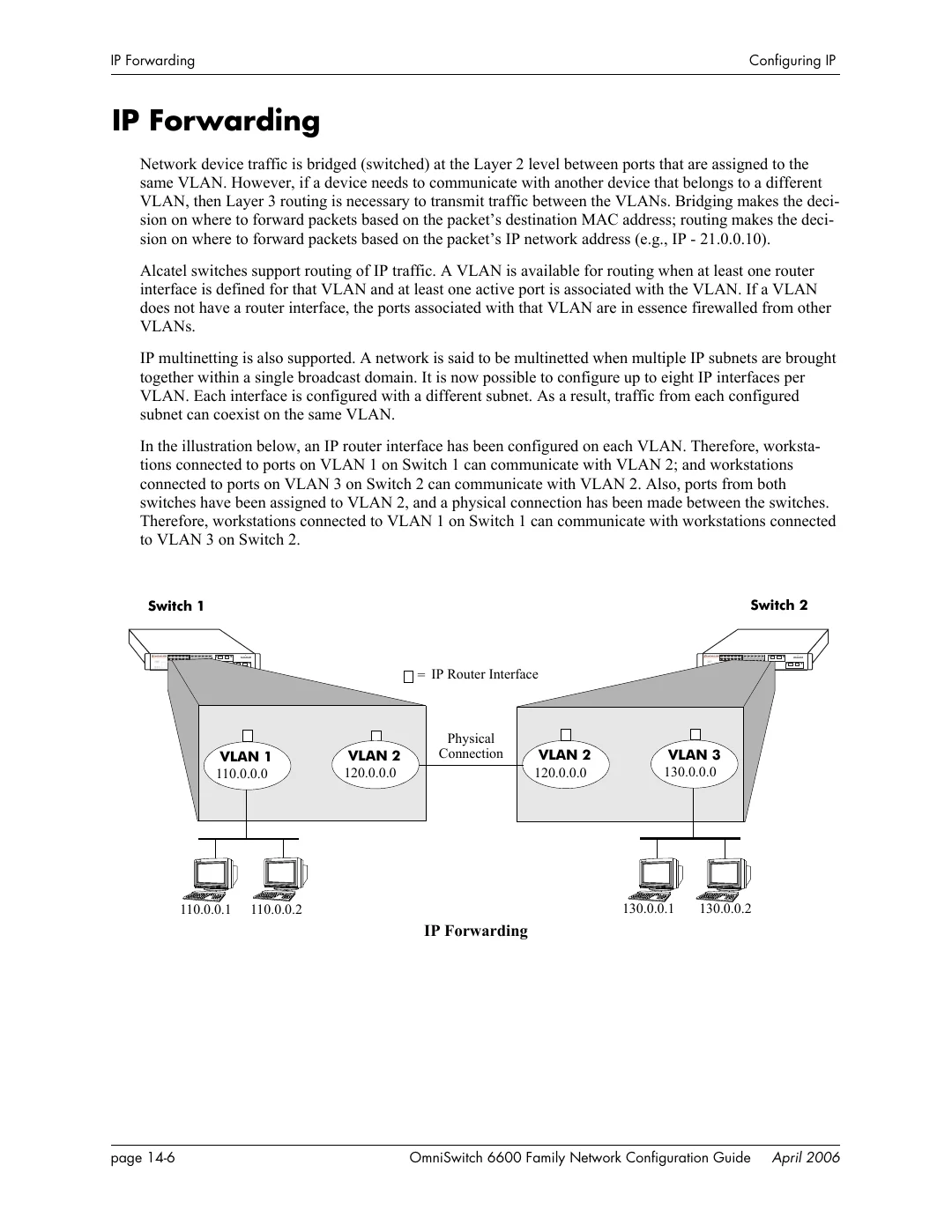
In the illustration below, an IP router interface has been configured on each VLAN. Therefore, worksta-
tions connected to ports on VLAN 1 on Switch 1 can communicate with VLAN 2; and workstations
connected to ports on VLAN 3 on Switch 2 can communicate with VLAN 2. Also, ports from both
switches have been assigned to VLAN 2, and a physical connection has been made between the switches.
Therefore, workstations connected to VLAN 1 on Switch 1 can communicate with workstations connected
to VLAN 3 on Switch 2.
IP Forwarding
OmniSwitch 6648
OmniSwitch 6648
Switch 2
130.0.0.1
130.0.0.2
VLAN 3
130.0.0.0
Switch 1
VLAN 1
110.0.0.0
110.0.0.1
110.0.0.2
Physical
Connection
IP Router Interface
=
VLAN 2
120.0.0.0
VLAN 2
120.0.0.0