Creating Policies
Configuring QoS
page 24-32
OmniSwitch 6600 Family Network Configuration Guide
April 2006
Testing Conditions
Before applying policies to the configuration through the
qos apply
command, you may want to see how
the policies will be used to classify traffic. Or you may want to see how theoretical traffic would be classi-
fied by policies that are already applied on the switch.
Use the
commands to see how the switch will classify certain condition parameters.
This command is used to examine the set of pending policies only. Use the
applied
keyword with the
command to examine the applied set of policies only. The command includes a keyword (
l2
,
l3
,
multicast
)
to indicate whether the Layer 2, Layer 3, or multicast classifier should be used to classify the traffic.
The keywords used with these commands are similar to the keywords used for the
policy condition
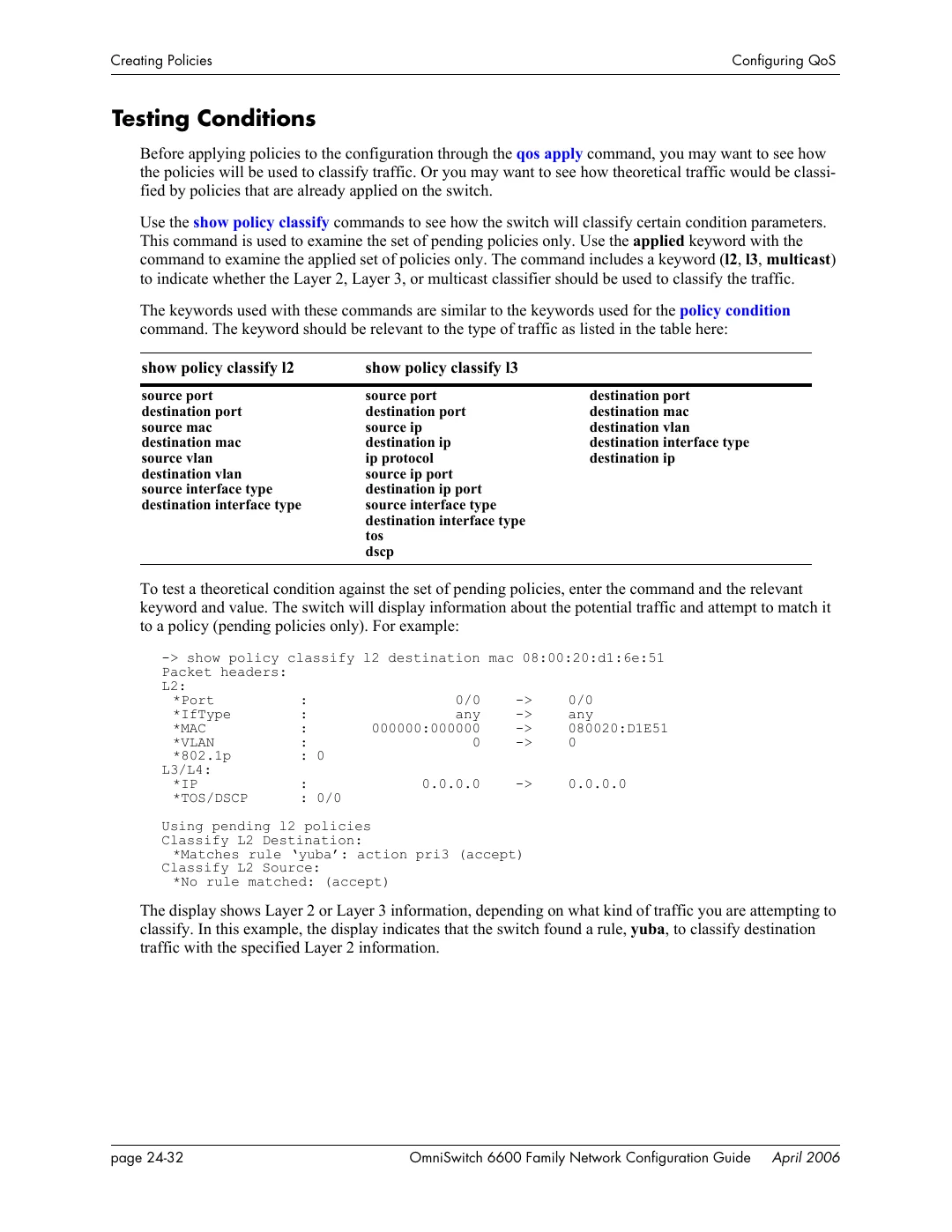
command. The keyword should be relevant to the type of traffic as listed in the table here:
To test a theoretical condition against the set of pending policies, enter the command and the relevant
keyword and value. The switch will display information about the potential traffic and attempt to match it
to a policy (pending policies only). For example:
-> show policy classify l2 destination mac 08:00:20:d1:6e:51
Packet headers:
L2:
*Port
:
0/0
->
0/0
*IfType
:
any
->
any
*MAC
:
000000:000000
->
080020:D1E51
*VLAN
:
0
->
0
*802.1p
: 0
L3/L4:
*IP
:
0.0.0.0
->
0.0.0.0
*TOS/DSCP
: 0/0
Using pending l2 policies
Classify L2 Destination:
*Matches rule ‘yuba’: action pri3 (accept)
Classify L2 Source:
*No rule matched: (accept)
The display shows Layer 2 or Layer 3 information, depending on what kind of traffic you are attempting to
classify. In this example, the display indicates that the switch found a rule,
yuba
, to classify destination
traffic with the specified Layer 2 information.
show policy classify l2
show policy classify l3
source port
destination port
source mac
destination mac
source vlan
destination vlan
source interface type
destination interface type
source port
destination port
source ip
destination ip
ip protocol
source ip port
destination ip port
source interface type
destination interface type
tos
dscp
destination port
destination mac
destination vlan
destination interface type
destination ip