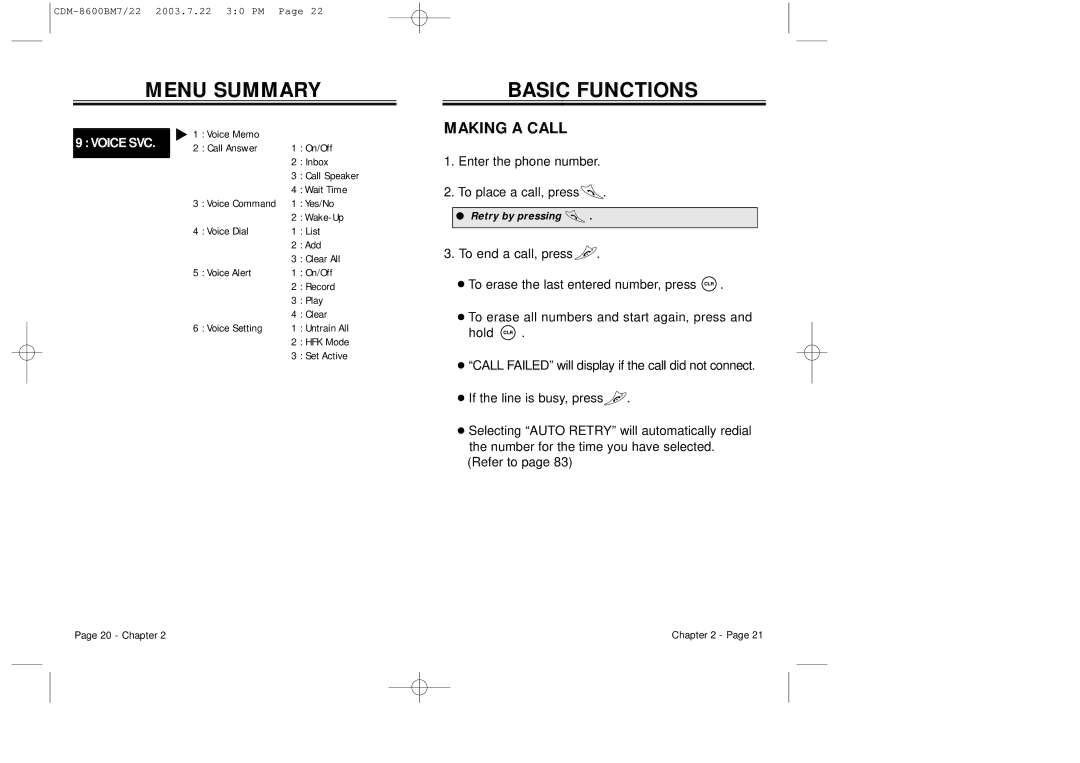
MENU SUMMARY
| u 1 | : Voice Memo |
|
| |
9 : VOICE SVC. |
|
| |||
2 | : Call Answer | 1 : On/Off | |||
| |||||
|
|
| 2 | : Inbox | |
|
|
| |||
|
|
| 3 | : Call Speaker | |
|
|
| 4 | : Wait Time | |
| 3 | : Voice Command | 1 : Yes/No | ||
|
|
| 2 | : | |
| 4 | : Voice Dial | 1 : List | ||
|
|
| 2 | : Add | |
|
|
| 3 | : Clear All | |
| 5 | : Voice Alert | 1 : On/Off | ||
|
|
| 2 | : Record | |
|
|
| 3 | : Play | |
|
|
| 4 | : Clear | |
| 6 | : Voice Setting | 1 : Untrain All | ||
|
|
| 2 | : HFK Mode | |
|
|
| 3 | : Set Active | |
BASIC FUNCTIONS
MAKING A CALL
1.Enter the phone number.
2.To place a call, press .
.
●Retry by pressing  .
.
3.To end a call, press .
.
●To erase the last entered number, press  .
.
●To erase all numbers and start again, press and
hold  .
.
●“CALL FAILED” will display if the call did notconnect.
●If the line is busy, press .
.
●Selecting “AUTO RETRY” will automatically redial the number for the time you have selected.
(Refer to page 83)
Page 20 - Chapter 2 | Chapter 2 - Page 21 |