W . d e l l . c o m s u p p o r t . d e l l . c o m
Quick Reference Guide
August HH801
Contents
Diagnostic Lights Beep Codes
Finding Information
How to use Windows XP
What Are You Looking For? Find It Here Warranty information
Click the topic that describes your problem
According to the operating system you ordered
When you use
Use the Service
When contacting support
Updates
Mini Tower Computer Front View
System Views
25 for more information
Blinking green The computer is in a power-saving mode
No light The computer is turned off
Steady green The computer is in a normal operating state
Mini Tower Computer Back View
Though the AC power available in Japan is 100
Mini Tower Computer Back-Panel Connectors
Address. For more information, see your online User’s Guide
Green a good connection exists between a 10-Mbps network
That came with your computer
Cap
Begin on page 25 for more information
Desktop Computer Front View
Desktop Computer Back View
Desktop Computer Back-Panel Connectors
Orange a good connection exists between a 100-Mbps network
Small Form Factor Computer Front View
Small Form Factor Computer Back View
Small Form Factor Computer Back-Panel Connectors
Address. For more information, see your online User’s Guide
Ultra-Small Form Factor Computer Front View
Blinking or solid yellow See your online User’s Guide
Ultra-Small Form Factor Computer Side View
Ultra-Small Form Factor Computer Back View
Ultra-Small Form Factor Computer Back-Panel Connectors
Removing the Computer Cover
Network controller is turned off in system setup
Before Working Inside Your Computer
Before You Begin
Mini Tower Computer
Desktop Computer
Small Form Factor Computer
Security cable slot Cover release latch Computer cover
Ultra-Small Form Factor Computer
Release knob
Inside Your Computer
System Board Components
Jumper Settings
Rtcrst
Jumper Setting Description
System Board Components
Real-time clock has not been
Drive-release latch Optical drive
System Board Components
Jumper Settings
Ultra-Small Form Factor Computer
System Board Components
Setting Up Your Computer
Quick Reference Guide
Set Up Your Keyboard and Mouse Set Up Your Monitor
Power Connections
Solving Problems
Dell Diagnostics
When to Use the Dell Diagnostics
Insert the Drivers and Utilities CD
Tab Function
Option Function
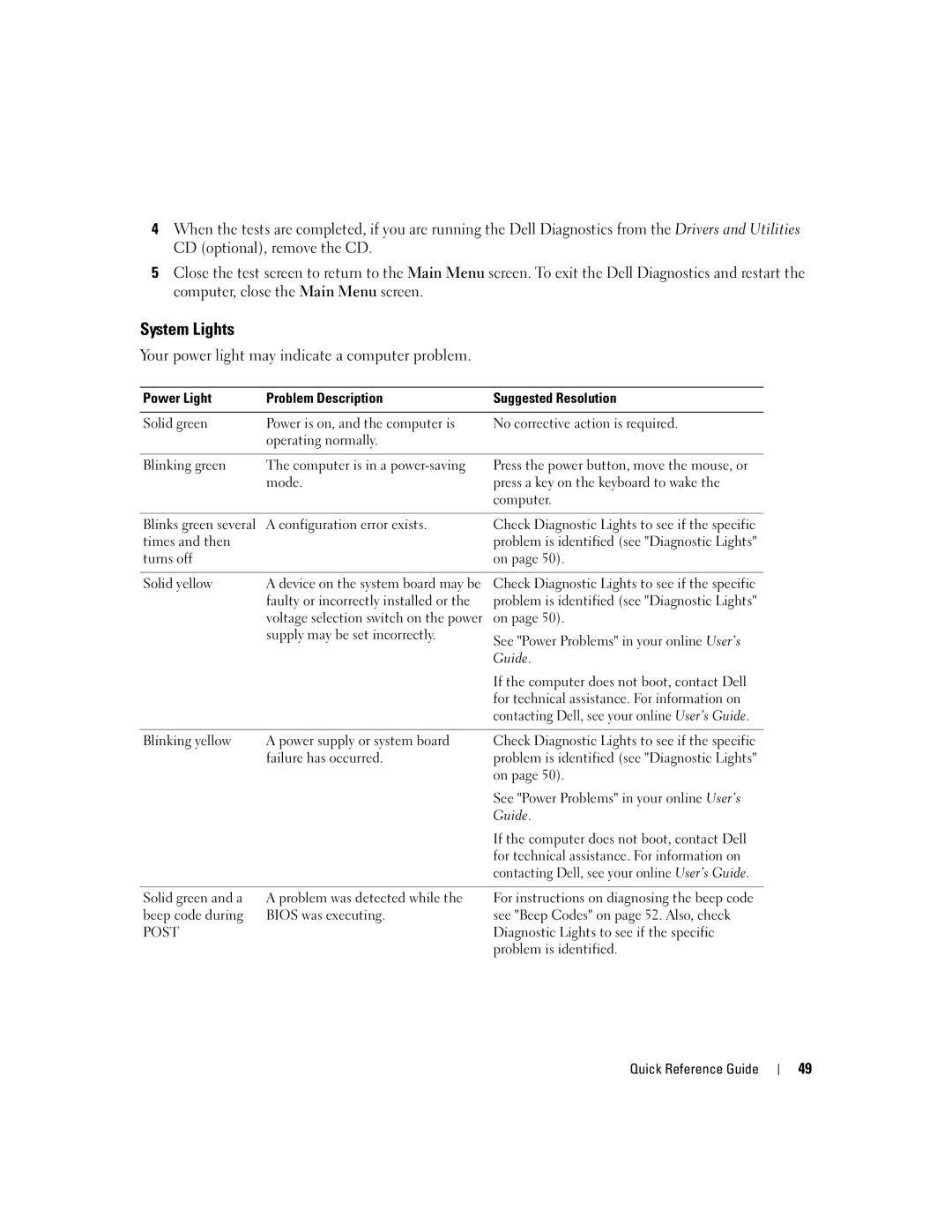
System Lights
Power Light Problem Description Suggested Resolution
Light Pattern Problem Description
Diagnostic Lights
See your online User’s Guide
Installed, reinstall it and restart
Light Pattern Problem Description Suggested Resolution
Without error
If available, install properly working
Beep Codes
Code Cause
Resolving Software and Hardware Incompatibilities
Using Microsoft Windows XP System Restore
Getting Started
Reinstalling Microsoft Windows XP
Reinstalling Windows XP
Quick Reference Guide
Drivers for Your Computer
Using the Drivers and Utilities CD
Index
Problems. See troubleshooting
Index
Guide de référence rapide
Remarques, avis et précautions
101
Installation du clavier et de la souris 105
103
106
110
Réinstallation de Microsoft Windows XP 115
112
114
Recherche dinformations
Dexploitation
Du système dexploitation que vous avez commandé
Option et quil ne soit pas livré avec tous les ordinateurs
En option Drivers and Utilities
Étiquette de la Product Key Clé de produit
Devez également réinstaller lutilitaire DSS. DSS
Microsoft Windows
Articles de techniciens, cours en ligne et
Ordinateur mini-tour Vue frontale
Vues du système
Système dexploitation
Vert clignotant Lordinateur est en mode déconomie dénergie
Éteint Lordinateur est éteint
Vert fixe Lordinateur fonctionne normalement
Ordinateur mini-tour Vue arrière
Lalimentation en CA soit de 100
Ordinateur mini-tour Connecteurs du panneau arrière
Utilisez le câble Y fourni avec lordinateur
Graphique. Ne retirez pas le cache
« Avant de commencer » à la
Ordinateur de bureau Vue frontale
Arrêt du système dexploitation
Ordinateur de bureau Vue arrière
Ordinateur de bureau Connecteurs du panneau arrière
Et lordinateur
Lordinateur
Ordinateur compact Vue frontale
Ordinateur compact Vue arrière
Ordinateur compact Connecteurs du panneau arrière
Lordinateur
Ordinateur ultra compact Vue frontale
Ordinateur ultra compact Vue latérale
Ordinateur ultra compact Connecteurs du panneau arrière
Ordinateur ultra compact Vue arrière
Retrait du capot de lordinateur
Démarrer, puis sur Arrêter lordinateur
Avant de commencer
Avant dintervenir à lintérieur de votre ordinateur
Ordinateur mini-tour
Ordinateur de bureau
Ordinateur compact
Guide de référence rapide
Ordinateur ultra compact
Bouton de fermeture
’intérieur de votre ordinateur
Composants de la carte système
Paramètres des cavaliers
12VPOWER
Fermé Ouvert
Cavalier Paramètre Description
Composants de la carte système
Fermé
Ordinateur compact
Composants de la carte système
Intspkr Intruder
Paramètres des cavaliers 100
101
Intspkr
102
103
Configuration de votre ordinateur
104
Branchez le clavier et la souris
105
Quand utiliser Dell Diagnostics
Résolution des problèmes
Connexions dalimentation
106
107
Démarrage de Dell Diagnostics à partir de votre disque dur
108
Menu principal de Dell Diagnostics
Option Fonction
Onglet Fonction
109
Voyants du système
110
Voyants de diagnostic
En ligne
111
112
Codes sonores
113
Résolution des incompatibilités logicielles et matérielles
Cliquez sur Restauration du système
Création dun point de restauration
Restauration de lordinateur à un état antérieur
114
Réinstallation de Microsoft Windows XP
Démarrage à partir du CD Operating System
Réinstallation de Windows XP
116
117
Installation de Windows XP
Pilotes pour votre ordinateur
Utilisation du CD Drivers and Utilities
118
119
120
Guía de referencia rápida
Notas, avisos y precauciones
123
124
125
Búsqueda de información
Lo que es posible que no se envíe con su ordenador
126
Opcional Drivers and Utilities
Función del sistema operativo que haya solicitado
127
Ordenador minitorre- Vista anterior
Vistas del sistema
128
LAN
129
130
Ordenador minitorre- Vista posterior
131
Ordenador minitorre Conectores del panel posterior
La alimentación de CA en Japón sea de 100
Nota No enchufe un cable de teléfono al conector de red
132
En forma de y suministrado con el ordenador
133
Ordenador de sobremesa- Vista anterior
Más información
134
Ordenador de sobremesa- Vista posterior
Sin luz el ordenador está apagado
135
Ordenador de sobremesa Conectores del panel posterior
De vínculo
136
137
Ordenador de formato reducido Vista posterior
138
139
Ordenador de formato reducido Conectores del panel posterior
140
141
Ordenador de formato ultrareducido Vista anterior
142
Ordenador de formato ultrareducido Vista lateral
143
Ordenador de formato ultrareducido Vista posterior
144
Cómo quitar la cubierta del ordenador
Antes de trabajar en el interior de su ordenador
Antes de empezar
145
146
Ordenador de minitorre
147
Ordenador de sobremesa
148
Ordenador de formato reducido
149
150
Ordenador de formato ultrareducido
151
152
Interior de su ordenador
153
Componentes de la placa base
SATA0, SATA1, SATA4, SATA5
Configuración de puentes 154
Puente Posición Descripción
155
Puenteado No puenteado
Componentes de la placa base 156
157
Configuración de puentes
Puenteado No puenteado Guía de referencia rápida
158
Ordenadores de formato reducido
159
160
161
162
163
Configuración del ordenador
164
Conecte el teclado y el ratón
165
Configurar el teclado y el ratón Configurar el monitor
Cuándo utilizar los Dell Diagnostics Diagnósticos Dell
Solución de problemas
Conexiones de alimentación
166
167
Cómo iniciar Dell Diagnostics desde la unidad de disco duro
168
Menú principal de Dell Diagnostics Diagnósticos Dell
Opción Función
Ficha Función
Indicadores luminosos del sistema
Descripción del problema Solución sugerida
169
Con Dell, consulte la Guía del usuario en línea
Patrón de luz Descripción del problema Resolución sugerida
Indicador de alimentación Descripción del problema
Indicadores de diagnóstico
170
171
172
Códigos de sonido
Haga clic en el botón Inicio y en Ayuda y soporte técnico
Cómo resolver incompatibilidades de software y hardware
173
Código Causa
Haga clic en Restaurar sistema
Creación de un punto de restauración
Restauración del ordenador a un estado operativo anterior
Siguiente
Cómo volver a instalar Microsoft Windows XP
Arranque desde el CD Operating System Sistema operativo
Reinstalación de Windows XP
176
Instalar Windows ahora
Configuración de Windows XP
177
Controladores para el ordenador
Uso del CD Drivers and Utilities
178
Índice
179
180