K E Y B O A R D
I N T E G R A T E D S I N G L E A N A L O G
M I C R O P H O N E — Used for chatting and voice recording.
Right View

 1
1
|
|
|
| 2 |
|
|
|
| 3 |
|
|
| 5 | 4 |
|
| 6 |
| |
| 7 |
|
| |
|
|
|
| |
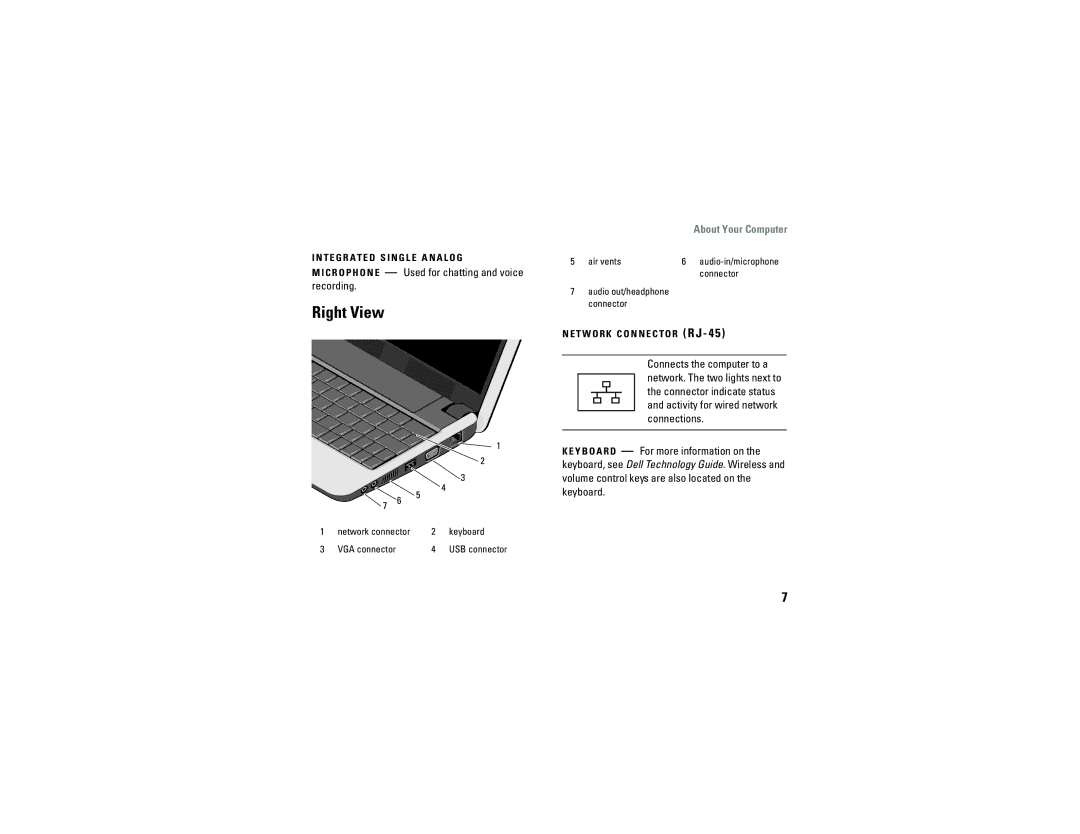
1 | network connector | 2 | keyboard | |
3 | VGA connector |
| 4 | USB connector |
About Your Computer
5 | air vents | 6 | |
|
|
| connector |
7audio out/headphone connector
N E T W O R K C O N N E C T O R
Connects the computer to a network. The two lights next to the connector indicate status and activity for wired network connections.
— For more information on the keyboard, see Dell Technology Guide. Wireless and volume control keys are also located on the keyboard.
7