Model 1 Internet Phone User’s Guide
Equipment Approval Information
Notification to the Local Telephone Company
Interference Information
Hearing Aid Compatibility HAC
Licensing
FCC RF Radiation Exposure Statement
Table of Contents
Troubleshooting Guide
Conference Operation
Call Log
Contacts Landline Only
Steps
Parts Checklist for model
Introduction
Before You Begin
Installation
Important Installation Guidelines
Telephone Jack Requirements
Digital Security System
Indicator
Handset Layout
Base Layout
Earpiece Display
Installing the Phone
Installing the Handset Battery
Base Station
System Requirements
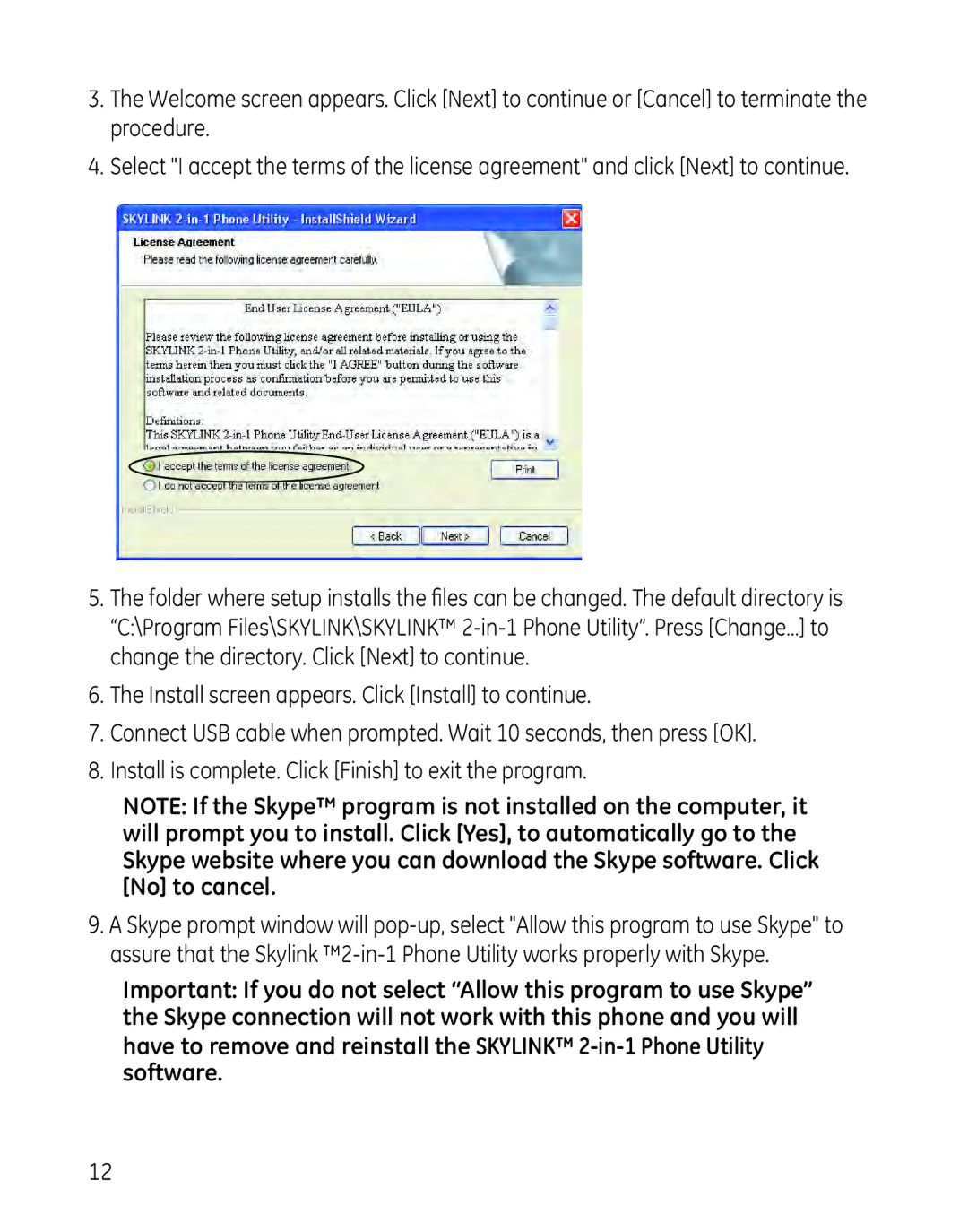
Software Installation
Page
If Speakers 2-in-1 Phone is selected
Then select your PC playback device Set as default
Open Monitor
Exit
Skylink Operation Guide
To Uninstall the Software
Programming the Telephone
Timer
Alarm
From the Timer menu
Time Format
Handset Settings
Ringer Volume
Language
On/Off
Ringer Volume
Ringer Type
To store/dial the voice messaging service number
Message Waiting
Wallpaper
Contrast
Key Tones
Auto Answer
Handset Name
Directory Keypad Character Selection
Menu Color
Backlight
Skype Contacts
Registration
Deregistration
Base Settings
Default Setting
Select Base
From the Base Settings menu
Ringer On/Off
Skype Status
Power On/Off Operation
Telephone Operation
Function
Making a Call
Skype Calls
SkypeOut Call
Skype Call
Answering a Call
Call Waiting
Redial
Adjusting Earpiece and Ringer Volume
Dialing from Contacts
Muting the Microphone and Ringer
Paging the Handset
Handset Speaker Phone
Key Lock
Call Transfer/Forwarding
Applicable only with additional handsets
Advanced Intercom Features
Intercom Operation
Handset to Handset Intercom Call
Receiving an Intercom Call
Conference Operation
Two-Way Calling
Local Three-way Conference Call
Call Log
Skype Conference Call
Conference Call with a Landline and an Skype Contact
Browsing Call Logs
From the Call LOG menu
Eleven digits
Ten digits
Contacts Landline Only
Deleting Call Logs
For landline call records
For Skype call records
Searching
Adding
From the Contacts menu
Group
Speed Dial
If you choose Contacts
If you choose Delete
Changing the Battery
Check Memory
Emergency Call
Battery Safety Precautions
Shortcut Key Guide
LCD Icon Guide
Icon Icon Name Description
Small Icon
Skype Icon
Troubleshooting Guide
Telephone Solutions
Forgot Base PIN
Page
Caller ID Solutions
Skype Solutions
Battery Solutions
Skype Ring Delay
Accessory Information
General Product Care
Causes of Poor Reception
Warranty Assistance
Thomson Inc Manager, Consumer Relations PO Box Indianapolis,
Limited Warranty
Limitation of Warranty
Product Registration
If you purchased your product outside the USA
Index
Index
Thomson Inc
Modelo En 1 Teléfono para Internet Guía del Usuario
Rápida en la página
Información sobre la Aprobación de Equipo
Información de Interferencias
Compatibilidad con Audífonos CCA
Declaración de la FCC sobre Exposición a la Radiación RF
Información para el Producto Dect Teléfono
Tabla de Contenido
Operación del Interfono
Registro de Llamadas
Tradicional
Soluciones Para Skype
Pasos
Introducción
Antes de Comenzar
Lista de Partes para modelo
Instalación
Sistema Digital de Seguridad
Pautas Importantes de la Instalación
Formato del Auricular
Formato de la Base
Instalar el Teléfono
Instalar la Batería del Auricular
Estación para la Base
Requerimientos de Sistema RecomendadoMínimo
Instalación del Software
Page
Si Bocinas 2-en-1 Teléfono está seleccionado
Exit Salir
Guía de Operación Skylink
Programación del Teléfono
Para Desinstalar el Software
Alarma
Temporizador
Formato Tiempo
Reloj Para Programar la Fecha y Hora
Configs Auriclar
Idioma
On/Off
Vol Timbre
Tipo de Timbre
Vol Timbre
Mensaje en Espera
Tapiz
Contraste
Tonos de Tecla
Auto Respuesta
Nombre del Auricular
Selección de Caracter del Teclado del Directorio
Color del Menú
Luz de Fondo
Contactos Skype
Para Cancelar el Registro
Registro
Config Base
Para Seleccionar Base
Programación de Fábrica
Del Menú del Config Base
Timbre On/Off
Mi Estado Skype
Operación Básica del Teléfono
Función
Operación de Encendido/Apagado
Para Hacer una Llamada
Llamadas Skype
Llamada SkypeOut
Llamada Skype
Para Responder una Llamada
Llamada en Espera
Remarcado
Marcación desde Contactos
Silenciamiento del Micrófono y del Timbre
Para Buscar el Auricular
Altavoz del Auricular
Bloqued de Tecla
Transferencia/Envío de Llamada
Aplicable solamente con auriculares adicionales
Operación del Interfono
Llamadas de Intercomunicaón de Auricular a Auricular
Para Recibir Una Llamada de Intercomunicación
Funciones Avanzadas del Interfono
Recuperación de Conferencia
Conversación Entre Dos Personas
Llamada de Conferencia de Tres Vías Local
Registro de Llamadas
Llamada de Conferencia Skype
Navegando en Los Reistros de Llamada
Desde el menú Reg Llamadas
Once dígitos
Ten dígitos
Contactos Solamente Línea Telefónica Tradicional
Para Eliminar Registros de Llamada
Para registros de llamada de línea telefónica tradicional
Para registros de llamada Skype
Búsqueda
Para Agregar
Desde el menú Contactos
Grupo
Marcación Rápida
Si usted elige el Contactos
Cómo Cambiar la Batería
Para Checar Memoria
Llamada de Emergencia
Precauciones de Seguridad para la Batería
Guía de Teclas de Acceso Directo
Guía de Iconos LCD
Icono Nombre de Icono Descripción
Icono Skype
Solución de Problemas
PIN de La Base Olvidado
Soluciones para el Teléfono
No hay sonido del auricular Ajuste el volumen del auricular
Soluciones para el Identificador de Llamadas
Soluciones Para Skype
Cuidado General del Producto
Batería
Causas de una Mala Recepción
Información de Accesorios
Adaptador de corriente CA para base
Para carga del auricular Broche de cinturón
Ayuda de la Garantía
Garantía Limitada
Registro del Producto
Limitaciones sobre la Garantía
Si compró su producto fuera de los Estados Unidos
Índice
Índice
Thomson Inc