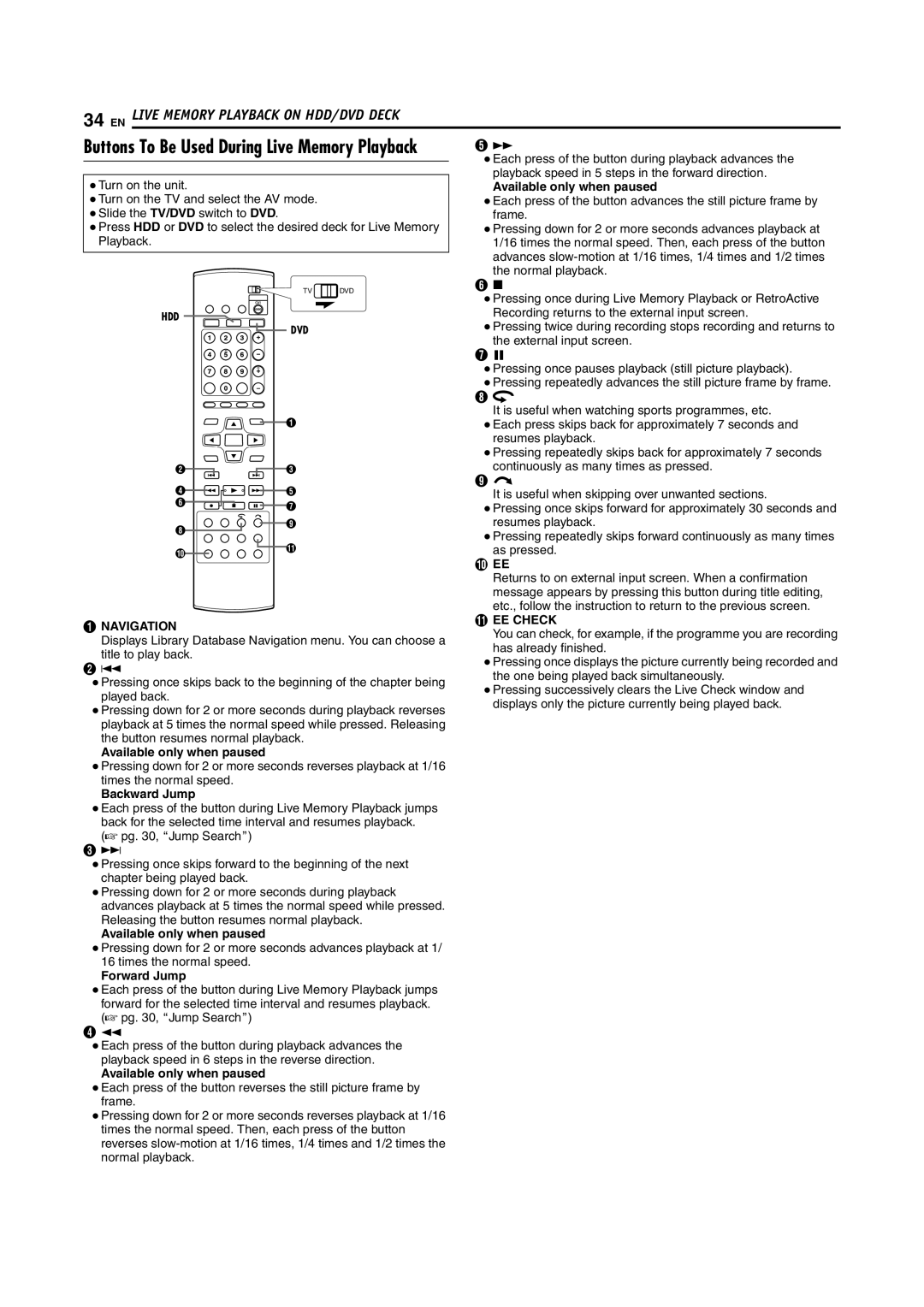
34 EN LIVE MEMORY PLAYBACK ON HDD/DVD DECK
Buttons To Be Used During Live Memory Playback | E N | ||
|
|
| ● Each press of the button during playback advances the |
● Turn on the unit. |
|
| playback speed in 5 steps in the forward direction. |
|
| Available only when paused | |
● Turn on the TV and select the AV mode. |
| ● Each press of the button advances the still picture frame by | |
● Slide the TV/DVD switch to DVD. |
|
| frame. |
● Press HDD or DVD to select the desired deck for Live Memory | ● Pressing down for 2 or more seconds advances playback at | ||
Playback. |
|
| 1/16 times the normal speed. Then, each press of the button |
|
|
| advances |
|
|
| the normal playback. |
| TV | DVD | F o |
| ● Pressing once during Live Memory Playback or RetroActive | ||
|
|
| |
HDD |
|
| Recording returns to the external input screen. |
DVD |
| ● Pressing twice during recording stops recording and returns to | |
|
| ||
|
| the external input screen. | |
|
|
| |
|
|
| G W |
|
|
| ● Pressing once pauses playback (still picture playback). |
|
|
| ● Pressing repeatedly advances the still picture frame by frame. |
|
|
| H w |
|
|
| It is useful when watching sports programmes, etc. |
| A |
| ● Each press skips back for approximately 7 seconds and |
|
|
| resumes playback. |
|
|
| ● Pressing repeatedly skips back for approximately 7 seconds |
B | C |
| continuously as many times as pressed. |
D | E |
| I v |
| It is useful when skipping over unwanted sections. | ||
F | G |
| ● Pressing once skips forward for approximately 30 seconds and |
|
| ||
H | I |
| resumes playback. |
|
| ● Pressing repeatedly skips forward continuously as many times | |
|
|
| |
J | K |
| as pressed. |
|
|
| J EE |
| Returns to on external input screen. When a confirmation | |
| message appears by pressing this button during title editing, | |
| etc., follow the instruction to return to the previous screen. | |
A NAVIGATION | K EE CHECK | |
You can check, for example, if the programme you are recording | ||
Displays Library Database Navigation menu. You can choose a | ||
has already finished. | ||
title to play back. | ||
● Pressing once displays the picture currently being recorded and | ||
B S | ||
the one being played back simultaneously. | ||
● Pressing once skips back to the beginning of the chapter being | ||
● Pressing successively clears the Live Check window and | ||
played back. | ||
displays only the picture currently being played back. | ||
● Pressing down for 2 or more seconds during playback reverses | ||
| ||
playback at 5 times the normal speed while pressed. Releasing |
| |
the button resumes normal playback. |
| |
Available only when paused |
|
●Pressing down for 2 or more seconds reverses playback at 1/16 times the normal speed.
Backward Jump
●Each press of the button during Live Memory Playback jumps back for the selected time interval and resumes playback.
(A pg. 30, AJump SearchB)
CT
●Pressing once skips forward to the beginning of the next chapter being played back.
●Pressing down for 2 or more seconds during playback advances playback at 5 times the normal speed while pressed. Releasing the button resumes normal playback.
Available only when paused
●Pressing down for 2 or more seconds advances playback at 1/ 16 times the normal speed.
Forward Jump
●Each press of the button during Live Memory Playback jumps forward for the selected time interval and resumes playback. (A pg. 30, AJump SearchB)
DO
●Each press of the button during playback advances the playback speed in 6 steps in the reverse direction.
Available only when paused
●Each press of the button reverses the still picture frame by frame.
●Pressing down for 2 or more seconds reverses playback at 1/16 times the normal speed. Then, each press of the button reverses