Functional Overview
$VOLUME (VOL
– Adjusts the volume level.
^BASS / TREBLE
–Selects bass or treble sound. Use the VOLUME control to select the desired enhancement level.
&n
–Plugging in the headphones jack. The speakers output will be cancelled.
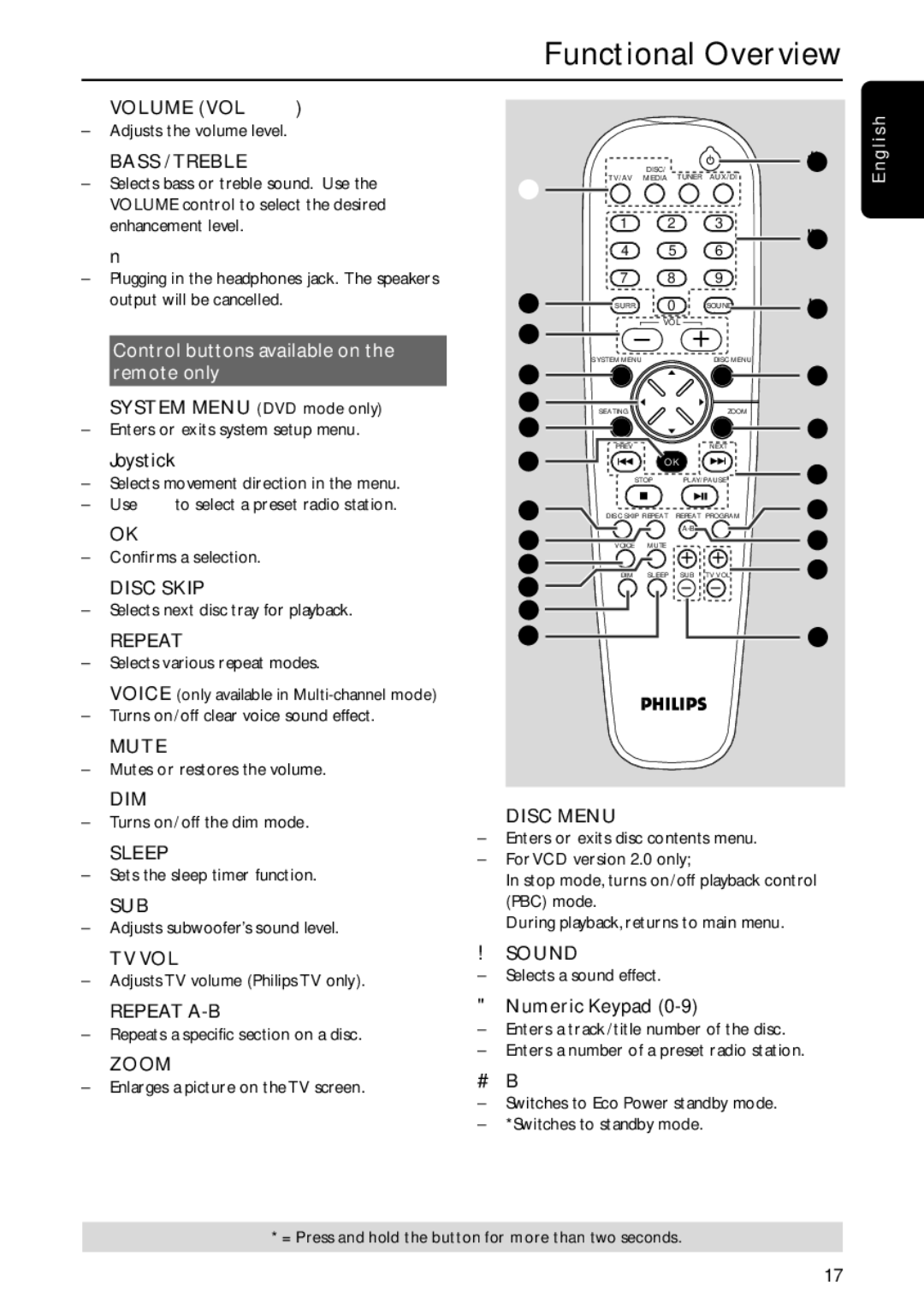
Control buttons available on the remote only
*SYSTEM MENU (DVD mode only)
– Enters or exits system setup menu.
(Joystick 1 2 3 4
–Selects movement direction in the menu.
–Use 1 2 to select a preset radio station.
)OK
–Confirms a selection.
¡DISC SKIP
–Selects next disc tray for playback.
™REPEAT
–Selects various repeat modes.
£VOICE (only available in
– Turns on/off clear voice sound effect.
≤MUTE
–Mutes or restores the volume.
|
| DISC/ |
| › | nglish |
@ | TV/AV | MEDIA | TUNER AUX/DI |
| E |
|
|
|
|
| |
| 1 | 2 | 3 | ‹ |
|
| 4 | 5 | 6 |
| |
|
|
| |||
| 7 | 8 | 9 |
|
|
! | SURR. | 0 | SOUND | ¤ |
|
|
|
| |||
% |
| VOL |
|
| |
|
|
|
|
| |
| SYSTEM MENU |
| DISC MENU |
|
|
* |
|
|
| ⁄ |
|
( | SEATING |
| ZOOM |
|
|
|
|
|
| ||
0 |
|
|
| º |
|
| PREV |
| NEXT |
|
|
) |
| OK | 9 |
| |
| STOP | PLAY/PAUSE |
| ||
¡ | DISC SKIP REPEAT | REPEAT PROGRAM | 8 |
| |
™ |
|
| ª |
| |
VOICE | MUTE |
|
| ||
£ | DIM | SLEEP | SUB TV VOL | • |
|
≤ |
| ||||
|
|
|
|
| |
∞ |
|
|
|
|
|
§ |
|
|
| ≥ |
|
∞DIM
–Turns on/off the dim mode.
§SLEEP
–Sets the sleep timer function.
≥SUB +-
–Adjusts subwoofer’s sound level.
⁄DISC MENU
–Enters or exits disc contents menu.
–For VCD version 2.0 only;
In stop mode, turns on/off playback control (PBC) mode.
During playback, returns to main menu.
• TV VOL +- | ¤ SOUND |
– Adjusts TV volume (Philips TV only). | – Selects a sound effect. |
|
ªREPEAT
–Repeats a specific section on a disc.
ºZOOM
– Enlarges a picture on the TV screen.
‹Numeric Keypad (0-9)
–Enters a track/title number of the disc.
–Enters a number of a preset radio station.
›B
–Switches to Eco Power standby mode.
–*Switches to standby mode.
* = Press and hold the button for more than two seconds.
17