General Control
Basic Operation - General Control -
12 | |
|
■Demonstration mode
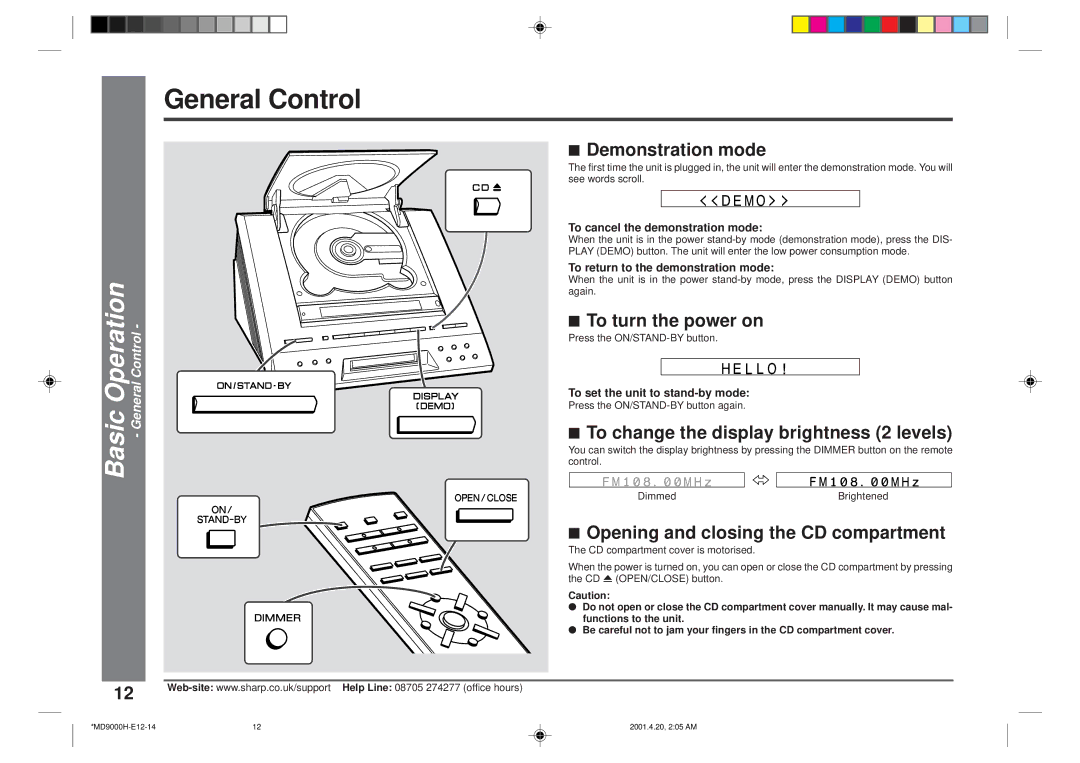
The first time the unit is plugged in, the unit will enter the demonstration mode. You will see words scroll.
To cancel the demonstration mode:
When the unit is in the power
To return to the demonstration mode:
When the unit is in the power
■To turn the power on
Press the
To set the unit to
Press the
■To change the display brightness (2 levels)
You can switch the display brightness by pressing the DIMMER button on the remote control.
Dimmed | Brightened |
■Opening and closing the CD compartment
The CD compartment cover is motorised.
When the power is turned on, you can open or close the CD compartment by pressing the CD 7 (OPEN/CLOSE) button.
Caution:
●Do not open or close the CD compartment cover manually. It may cause mal- functions to the unit.
●Be careful not to jam your fingers in the CD compartment cover.
12 | 2001.4.20, 2:05 AM |