Listening to the Radio
Radio - Listening to the Radio -
22 | |
|
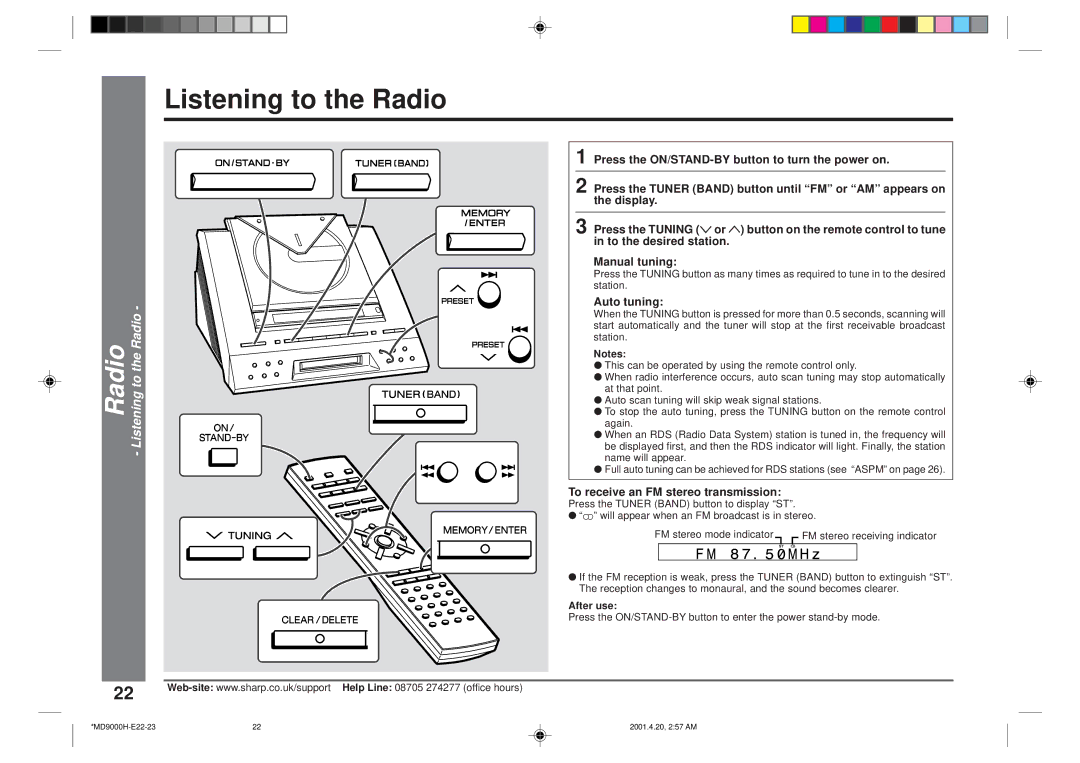
1 Press the
2 Press the TUNER (BAND) button until “FM” or “AM” appears on the display.
3 Press the TUNING (X or W) button on the remote control to tune in to the desired station.
Manual tuning:
Press the TUNING button as many times as required to tune in to the desired station.
Auto tuning:
When the TUNING button is pressed for more than 0.5 seconds, scanning will start automatically and the tuner will stop at the first receivable broadcast station.
Notes:
●This can be operated by using the remote control only.
●When radio interference occurs, auto scan tuning may stop automatically at that point.
●Auto scan tuning will skip weak signal stations.
●To stop the auto tuning, press the TUNING button on the remote control again.
●When an RDS (Radio Data System) station is tuned in, the frequency will be displayed first, and then the RDS indicator will light. Finally, the station name will appear.
●Full auto tuning can be achieved for RDS stations (see “ASPM” on page 26).
To receive an FM stereo transmission:
Press the TUNER (BAND) button to display “ST”.
●“j” will appear when an FM broadcast is in stereo.
FM stereo mode indicator |
|
|
| FM stereo receiving indicator | ||
|
|
| ||||
|
|
|
|
|
|
|
|
|
|
|
|
|
|
●If the FM reception is weak, press the TUNER (BAND) button to extinguish “ST”. The reception changes to monaural, and the sound becomes clearer.
After use:
Press the
22 | 2001.4.20, 2:57 AM |