Setting the
Basic Operation - Setting the Clock -
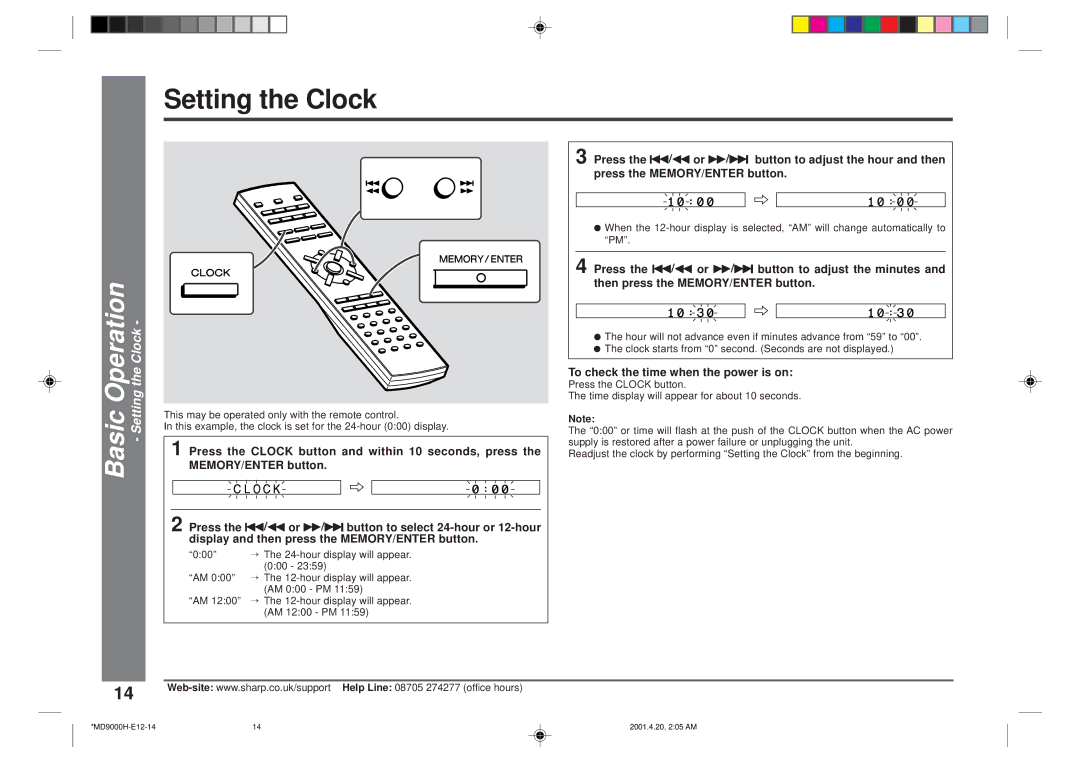
This may be operated only with the remote control.
In this example, the clock is set for the
1 Press the CLOCK button and within 10 seconds, press the MEMORY/ENTER button.
2 Press the 5/3 or 2/4 button to select
“0:00” → The
“AM 0:00” → The
“AM 12:00” → The
3 Press the 5/3 or 2/4 button to adjust the hour and then press the MEMORY/ENTER button.
●When the
4 Press the 5/3 or 2/4 button to adjust the minutes and then press the MEMORY/ENTER button.
●The hour will not advance even if minutes advance from “59” to “00”.
●The clock starts from “0” second. (Seconds are not displayed.)
To check the time when the power is on:
Press the CLOCK button.
The time display will appear for about 10 seconds.
Note:
The “0:00” or time will flash at the push of the CLOCK button when the AC power supply is restored after a power failure or unplugging the unit.
Readjust the clock by performing “Setting the Clock” from the beginning.
14 | |
|
14 | 2001.4.20, 2:05 AM |