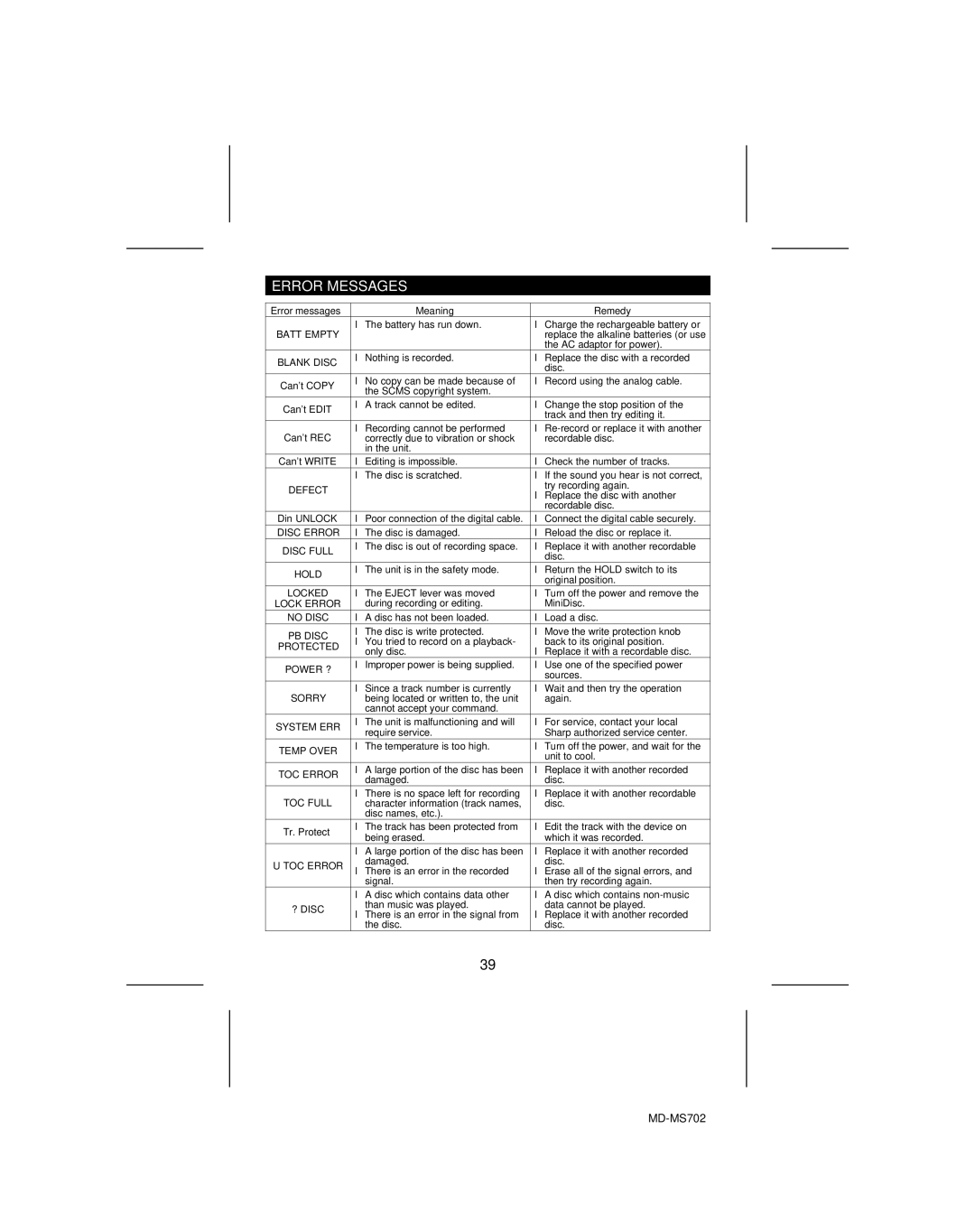
ERROR MESSAGES
Error messages | Meaning | Remedy | |
BATT EMPTY | ● The battery has run down. | ● Charge the rechargeable battery or | |
| replace the alkaline batteries (or use | ||
|
| the AC adaptor for power). | |
BLANK DISC | ● Nothing is recorded. | ● Replace the disc with a recorded | |
| disc. | ||
|
| ||
Can't COPY | ● No copy can be made because of | ● Record using the analog cable. | |
the SCMS copyright system. |
| ||
|
| ||
Can't EDIT | ● A track cannot be edited. | ● Change the stop position of the | |
| track and then try editing it. | ||
|
| ||
Can't REC | ● Recording cannot be performed | ● | |
correctly due to vibration or shock | recordable disc. | ||
| in the unit. |
| |
Can't WRITE | ● Editing is impossible. | ● Check the number of tracks. | |
| ● The disc is scratched. | ● If the sound you hear is not correct, | |
DEFECT |
| try recording again. | |
| ● Replace the disc with another | ||
|
| ||
|
| recordable disc. | |
Din UNLOCK | ● Poor connection of the digital cable. | ● Connect the digital cable securely. | |
DISC ERROR | ● The disc is damaged. | ● Reload the disc or replace it. | |
DISC FULL | ● The disc is out of recording space. | ● Replace it with another recordable | |
| disc. | ||
|
| ||
HOLD | ● The unit is in the safety mode. | ● Return the HOLD switch to its | |
| original position. | ||
|
| ||
LOCKED | ● The EJECT lever was moved | ● Turn off the power and remove the | |
LOCK ERROR | during recording or editing. | MiniDisc. | |
NO DISC | ● A disc has not been loaded. | ● Load a disc. | |
PB DISC | ● The disc is write protected. | ● Move the write protection knob | |
● You tried to record on a playback- | back to its original position. | ||
PROTECTED | |||
only disc. | ● Replace it with a recordable disc. | ||
| |||
POWER ? | ● Improper power is being supplied. | ● Use one of the specified power | |
| sources. | ||
|
| ||
SORRY | ● Since a track number is currently | ● Wait and then try the operation | |
being located or written to, the unit | again. | ||
| cannot accept your command. |
| |
SYSTEM ERR | ● The unit is malfunctioning and will | ● For service, contact your local | |
| require service. | Sharp authorized service center. | |
TEMP OVER | ● The temperature is too high. | ● Turn off the power, and wait for the | |
| unit to cool. | ||
|
| ||
TOC ERROR | ● A large portion of the disc has been | ● Replace it with another recorded | |
damaged. | disc. | ||
| |||
TOC FULL | ● There is no space left for recording | ● Replace it with another recordable | |
character information (track names, | disc. | ||
| disc names, etc.). |
| |
Tr. Protect | ● The track has been protected from | ● Edit the track with the device on | |
being erased. | which it was recorded. | ||
| |||
| ● A large portion of the disc has been | ● Replace it with another recorded | |
U TOC ERROR | damaged. | disc. | |
● There is an error in the recorded | ● Erase all of the signal errors, and | ||
| signal. | then try recording again. | |
| ● A disc which contains data other | ● A disc which contains | |
? DISC | than music was played. | data cannot be played. | |
● There is an error in the signal from | ● Replace it with another recorded | ||
| |||
| the disc. | disc. |
39