Sun GigaSwift Ethernet Adapter Installation User’s Guide
Please Recycle
FCC Class a Notice
Regulatory Compliance Statements
ICES-003 Class a Notice Avis NMB-003, Classe a
Bsmi Class a Notice
Page
European Union
Declaration of Conformity
Page
Declaration of Conformity
Page
Contents
Configuring Driver Parameters
Network Configuration
Specifications
Configuring VLANs
Diagnostic Software and Troubleshooting Issues
Index
Page
Figures
Page
Tables
Performance Sepcifications
How This Book Is Organized
Preface
Typographic Conventions
Using Unix Commands
Accessing Sun Documentation Online
Shell Prompts
Related Documentation
Sun Welcomes Your Comments
Hardware Overview
Product Overview
Sun GigaSwift Ethernet MMF Adapter
Link is in Full Duplex mode
LED Displays
1Front Panel Display LEDs for the MMF Adapter
2Sun GigaSwift Ethernet UTP Adapter
Sun GigaSwift Ethernet UTP Adapter
2Front Panel Display LEDs for the UTP Adapter
Patch Requirements
Hardware and Software Requirements
Key Protocols and Interfaces
Product Features
Diagnostic Support
Page
Become superuser
Installing the Driver Software
1Files and Directories on the CD-ROM
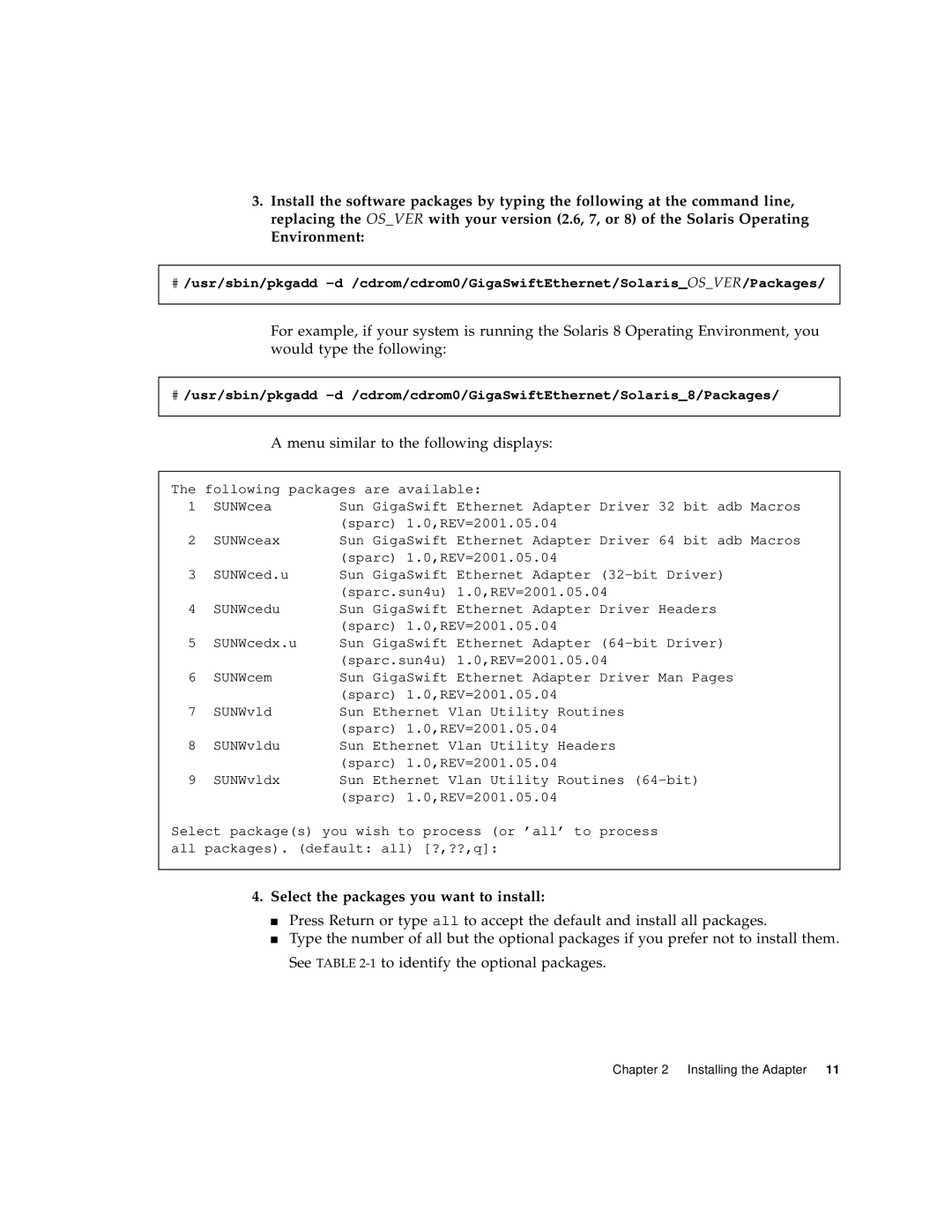
Menu similar to the following displays
Select the packages you want to install
Verifying Patches
Patch version should be -07 or greater
# showrev -p grep
Patch version should be -05 or greater
Patch version should be -13 or greater
Installing the Adapter Without Dynamic Reconfiguration
To Install the Adapter
Save the filler panel screw for Step
1Connecting the Fiber Optic Cable
2Cat-5 Twisted-Pair Cable
To Verify the Installation
List the network devices on your system
Ok show-nets
Ok cd /pci@1f,0/pci@1/network@4
Ok .properties
View the.properties file for a list of device properties
Setting the local-mac-addressProperty
Phy-typewill have its value assigned as follows
Ok setenv local-mac-address? true
Rebooting the System
Ok setenv boot-device /pci@1f,2000/pci@1/network@4
Ok boot -r
To Install an Adapter in a Dynamic Reconfiguration System
Installing the Adapter With Dynamic Reconfiguration
States and conditions should be
# cfgadm
# cfgadm -v -c configure sysctrl#slot#
# cfgadm -c disconnect sysctrl#slot#
# cfgadm -c disconnect sysctrl03
Reconfigure the devices on the adapter
Configure the adapter and slot
# drvconfig devlinks disks ports tapes
Connect the adapter and slot
Page
Use the ifconfig command to setup the adapter’s ce interface
Configuring the Network Host Files
# ifconfig ce0 plumb ipaddress up
To Set Up a GigaSwift Ethernet Port on a Diskless Client
# cat /etc/hosts
Export/root/clientname
Edit the hosts in the diskless client’s root directory
Network Configuration
# grep clientname /etc/bootparams
Find the root directory of the client system
# cd /cdrom/cdrom0/GigaSwiftEthernet/Packages # ls SUNWce
Use the shutdown command to display the OpenBoot ok prompt
Shut down and halt the client system
# shutdown -i0 -g0 -y
Proceed with the Solaris operating environment installation
Ok boot /pci@1f,4000/network@4speed=100,duplex=full
# pkginfo grep SUNWce
Ok boot device-pathspeed=s,duplex=d,link-clock=c,promiscuous
Booting Over the GigaSwift Ethernet Network
2link-clockCapabilities for Link Up
1Device Link Parameters
# boot netspeed=100,duplex=full
# boot netspeed=1000,duplex=full,link-clock=master
# boot netspeed=1000,duplex=auto,link-clock=auto
Page
GigaSwift Ethernet Device Driver Parameters
Configuring Driver Parameters
1ce Driver Parameter, Status, and Descriptions
Driver Parameter Values and Definitions
Operational Mode Parameters
Operational Mode Parameters
Flow Control Parameters
2Operational Mode Parameters
3Read-Write Flow Control Keyword Descriptions
3provides flow control keywords and describes their function
4Forced Mode Parameter
Gigabit Link Clock Mastership Controls
Interpacket Gap Parameters
5Parameters Defining enable-ipg0and ipg0
Interrupt Parameters
7describes the receive interrupt blanking values
7RX Blanking Register for Alias Read
8RX Random Early Detecting 8-Bit Vectors
Random Early Drop Parameters
9PCI Bus Interface Parameters
PCI Bus Interface Parameters
Setting Parameters Using the ndd Utility
Setting ce Driver Parameters
Use the instance number to select the device
To Specify Device Instances for the ndd Utility
Device remains selected until you change the selection
# ndd -set /dev/ce instance instance#
Ndd utility then prompts you for the name of the parameter
To modify a parameter value, use the -setoption
# ndd -set /dev/ce parameter value
# ndd /dev/ce parameter
Setting the Autonegotiation Mode
Setting Parameters Using the ce.conf File
Set the adv-autoneg-capparameter to
# ndd -set /dev/ce adv-autoneg-cap
To Set Driver Parameters Using a ce.conf File
Second line in the previous example
# grep ce /etc/pathtoinst
Third line in the previous example
Usability Enhancements to the Driver
Save the ce.conf file
# ndd -set /dev/hme instance
Then you had to get the link status
GigaSwift Ethernet Driver Operating Statistics
# ndd -get /dev/hme link-status
# kstat cen grep linkup
10Read-Only ce Device Capabilities
Reporting the Link Partner Capabilities
11describes the read-only link partner capabilities
11Read-Only Link Partner Capabilities
12Transmit and Receive Parameters
12describes the netstat -k transmit and receive parameters
12Transmit and Receive Parameters
Code Example 4-1Output from kstat Command
# netstat -k ce0
# kstat Ce0
# kstat ce0
# kstat ce0
# kstat ce0 grep lp
Use the kstat command to discover link partner capabilities
# kstat ce0 grep link
Use the kstat command to discover link settings
Page
An Overview of VLANs
Configuring VLANs
1shows an example network that uses VLANs
Configuring VLANs
Vlan logical PPA = 1000 * VID + Device PPA
To Configure Static VLANs
# ifconfig -a
# ifconfig ce123000 plumb up # ifconfig ce224000 plumb up
Page
Table A-1SC Connector Link Characteristics Ieee P802.3z
Connectors
Performance Specifications
Table A-2Cat-5 Connector Link Characteristics
Table A-3Performance Sepcifications
Physical Characteristics
Power Requirements
Table A-5Power Requirements
Page
SunVTS Diagnostic Software
Diagnostic Software Troubleshooting Issues
Running the Ethernet FCode Self-Test Diagnostic
Using the OpenBoot Prom FCode Self- Test
Reset the system
Shut down the system
Ok setenv diag-switch? false
Type show-netsto display the list of devices
Ok test /pci@1f,0/pci@1/network@4
Set the auto-boot?configuration parameter to true
Troubleshooting Issues
Reset and reboot the system
Ok setenv auto-boot? true
Adv-pause-cap
Type the following to apply and save your changes
Failure to Configure GigaSwift Ethernet Instance
Non-Specific Issues
Table B-1Troubleshooting the GigaSwift Ethernet Adapter
Reboot system
Problem with DR Attach on Sun Enterprise Platforms
Add the following lines to the /etc/system file
Set drdetachsafelist1=ce set hswpsuspendsafelist1=ce
Page
Index
Symbols