Configuring DHCP Relay
DHCP Relay Overview
OmniSwitch 6600 Family Network Configuration Guide
April 2006
page 18-7
External DHCP Relay Application
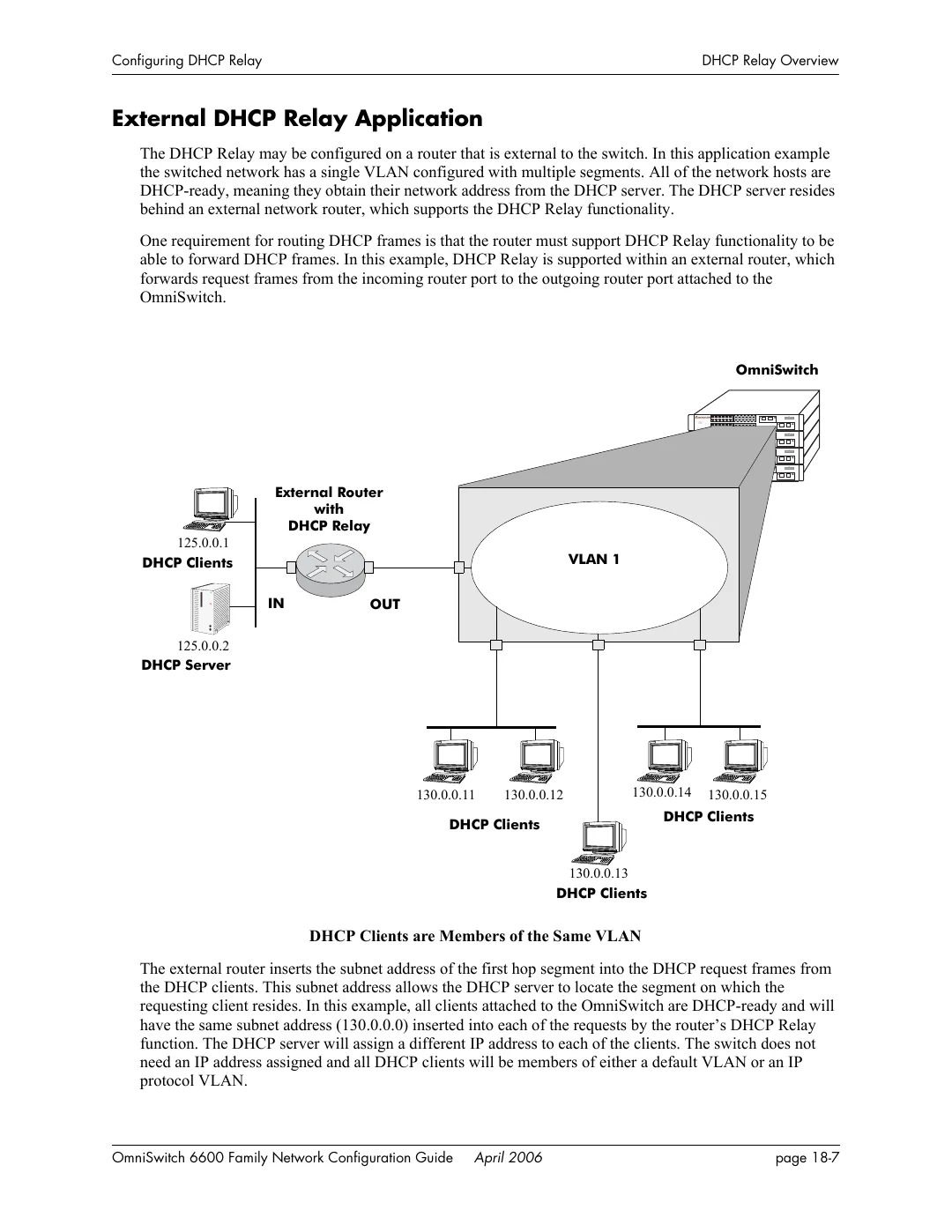
The DHCP Relay may be configured on a router that is external to the switch. In this application example
the switched network has a single VLAN configured with multiple segments. All of the network hosts are
DHCP-ready, meaning they obtain their network address from the DHCP server. The DHCP server resides
behind an external network router, which supports the DHCP Relay functionality.
One requirement for routing DHCP frames is that the router must support DHCP Relay functionality to be
able to forward DHCP frames. In this example, DHCP Relay is supported within an external router, which
forwards request frames from the incoming router port to the outgoing router port attached to the
OmniSwitch.
DHCP Clients are Members of the Same VLAN
The external router inserts the subnet address of the first hop segment into the DHCP request frames from
the DHCP clients. This subnet address allows the DHCP server to locate the segment on which the
requesting client resides. In this example, all clients attached to the OmniSwitch are DHCP-ready and will
have the same subnet address (130.0.0.0) inserted into each of the requests by the router’s DHCP Relay
function. The DHCP server will assign a different IP address to each of the clients. The switch does not
need an IP address assigned and all DHCP clients will be members of either a default VLAN or an IP
protocol VLAN.
OmniSwitch 6648
OmniSwitch 6648
OmniSwitch 6648
OmniSwitch 6648
OmniSwitch
VLAN 1
DHCP Clients
130.0.0.11
130.0.0.12
DHCP Clients
130.0.0.14
130.0.0.13
DHCP Clients
130.0.0.15
125.0.0.1
125.0.0.2
External Router
with
DHCP Relay
DHCP Clients
DHCP Server
OUT
IN