User’s Manual
Trademark Information
Page
For Your Safety
Turn off in the event of malfunction
Do not disassemble
Handle the camera strap with care
Observe caution when handling the battery
For Your Safety
Iii
Observe caution when using the flash
Use appropriate cables
Handle moving parts with care
CD-ROMs
Modifications
Interface Cables
Nikon Inc Walt Whitman Road Melville, New York
Tel
Following apply only to users in European countries
Table of Contents
Table of Contents
Viii
105
126
About This Manual
Information and Precautions
Use Only Nikon Brand Electronic Accessories
Life-Long Learning
Before Taking Important Pictures
Information and Precautions
Disposing of Data Storage Devices
Camera Body
Parts of the Camera
Built-in flash raised
3 4 16 17
Parts of the Camera
Changing the Angle of the Monitor
Raising and Lowering the Built-in Flash
Attaching the Camera Strap and Lens Cap
Press the mflash pop-up button to raise the built-in flash
Lens Cap
Monitor
Shooting
132
Playback
156
Align the mode icon with the mark next to the mode dial
Mode Dial
Basic Operations
Command Dial
For Shooting
For Playback
Basic Operations
Multi Selector
For the Menu Screen
Switching Between Tabs
DButton
Diopter Adjustment of Electronic Viewfinder
Help Displays
Xmonitor Button
Monitor
Sdisplay Button
Display information
Framing grids1
Information hidden
Charging the Battery
Connect the power cable in the order
Remove the battery and unplug the charger
Charging the Battery
Inserting the Battery
Open the battery-chamber/memory card Slot cover
Insert the battery
Close the battery-chamber/memory card slot cover
Removing the Battery
Inserting the Battery
Auto Power Off while in Shooting Mode Standby Mode
Turning On and Off the Camera
Setting Display Language, Date and Time
Press the power switch to turn on the camera
Button
Choose Yes and press the kbutton
Setting Display Language, Date and Time
Edit the date
Check that the lens cap is removed, and press the kbutton
Changing the Date and Time
Inserting Memory Cards
Removing Memory Cards
Insert the memory card
Inserting the Memory Card Correctly
Write Protect Switch
Formatting a Memory Card
Battery Level
Turn the Camera On and Select AAuto Mode
Number of Exposures Remaining
Indicators Displayed in AAuto Mode
Turn the Camera On and Select AAuto Mode
Functions Available in AAuto Mode
Vibration Reduction
Using the Electronic Viewfinder
Frame a Picture
Ready the camera
Frame the picture
Using the Zoom
Digital Zoom
Frame a Picture
Digital Zoom and Interpolation
Press the shutter-release button halfway
Focus and Shoot
Press the shutter-release button the rest of the way down
Focus and Shoot
During Recording
Autofocus
Focus Lock
Viewing Pictures Playback Mode
Viewing and Deleting Pictures
Deleting Pictures
Press the cbutton
Options Available in Playback Mode
Deleting the Last Picture Taken While in Shooting Mode
Pressing the cButton to Turn on the Camera
Viewing Pictures
Using the Flash
Setting the Flash Mode
Press mflash mode
Using the Flash
Press the mflash pop-up button
Flash Mode Setting
Flash Indicator
Red-eye Reduction
Press nself-timer
Taking Pictures with the Self-Timer
Frame the picture and press Shutter-release button halfway
Using Focus Mode
Focus Modes Available in Each Shooting Mode
Focus Mode Setting
Autofocus
Setting the Focus Mode
Press pfocus mode
Using Focus Mode
Macro Close-up
Using Manual Focus
Press pfocus mode to display the focus menu
Press Hor Ion the multi selector to adjust the focus
Press the kbutton to check the field of view
Press Hor Ion the multi selector to adjust the exposure
Exposure Compensation
Press oexposure compensation
Press the shutter-release button to take the picture
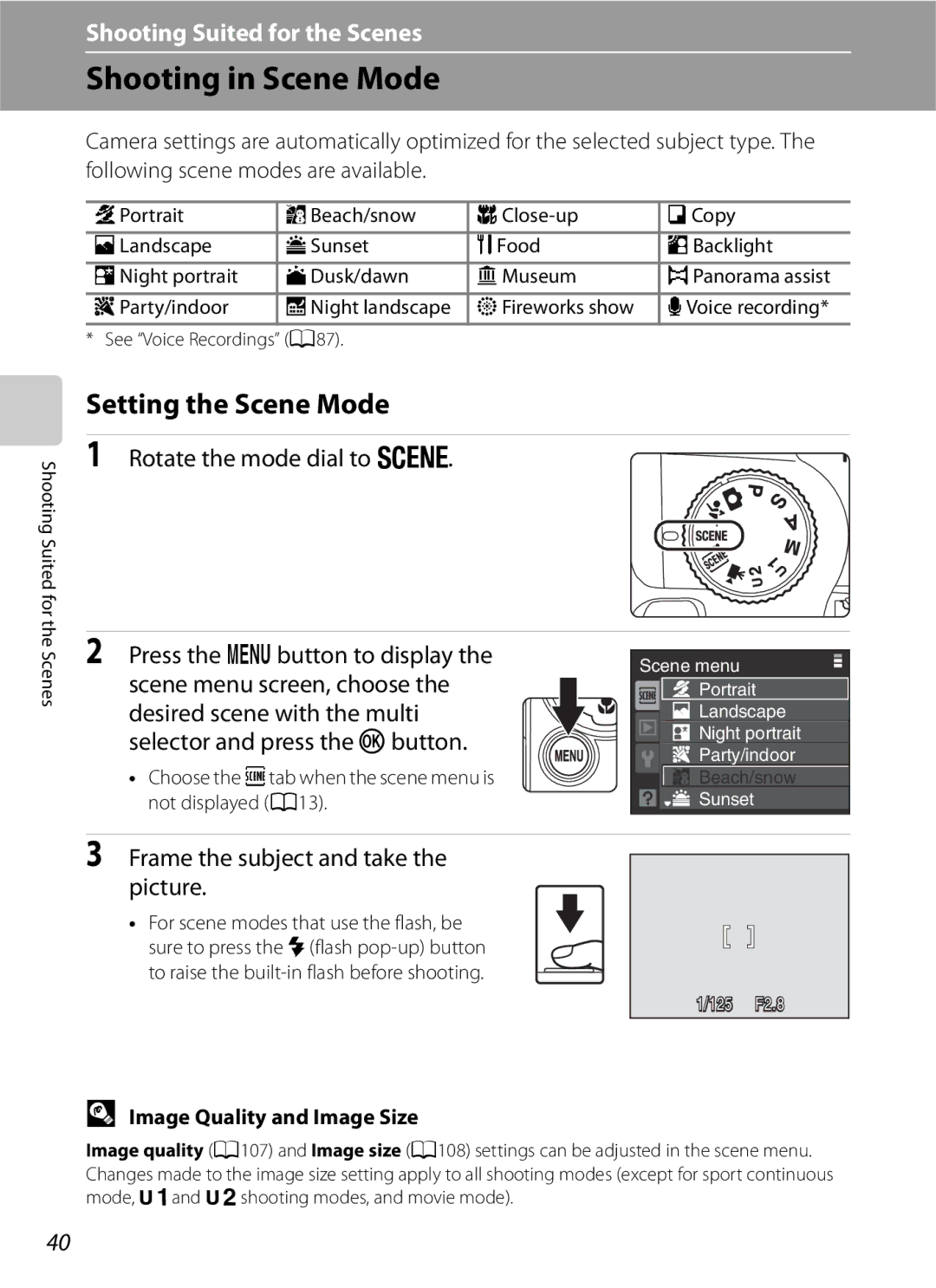
Shooting in Scene Mode
Setting the Scene Mode
Rotate the mode dial to y
Press the dbutton to display the scene menu screen, choose
Shooting in Scene Mode
Features
Icons Used for Descriptions
Party/indoor
Off*2
Camera focuses on the subject in the center of the frame
Sunset
Beach/snow
Dusk/dawn
Night landscape
Self-timer is available Other settings can be selected
Off Copy
Shooting in Scene Mode
Taking Pictures in Food Mode
Use this mode to take pictures of food
AF area mode is set to Manual A122
Press the multi selector Hor Ito choose white balance
White Balance Setting in Food Mode
Taking Pictures for a Panorama
Shoot the first picture
Shoot the second picture
Picture taken will be displayed in 1/3 of the monitor
Press the kbutton when shooting is completed
Rexposure lock Indicator
Panorama Assist
Panorama Maker
Rotate the mode dial to
Auto mode Portrait a Landscape a
Night landscape a Close-up a
Backlight A46
Flash Mode in Scene Auto Selector Mode
Focusing in Scene Auto Selector Mode
Functions Restricted in Scene Auto Selector Mode
Using Smile Timer/Blink Proof
Press the shutter-release button fully
Modes
Point the camera at the subject
Face Priority and Smiling Face Detection Features
Using Smile Timer/Blink Proof
Functions Restricted in Smile Timer/Blink Proof Mode
Shooting in Sport Continuous Mode
Rotate the mode dial to dsport Continuous
Press the dbutton and choose a
Continuous shooting type
Shooting in Sport Continuous Mode
Sport Continuous Menu
Sport Continuous Menu
Pre-shooting Cache
Press down halfway
Number of frames
C, Dmodes
C, Dmodes
Shutter Speed and Aperture
AProgrammed Auto Mode
Flexible Program
BShutter-Priority Auto Mode
BShutter-Priority Auto Mode
Focus and shoot
Set the shutter speed and shoot pictures
Aperture-Priority Auto Mode
Rotate the mode dial to C
CAperture-Priority Auto Mode
Set the aperture value and shoot pictures
DManual Mode
Rotate the mode dial to D
Aperture setting
Shutter speed value between Second and 8 seconds
Rotate the command dial to choose an aperture value
DManual Mode
Using E, FUser Setting Mode
Basic Settings
Backup battery
Shooting menu
Save the Settings in Eor F
Rotate the mode dial to the desired exposure mode
Change to a frequently used setting Press the dbutton
Using E, FUser Setting Mode
Choose the destination to reset and press the kbutton
Resetting Saved Settings
Saved settings have been reset
Rotate the mode dial to A, B, Cor D
Active D-Lighting
Lighting with the multi selector and press the kbutton
Choose the amount of enhancement and press the kbutton
Viewing Multiple Pictures Thumbnail Playback
From 4 9 16 Calendar display Thumbnails
Calendar display
Viewing Multiple Pictures Thumbnail Playback
Icons on the Thumbnails
Print-set icon
Pictures Taken Using the Face-Priority Function
Taking a Closer Look Playback Zoom
Guide at lower right shows which portion is enlarged
Pictures are zoomed
Restrictions on Picture Editing
Editing Pictures
Original Pictures and Edited Copies
Using Quick Retouch
Editing Pictures
Enhancing Brightness and Contrast D-Lighting
Creating a Cropped Copy Crop
Refine copy composition
Image Size
Crop the picture in its current tall portrait orientation
Resizing Pictures Small Picture
Button
Black Border
Adding Black Frame on Pictures Black Border
New copy with a black frame is created
Voice Memos Recording and Playback
Recording Voice Memos
Playing Voice Memos
Deleting Voice Memos
Recording Movies
Changing Movie Settings
Shooting Movies
Movie Menu
Selecting Movie Options
Movie menu offers the options shown below
Set to D Movie MdMDMovie menu MMovie options
IAutofocus Mode
Choose how the camera focuses in movie mode
Movie Menu
Maximum Movie Length
Enable or disable electronic VR for movie recording
WElectronic VR
Time-Lapse Movies
Choose y Time-lapse moviePand press the kbutton
Time-Lapse Movie
Camera returns to shooting mode
Choose from 30 s, 1 min, 5 min, 10 min, 30 min and 60 min
Movie Playback
Deleting Movie Files
Making Voice Recordings
Press Jor Kto choose kon the operation
Panel, and press the kbutton to start Recording
Length of recording that can be made will be displayed
Operations During Recording
Making Voice Recordings
Press Jor Kon the multi selector to choose l
Selected sound file will be played back
Operations During Playback
Deleting Sound Files
Playing Voice Recordings
Copying Voice Recordings
Choose a copy option and press the kbutton
Select a copy option and press the kbutton
Choose the data to be copied
Connecting to a TV
Turn off the camera
Tune the television to the video channel
Hold down the cbutton to turn on the camera
Connecting to a Computer
Before Connecting the Camera
Installing the Software
Compatible Operating Systems
Connecting to a Computer
Connecting the USB Cable
Transferring Pictures from the Camera to a Computer
Turn on the camera
Transfer pictures when Nikon Transfer has finished loading
Disconnect the camera when transfer is complete
Start Transfer button
Turn the camera off and disconnect the USB cable
Using the Computer to Open Image/Sound Files
Using a Card Reader
Panorama Creation with Panorama Maker
Connecting to a Printer
Printing Pictures
Connecting the Camera and Printer
Connecting to a Printer
Check printer settings
Turn off the camera Turn on the printer
Printing Pictures One at a Time
Choose Copies and press the kbutton
Choose the desired paper size and press the kbutton
Choose the number of copies up to nine
Printing Multiple Pictures
Printing starts
100
Print menu is displayed
101
Print selection
Print, choose Start print and press the k Button
Print all images
Paper Size
102
Current print/total number of prints
Press the dbutton in playback mode
Creating a Dpof Print Order Print Set
Choose the pictures up to a maximum
103
Deleting All Print Orders
Creating a Dpof Print Order Print Set
Date imprint
105
Shooting Options The Shooting Menu
Image quality A107
Displaying the Shooting Menu
106
Shooting Options The Shooting Menu
Functions that Cannot Be Applied Simultaneously
Image Quality
107
108
Image size
3264×2448 or D 2592×1944
109
Number of Exposures Remaining
110
Printing Images of Size
111
Optimize Image
Optimize Image
112
Customizing Image Enhancement Options Custom
Contrast Control contrast
Shooting in Black-and-White Black-and-white
113
Image sharpening , and Monochrome filter
W + Color
White Balance
Flash Mode
114
Preset Manual
Choose Measure
Frame the reference object
Press the kbutton to measure the white balance value
116
ISO Sensitivity
Fixed range auto
Metering
117
Is known as Metering Choose how the camera meters exposure
Metering Area
Continuous
118
119
Interval Timer Shooting
30 s 600 images Min 300 images Min 60 images Min 30 images
120
Auto Bracketing
121
±0.3
±0.7
AF-Area Mode
122
Face priority Camera automatically detects and focuses on a
Focus area
Shooting with Face Priority
123
124
Autofocus Mode
Flash Exp. Comp
125
Choose how the camera focuses
Distortion Control
Noise Reduction
126
Functions that Cannot be Applied Simultaneously
Flash mode
127
3968×2232 and H 2992×2992
128
Auto bracketing
Playback Options The Playback Menu
Displaying the Playback Menu
129
Playback menu contains the following options
Selecting Pictures
Press the multi selector Jor Kto choose
Desired picture
130
Slide Show
Use the multi selector to choose Start
Slide show begins
Choose End or Restart
Delete
Protect
132
Delete selected or all pictures
Rotate Image
Hide Image
133
Rotate Counterclockwise
Copy
134
Memory contains no images. Message
Press the dbutton McPlayback menu A129 MhCopy
Basic Camera Setup The Setup Menu
Setup menu contains the following options
Monitor settings A141
135
Displaying the Setup Menu
Press the dbutton to display the menu screen
Press Jon the multi selector
Press Kor the kbutton
Press the dbutton Mz Setup menu A135 MWelcome screen
None default setting Welcome screen is not displayed
Welcome Screen
137
Setting the Travel Destination Time Zone
Date
Use the multi selector to choose Time zone
Choose x Travel destination and press the kbutton
Press K
Press Jor Kto choose the travel destination time zone
139
Home Time Zone
140
Time Zones A20
Monitor Settings
Change the settings for the options below
Press the dbutton Mz Setup menu A135 MMonitor settings
141
Press the dbutton Mz Setup menu A135 MDate imprint
Date Imprint
142
Date Imprint and Print Set
Press the dbutton Mz Setup menu A135 MVibration reduction
On default setting
Vibration Reduction
143
Motion Detection
Press the dbutton Mz Setup menu A135 MMotion detection
144
Enable or disable AF-assist illumination
Enable or disable digital zoom
AF Assist
Digital Zoom
Sound Settings
Adjust the following sound settings
Canceling Standby Mode
Auto Off
Format Memory/Format Card
Formatting the Internal Memory
Formatting a Memory Card
147
Video Mode
Adjust settings for connection to TV Choose Ntsc or PAL
Language
148
Blink Warning
Press the dbutton Mz Setup menu A135 MBlink warning
149
Operating the Did someone blink? Screen
150
Reset All
151
152
Shooting Menu
Setup Menu
Setup menu Date A138, Language A148 and Video mode A148
153
Others
Reset file numbering
Firmware Version
154
View the current camera firmware version
Optional Accessories
Approved Memory Cards
155
Chamber/memory card slot cover
File and Folder Names
156
157
Caring for the Camera
158
159
Battery
Caring for the Camera
160
Cleaning
Do not use alcohol, thinner, or other volatile chemicals
Storage
161
Display Description Solution
Error Messages
162
Description Solution
163
Error Messages
164
165
Troubleshooting
Display, Settings and Power Supply
Problem Cause/Solution
166
167
Troubleshooting
Electronically Controlled Cameras
168
Bracketing
When Multi-shot 16 is selected for Continuous
169
170
Underexposed
Continuous H 169 setting
171
172
Specifications
Nikon Coolpix P90 Digital Camera
173
Specifications
Continuous H
Rechargeable Li-ion Battery EN-EL5
Battery Charger MH-61
Specifications
174
Supported Standards
175
Index
Symbols
176
177
178
179
FX9B0111