Dual Camera
Model No.HX-WA10
VQT3P35
To Reduce the Risk of FIRE, Electric Shock or Product Damage
FCC Note
HX-WA10
Concerning the battery Battery pack Lithium ion battery pack
AC adaptor
Lithium ion battery that is recyclable powers
A./CANADA Consumers Attention
Precautions
Camera or the Power Supply Turned on When not in USE
Care
If you see this symbol
Condensation when the lens is cloudy
IMPORTANT! Please Read
About handling the camera
Indemnity about recorded content
Be sure to take some test pictures beforehand
Be aware of copyrights
Back up data periodically
About the battery pack
10 VQT3P35
Photo compatibility
About the photos and illustrations in this manual
Important about the Waterproof Performance of the Camera
Handling of the camera
12 VQT3P35
Care of the brush
Terminal cover lock Red part Colored label
Example of foreign matter inside the battery cover
14 VQT3P35
Example of foreign matter inside the terminal cover
Push the battery cover lock to the left to lock it
Using the camera underwater
16 VQT3P35
Hint
Care of the camera after using underwater
Causes of water leak
18 VQT3P35
Wiping moisture from the camera
About the water draining design
Draining water from the camera
Easy shooting/playback Basic features Intelligent Auto Mode
What YOU can do with Your Digital Movie Camera
Shoot movies
Take photos Play back videos and photos
User guide on the Internet
On a computer Pages 135 to
22 VQT3P35
Contents
24 VQT3P35
Playback
„ Option Settings
Connecting to a Computer
Connecting to a TV
26 VQT3P35
COPYING/DUBBING
Battery pack
VW-VBX070 VSK0750 USB cable
VFA0544 VFA0543 Brush
About the Card
28 VQT3P35
SD Memory
Sdxc Memory
Write-protect switch
Parts Names
Front
30 VQT3P35
Rear
Status indicator status Camera
32 VQT3P35
Status
Charging the Battery Pack
Guide to charging time and recording capacity
Charging/recording time
Approximate operating time and number of recordable images
34 VQT3P35
Open the battery cover
Insert the battery pack, then replace the battery cover
To remove the battery pack
36 VQT3P35
During charging
Recharging when connected to a computer
To maximize the battery pack life
38 VQT3P35
About the temperature alert icon
Installing the Card
When removing the card
40 VQT3P35
Close the battery cover securely
If the status indicator is lit red
Do not attempt to forcibly remove the card
How to open the monitor unit
Turning the Camera on and OFF
Turning on the camera
42 VQT3P35
Turning on the camera when it is in the sleep mode
Press the power button for at least 1 second
About the standby mode
Turning off the camera
Date and Time Setting
44 VQT3P35
Set the date
Set the clock
Press the Menu button
Date and time backup
To correct the date and time settings
About the internal backup battery
46 VQT3P35
Switching Between the Recording Mode and Playback Mode
Turn on the camera Press the REC/ button
Accessing/exiting the Menu Screen
Menu Screen
48 VQT3P35
To display a different Tab Menu h The Menu Screen consists
Using the Menu
Setting Screen
About the applicable mode indicator
Overview of the Menu Screen Recording Menu
50 VQT3P35
Scene mode
Color mode
Self-timer
Remaining battery power indication
52 VQT3P35
Focus mode
Metering mode n Multi-metering
Image stabilizer
Focus
54 VQT3P35
Shortcuts setting page 94 h Assign operation shortcuts to
Exposure
Subject tracking page 92 h Automatically target a specific
Digital zoom
Play volume
Playback Menu
56 VQT3P35
Slideshow
Red-eye correction Copy Repair the red-eye caused
Intelligent Auto Mode
58 VQT3P35
Mode Scene Effect Night Recording night
Scenery
Macro Recording zooming
On a flower etc
Intelligent Auto Mode
60 VQT3P35
Automatic white balance
Auto focus
Before Taking Pictures
For best results
Holding the camera
If the camera feels warm
How to use the accessories
62 VQT3P35
Video Recording
Turn on the camera
Press the @ button
End the recording
Taking Photos
64 VQT3P35
What is the camera focusing on?
Focus and exposure can be locked
Shutter speed and aperture are displayed
If the camera shake icon appears
Shoot a photo while recording a video
66 VQT3P35
About the recording size of photos
MACRO-PHOTOGRAPHY Zoom
Point the camera lens at Subject
Take the picture
When recording videos at a high magnification
68 VQT3P35
Shooting Under Water
After using in water
70 VQT3P35
Dry the camera
About the handstrap
Playing Back Videos and Photos
Press the SET button
Video playback operation
72 VQT3P35
To do this Do this
If the appears on the Playback Screen
How to save one frame from a video as a photo
74 VQT3P35
File size for a video is very large
If no audio is heard
Deleting Files
Delete single/delete all/delete folder
Delete selected
76 VQT3P35
Select DELETE, and press the SET button
Delete ALL, Delete Folder
Press the O button or @ button
Select YES, and press the SET button
Playback Modes
Image display playback
78 VQT3P35
Display a photo Push the zoom switch toward
Magnifying zooming in the image photos only
With the face tracking function
To magnify
Recording mode setting
Recording Menu
80 VQT3P35
Audio recording and playback
Recording
End the audio recording
You can capture a photo during an audio recording
82 VQT3P35
Recorded pixels
Hi-Speed Burst
Select C or t, and press the SET button
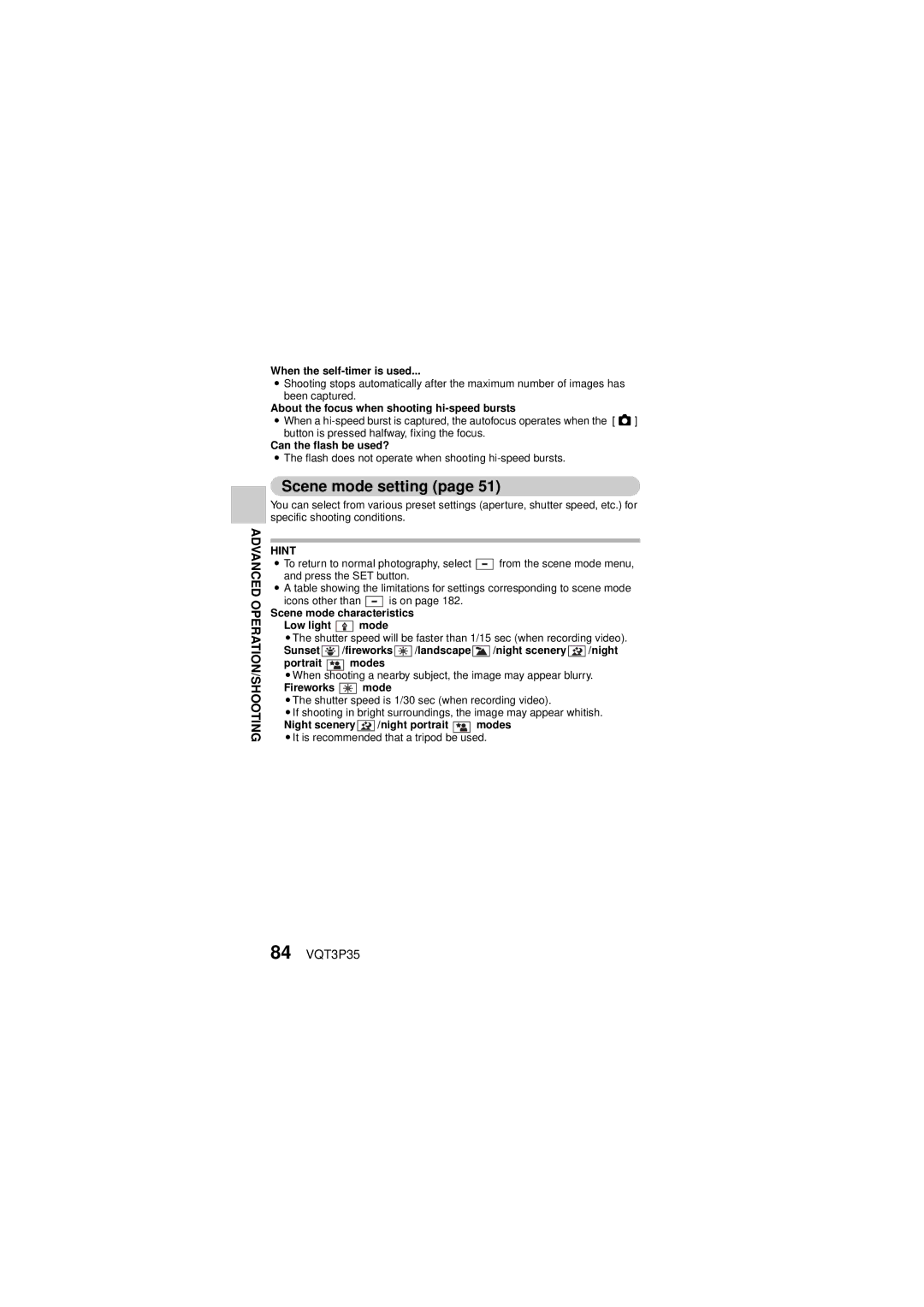
Scene mode setting
84 VQT3P35
Self-timer setting
To cancel the self-timer function
When xis selected
When yis selected
Motion compensation image stabilizer setting
When motion compensation is enabled
86 VQT3P35
If the motion compensation does not seem to be working
Focus setting How to use the manual focus
About the macro mode
Select -, and press the SET button
ISO sensitivity setting
88 VQT3P35
White balance setting
How to use the white set
To cancel the white balance setting
Reset the white balance in the following cases
Exposure setting
Setting ranges Aperture F3.5 to F8.0
90 VQT3P35
When shooting a hi-speed burst
When recording a video
Subject tracking settings
Shooting with the face tracking function
92 VQT3P35
Set the color tracking setting to
To cancel the color tracking operation
Shooting with the color tracking function photos only
If the subject is not successfully targeted
Shortcut setting
94 VQT3P35
Select SHORTCUTS, Press the SET button
Focus
Video view
Photo view
Press I or J
96 VQT3P35
To confirm the assigned shortcuts
Press G or H to adjust the exposure
Exposure compensation
Slideshow settings
Changing a setting
Playback Menu
Begin the slideshow
File protect setting
To cancel the protect mode for a file
Protect files one by one
To select a different image in step
Protect selected files
100 VQT3P35
Why can’t the image be resized?
Rotate
Resize
Correcting red-eye
102 VQT3P35
If the Red-eye correction not successful message appears
Procedure to trim extract a portion of a video
Editing videos
Extract the specified portion Two ways to split the video
Procedure to splice videos
When editing videos
104 VQT3P35
Splice the videos
Video trimming extracting
Select the video to be trimmed from the 8-image display
Select Split and press the SET button
106 VQT3P35
When joining the first and latter Portions
Press
Save AS NEW
Overwrite
Playback volume?
108 VQT3P35
Select the desired option, and press the SET button
Case of prolonged recording
Splicing joining videos
Select Splice and press the SET button
110 VQT3P35
Playback volume?
Copy
112 VQT3P35
If Copy Single was selected
If Copy ALL was selected
Copying selected files
File Info Display
114 VQT3P35
Display the Option Setting Menu
To access a Setting Screen
Option tab
Introduction to the Option Setting Menu
Tab
116 VQT3P35
Battery REC
Battery Play
Turn ON/OFF
Shutter
118 VQT3P35
Initial SET
Format
Delete Data
120 VQT3P35
REC Folder setting When the recording mode is active
Playback Folder setting When the playback mode is active
File NO. CONT’D setting Remaining battery charge display
TV output setting
122 VQT3P35
TV System
TV Aspect
If Viera Link is selected on Use the Viera Link
Relation between TV Aspect setting and TV display
124 VQT3P35
Photo 169 Video in SD mode Video in HD mode
Storage folder setting
126 VQT3P35
Select an existing folder
Playback folder setting
102CDPFP
File No. setting
128 VQT3P35
File number function OFF
File name image number
When the built-in memory is used
At the end of a photography session
Formatting initializing
130 VQT3P35
Formatting the card erases the files
Can’t select Delete DATA?
Set the camera to the recording mode
Checking the Remaining Card Memory
Set the camera to the audio recording mode
Check the available audio recording time
132 VQT3P35
Checking the Remaining Battery Pack Charge
Display the Recording Menu or Playback Menu
Battery remaining charge
134 VQT3P35
Approx. full
Setting the Connection Mode
Card Reader
WEB Camera
136 VQT3P35
About the USB cable
If the Disconnect USB cable message appears
Insert and pull out the cable carefully
Using AS a Card Reader
Mounting your camera
Dismounting the camera
About the Contents of the Card
When using as a card reader
About the volume name
About videos recorded with this camera
Video playback operating environment Windows Mac OS
To access the files in the built-in memory
140 VQT3P35
About audio files recorded with this camera
Connecting to a Computer
Using AS a Webcam
Operating environment Windows
142 VQT3P35
Using as a webcam
Set the camera to the WEB Camera webcam mode mode
Mac
Contents of the supplied CD-ROM HD Writer VE
What YOU can do with a Computer
Smart wizard
CD-ROM
End User License Agreement
146 VQT3P35
Connecting to a Computer
Operating Environment
Operating environment for HD Writer VE
148 VQT3P35
Computer
RAM
USB
150 VQT3P35
Other
To use the HD Writer VE
152 VQT3P35
CPU
Requirements
Installation
Insert the CD-ROM into the computer
Check the contents, then close the window
154 VQT3P35
Select Yes or No to create shortcut
Click Next
Computer must be rebooted for the application to work
Uninstalling HD Writer VE
Select Start →Control Panel →Programs and Features
Select HD Writer VE 1.0, then click Uninstall
156 VQT3P35
Starting HD Writer VE
Select Start → All Programs → Panasonic → HD Writer VE 1.0 →
158 VQT3P35
Operating environment
Copying photos on a computer
To disconnect USB cable safely
160 VQT3P35
Connecting to a TV
Connecting to a video input terminal
Connecting to the Hdmi terminal
162 VQT3P35
Playback using Viera Link Hdavi Control
What is the Viera Link?
Playing Back on a TV
Operate with the remote control for the TV
Automatic input switching
164 VQT3P35
Other linked operations Turning the unit off
Hint
COPYING/DUBBING
Dubbing in standard picture quality
166 VQT3P35
Start recording on the connected device
Commonly Asked Questions
168 VQT3P35
Question Answer Action
Larger, and for
170 VQT3P35
Images
172 VQT3P35
Misc
174 VQT3P35
Troubleshooting
Problem Cause Action
Power
Camera
176 VQT3P35
Sensitivity to a Image Setting is too Lower setting
178 VQT3P35
Setting is not Distance/range Correct Select
180 VQT3P35
Image
Setting Restrictions
182 VQT3P35
Color Mode restrictions
When shooting hi-speed bursts
About the scene mode function and focus setting
About the status indicator when charging the battery pack
184 VQT3P35
Off
About Copyright
Carefully observe copyright laws
Licenses
When carrying the camera, do not drop or bump it
Cleaning
186 VQT3P35
When disposing of or transferring the camera
About the battery
Be sure to remove and store the battery after use
Prepare spare batteries when going out
Do not throw an old battery into fire
188 VQT3P35
About the AC adaptor
About the LCD monitor
190 VQT3P35
About condensation
Recording mode Picture size
SD card
Built-in
Memory
192 VQT3P35
Recording pixels
Hi-Speed Burst Recording pixels
Specifications
194 VQT3P35
White balance adjustment
Zoom
Monitor
Microphone
196 VQT3P35
Battery operation time
Water-resistant
Video Recording media
Compression
198 VQT3P35
Audio compression
Photo Recording media
Picture size Photo recording single-shot
Optional Accessories
Accessory No Description
Accessory Order Form For USA and Puerto Rico Customers
200 VQT3P35
Panasonic Camcorder Products Limited Warranty
Limited Warranty Coverage For USA and Puerto Rico Only
Carry-In or Mail-In Service
Product or Part Name Parts Labor
Limited Warranty Limits And Exclusions
202 VQT3P35
For hearing or speech impaired TTY users, TTY
For hearing or speech impaired TTY users, TTY As of March
Instalación de la batería y de la tarjeta SD
204 VQT3P35
Inserte la tarjeta SD
Inserte la batería
Carga de la batería
Encendido de la cámara
206 VQT3P35
Abra la unidad de pantalla y Presione el interruptor
Apertura de la unidad de pantalla
Apagado de la cámara
Presione el interruptor durante al menos 1 segundo
Presione el botón REC
Selección del idioma de la pantalla
208 VQT3P35
Presione el botón Menu
Seleccione Language y presione el botón SET
Grabación
Presione el botón @
Termine la grabación
210 VQT3P35
Presione el botón O Presione el botón O hasta la mitad
Presione el botón SET
Consejo
Operación de reproducción de vídeos
212 VQT3P35
Para hacer esto Haga esto
Si aparece en la pantalla de reproducción
214 VQT3P35
VQT3P35
VQT3P35

 /fireworks
  /landscape
  /night scenery
  /night
 modes
modes mode
mode