Manual DE Instrucciones
Avertissement
Warnung
Advertencia
U T I O N
Precaution
Introduction
Never operate the register with wet hands
Contents
Part2 for the Operator
Part3 for the Manager
Correction After Finalizing a Transaction Void mode
CCD -Compulsory Cash/cheque Declaration
External View Front view Rear view
Printer
X1/Z1
Mode Switch and Mode Keys
Keyboard Keyboard layout Key names
X2/Z2
Displays Operator display
Customer display Pop-up type Drawer Lock Key
How to install the fixing angle bracket
Installing the Cash Register
How to remove the register from the fixing angle bracket
Initializing the Cash Register
MRS PGM
Installing Paper Rolls
Cut off the excess paper using the edge of the inner cover
Abbreviations and Terminology
Description of special keys
Guidance for text programming
Using character keys on the keyboard
Operator display Example
Time
Language Selection
Date and Time Programming
1430
Tax rate programming
S9 @
Tax Programming
Key operation example
Hash department
Department Programming
Group no
Dept. code VAT/tax status Group no
Specify the department code
Text programming Press sto skip. / Press Ato terminate
Unit price programming Press sto skip. / Press Ato terminate
300
Select of TAX2 TAX2NO
Enter a group no. for the department using numeric Keys
Group No. programming Press sto skip. / Press Ato terminate
Terminate programming
Selection Print
71 p
PLU Price Look-Up and Subdepartment Programming
Specify the PLU code
Key operation Operator display
500
Sign programming Press sto skip. / Press Ato terminate
Function programming Press sto skip. / Press Ato terminate
Sign
Text Programming
S5 P
Clerk names 12 digits
Ssssss s
S4 P
Logo message print format 6 types
Programming Other Necessary Items
Decimal point position tab setting for domestic currency
Rounding system
1500 ¡ 2300
Basic Sales Entry Example
Receipt print
141 p
PLU Entry
Operator display Receipt print
Correction of the Last Entry direct void
Cancellation of the Numeric Entry
1250 § 600 250 f§
1310 v§
1310 § 1755 ¶ 10 p 12 p 250 f§
250 fv§
Subtotal Void
1310 1755 § 10 p 35 p
Key operationOperator display
Full sales report
Sample report
Sales total including tax
Full sales report Key operation Operator display
Periodic consolidation
Daily net report Key operation Operator display
Other Basic Sales Entries
Error Warning
Additional Information for Basic Sales Entry
Department entries
Item Entries Single item entries
PLU/subdepartment entries
Repeat entries
Multiplication entries
Split pricing entries
@12 35 p
Single item cash sale Sics entry
Displaying Subtotals
250
Cash or cheque sale that does not require tender entry
300 § 10 p
Finalization of Transaction Cash or cheque tendering
1000 a
Mixed-tender sale
950 a b
Credit sale
Computation of VAT Value Added Tax/tax VAT/ tax system
1000 ¡
Automatic VAT 1 and automatic tax 2-4 system
800 § P5 % 15 p
Optional Features
140 ∞ 570 ¶ 10 %
575 § 10 p 100
13 fp
675 ¶
250 f§
Refund entries
Auxiliary Payment Treatment Currency exchange
Applying preset exchange rate
Applying manual exchange rate
No sale exchange
Received-on-account entries
Paid-out entries
Cashing a cheque
Overlappped Clerk Entries
100 ¡ 360 £ 150 50 ¡ 300 £
Automatic Sequence Key key Entries
Key operation example Comments
Prior to Programming
Procedure for programming
Guidance messages
253
S1 @
Entering character codes with numeric keys on the keyboard
065
Alphanumeric character code table
231
Programming for
Auxiliary Function Programming
Miscellaneous Key Programming
Specify the key to program
Amount programming Press sto skip. / Press Ato terminate
Press the Akey to terminate the -key Programming
Rate programming Press sto skip. / Press Ato terminate
Programming for %and
15.00
90.00
Press the Akey to terminate the %key Programming
EX SSS
939938
Mms
Programming for r, R, X, Y, cand b
Cheque
Compulsory
Press the Akey to terminate the Xkey Programming
Function parameters for a
018 @
Domestic currency symbol 4 digits
Foreign currency symbol 4 digits
Other Text Programming
Sstraining SS
Training mode text 12 digits
Function text 12 digits
35 @ Card N1 s
List of function texts
NET1
Register number
S2 @
Register Number and Consecutive Number Programming
Consecutive number
Function selection for miscellaneous keys
S5 @
Various Function Selection Programming
00000100 sA
Receipt print format
Print format
Journal print item selection
Other programming
Part3 for the Manager
Rounding down of the unit digit of amount
Applied to payment by cash and change amount
Split pricing counting
10 @ 0060 sA
Power save mode
Selection Entry
Clerk code assignment
Logo message print format
Entry digit limit for cash in drawer CID sentinel
Entry digit limit for cheque change
Training clerk specification for training mode
Entry digit limit for cheque cashing
Thermal printer density
Auto key programming Automatic sequencing key
Auto 2 p100 §
01 s
Euro system settings
Automatic Euro modification operation settings
Euro Programming
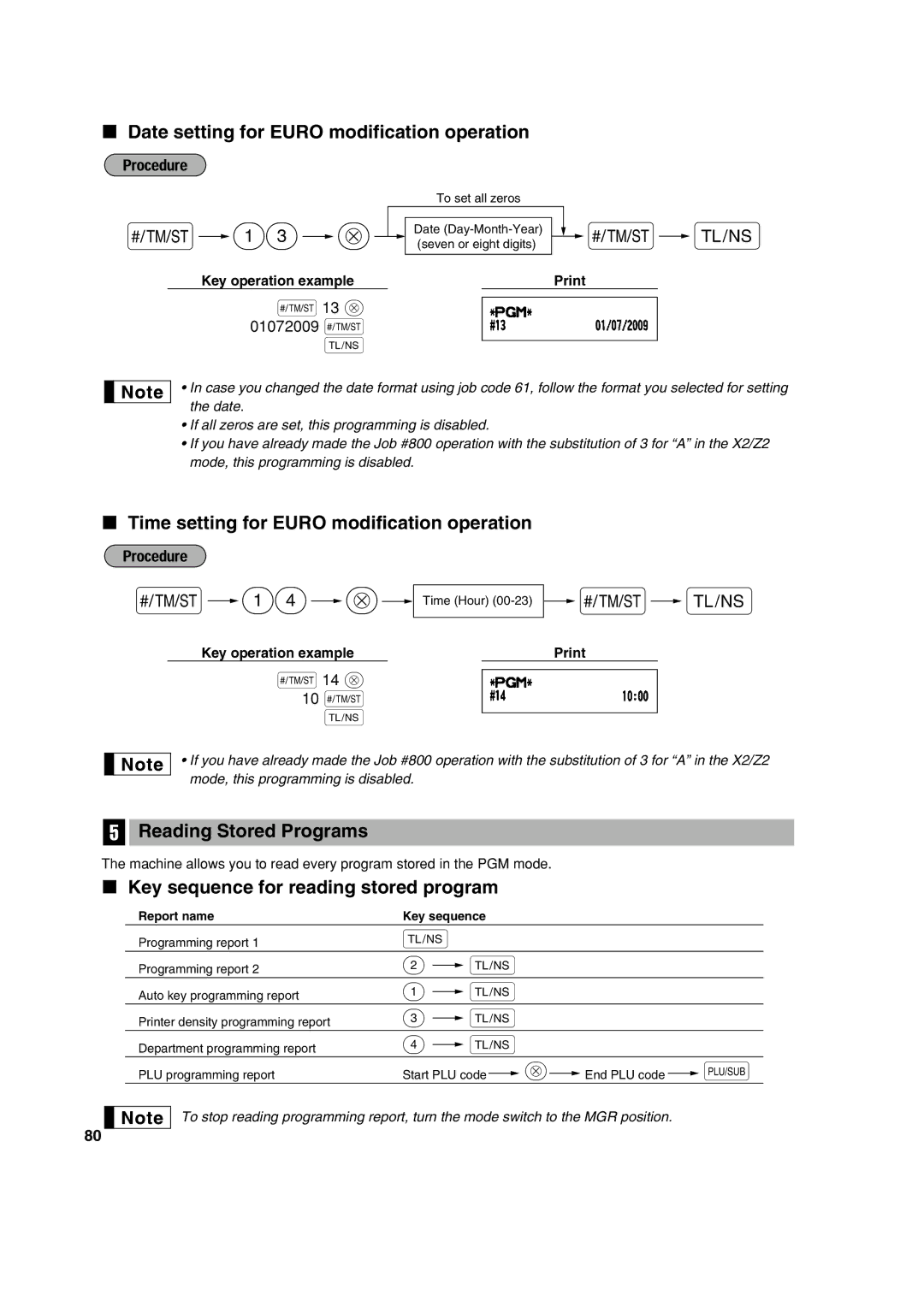
Reading Stored Programs
Date setting for Euro modification operation
Time setting for Euro modification operation
Key sequence for reading stored program
Sample printouts
Programming report
PLU programming report Auto key programming report
Programming report Department programming report
Printer density programming report
Training Mode
1000
Reading X and Resetting Z of Sales Totals
Summary of Reading X and Resetting Z Reports
Part2 Part3 for the Manager
Daily Sales Totals
Individual group total report on Department report
PLU report by associated department
Full group total report on department
PLU report by designated range
Transaction report
Individual clerk report
Full clerk report Hourly report
Full clerk report X1/Z1 mode
Type of compulsory cash/cheque declaration
250
Incorrect receipt Cancellation receipt
Override Entries
1500
Automatic Euro modification operation
Euro Migration Function
How currencies are treated in your register
Period
Items
Euro status
Checking the current Euro status
Optional Programming for the Introduction of Euro
Programming for Exchange Key
Case of Power Failure
Operator Maintenance
Case of Printer Error
Replacing the Paper Roll
Removing the paper roll
Cleaning the Printer Print Head / Sensor / Roller
Installing the paper roll
Removing a Paper Jam
Removing the Till and the Drawer
Opening the Drawer by Hand
Before Calling for Service
Error message table
Specifications
100
Information on Disposal for Users private households
Information on Disposal for Business Users
European Union
Geräuschpegel LpA 62,3 dB Gemessen nach EN ISO

 14
 @
 Time (Hour)
 s
 A