Service Menu
To access Maintenance Mode:
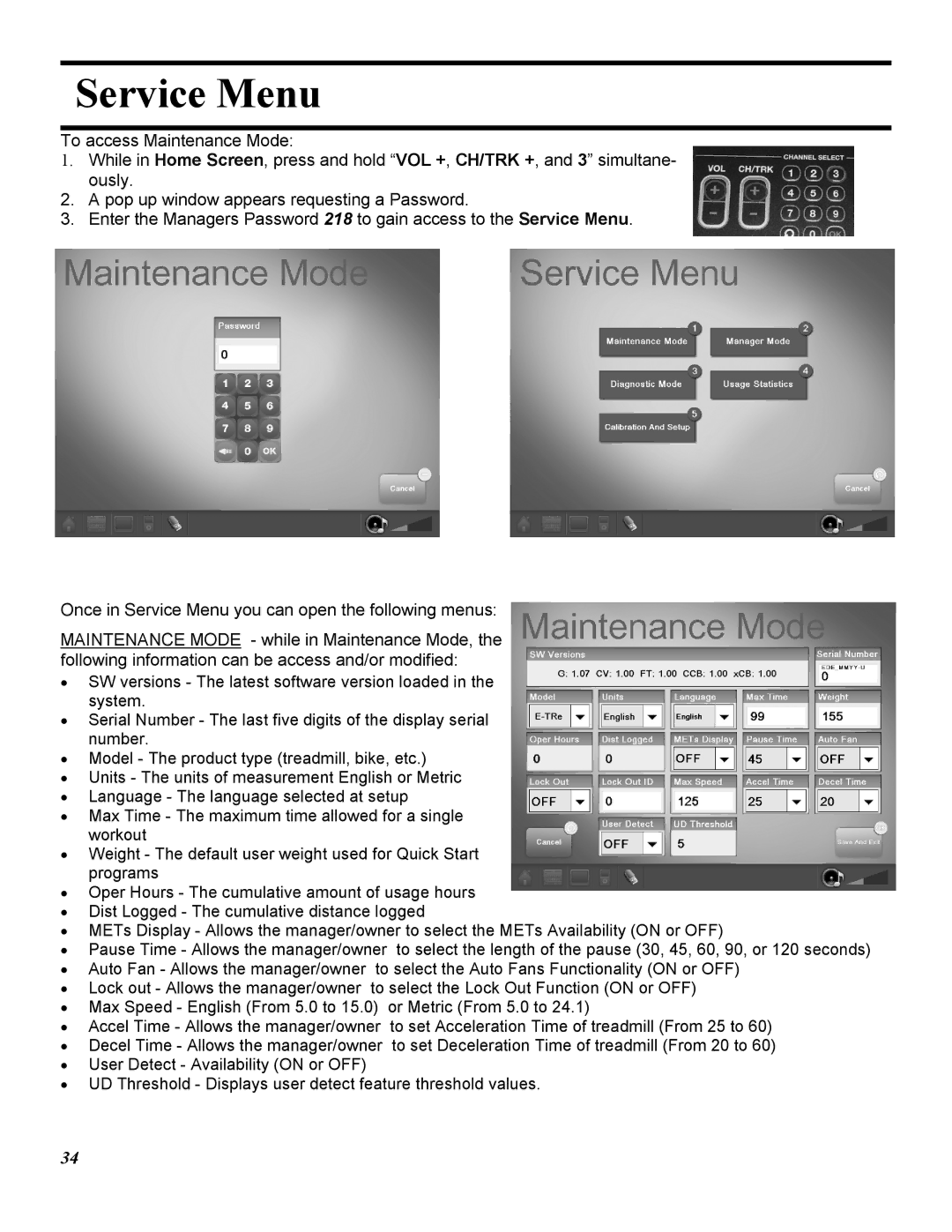
1.While in Home Screen, press and hold “VOL +, CH/TRK +, and 3” simultane- ously.
2.A pop up window appears requesting a Password.
3.Enter the Managers Password 218 to gain access to the Service Menu.
Once in Service Menu you can open the following menus:
MAINTENANCE MODE - while in Maintenance Mode, the following information can be access and/or modified:
•SW versions - The latest software version loaded in the system.
•Serial Number - The last five digits of the display serial number.
•Model - The product type (treadmill, bike, etc.)
•Units - The units of measurement English or Metric
•Language - The language selected at setup
•Max Time - The maximum time allowed for a single workout
•Weight - The default user weight used for Quick Start programs
•Oper Hours - The cumulative amount of usage hours
•Dist Logged - The cumulative distance logged
•METs Display - Allows the manager/owner to select the METs Availability (ON or OFF)
•Pause Time - Allows the manager/owner to select the length of the pause (30, 45, 60, 90, or 120 seconds)
•Auto Fan - Allows the manager/owner to select the Auto Fans Functionality (ON or OFF)
•Lock out - Allows the manager/owner to select the Lock Out Function (ON or OFF)
•Max Speed - English (From 5.0 to 15.0) or Metric (From 5.0 to 24.1)
•Accel Time - Allows the manager/owner to set Acceleration Time of treadmill (From 25 to 60)
•Decel Time - Allows the manager/owner to set Deceleration Time of treadmill (From 20 to 60)
•User Detect - Availability (ON or OFF)
•UD Threshold - Displays user detect feature threshold values.