Configuring 802.1Q
802.1Q Overview
OmniSwitch 6600 Family Network Configuration Guide
April 2006
page 11-3
802.1Q Overview
Alcatel’s 802.1Q is an IEEE standard for sending frames through the network tagged with VLAN identifi-
cation. This chapter details procedures for configuring and monitoring 802.1Q tagging on a single port in a
switch or a link aggregation group in a switch.
802.1Q tagging is the IEEE version of VLANs. It is a method for segregating areas of a network into
distinct VLANs. By attaching a label, or tag, to a packet, the packet can be identified as being from a
specific area or identified as being destined for a specific area.
When enabling a tagged port, you will also need to specify whether only 802.1Q tagged traffic is allowed
on the port, or whether the port accepts both tagged and untagged traffic.
“Tagged” refers to four bytes of reserved space in the header of the packet. The four bytes of “tagging” are
broken down as follows: the first two bytes indicate whether the packet is an 802.1Q packet, and the next
two bytes carry the VLAN identification (VID) and priority.
On the ingress side, packets are classified in a VLAN. After classifying a packet, the switch adds an
802.1Q header to the packet. Egress processing of packets is done by the switch hardware. Packets have
an 802.1Q tag which may be stripped off based on 802.1Q tagging/stripping rules.
If a port is configured to be a tagged port, then all the untagged traffic (including priority tagged, or
VLAN 0 traffic) received on the port will be dropped. You do not need to reboot the switch after chang-
ing the configuration parameters.
Note.
Priority tagged traffic, or traffic from VLAN 0, is used for Quality of Service (QoS) functionality.
802.1Q views priority tagged traffic as untagged traffic.
Mobile ports can be configured to accept 802.1Q traffic by enabling the VLAN mobile tagging feature as
described in
Chapter 4, “Configuring VLANs.”
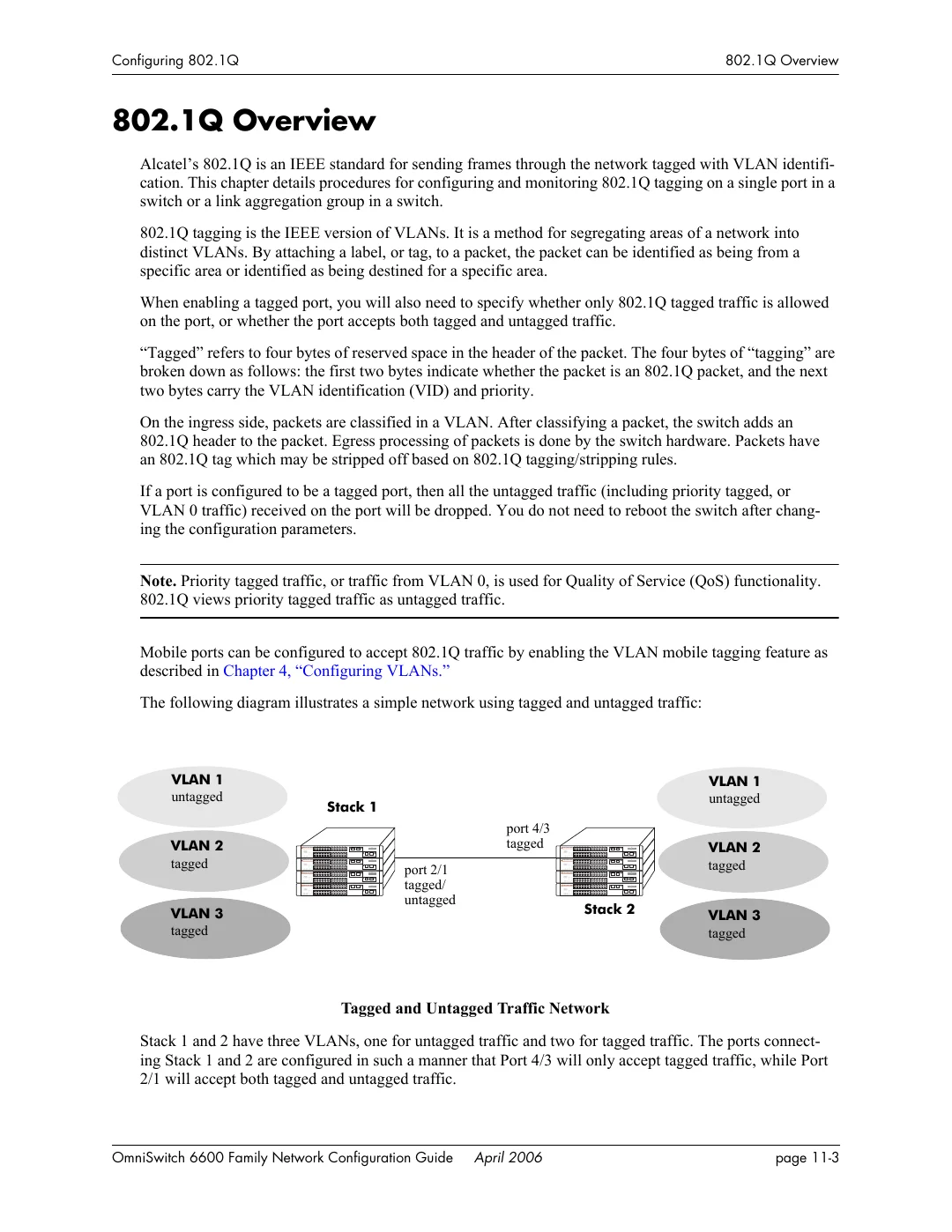
The following diagram illustrates a simple network using tagged and untagged traffic:
Tagged and Untagged Traffic Network
Stack 1 and 2 have three VLANs, one for untagged traffic and two for tagged traffic. The ports connect-
ing Stack 1 and 2 are configured in such a manner that Port 4/3 will only accept tagged traffic, while Port
2/1 will accept both tagged and untagged traffic.
VLAN 1
untagged
VLAN 2
tagged
VLAN 3
tagged
VLAN 1
untagged
VLAN 2
tagged
VLAN 3
tagged
Stack 1
Stack 2
port 2/1
tagged/
untagged
port 4/3
tagged
OmniSwitch 6648
OmniSwitch 6648
OmniSwitch 6648
OmniSwitch 6648
OmniSwitch 6648
OmniSwitch 6648
OmniSwitch 6648
OmniSwitch 6648