Configuring the Server Authority Mode
Configuring Authenticated VLANs
page 21-34
OmniSwitch 6600 Family Network Configuration Guide
April 2006
Configuring Multiple Mode
Multiple authority mode associates different servers with particular VLANs. This mode is typically used
when one party is providing the network and another is providing the server.
When this mode is configured, a client is first prompted to select a VLAN. After the VLAN is selected, the
client then enters a user name and password. The server configured for that particular authenticated VLAN
is polled for a match. (If the server is unavailable, the switch polls the first backup server, if one is config-
ured.) If a match is not found on the first available server, the authentication attempt fails. If a match is
found, the client’s MAC address is moved into that VLAN.
A server in multiple authority mode does not have to be configured with VLAN information. If the same
server services more than one VLAN, the same user ID and password may be used to authenticate into one
of several VLANs, depending on which VLAN the user selects at authentication. Clients are only able to
authenticate into one VLAN at a time. (In single authority mode, clients can authenticate into more than
one VLAN at a time if each VLAN is configured for a different protocol.)
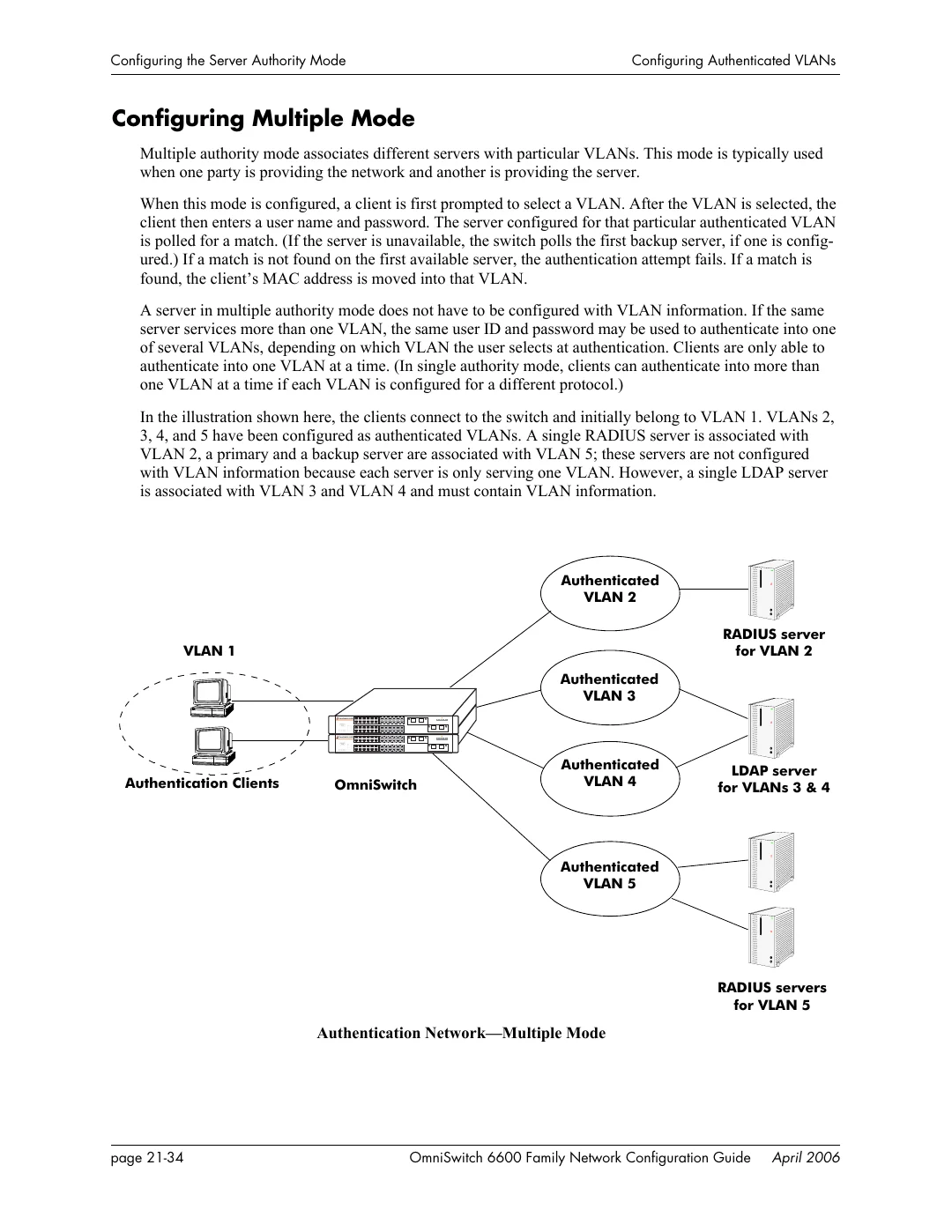
In the illustration shown here, the clients connect to the switch and initially belong to VLAN 1. VLANs 2,
3, 4, and 5 have been configured as authenticated VLANs. A single RADIUS server is associated with
VLAN 2, a primary and a backup server are associated with VLAN 5; these servers are not configured
with VLAN information because each server is only serving one VLAN. However, a single LDAP server
is associated with VLAN 3 and VLAN 4 and must contain VLAN information.
OmniSwitch
RADIUS servers
for VLAN 5
Authentication Network—Multiple Mode
RADIUS server
for VLAN 2
LDAP server
for VLANs 3 & 4
Authentication Clients
VLAN 1
Authenticated
VLAN 3
Authenticated
VLAN 2
Authenticated
VLAN 4
Authenticated
VLAN 5
OmniSwitch 6648
OmniSwitch 6648