TH-C90
Important for Laser Products
XV-THC90/XV-THC60
Table of contents
Supplied accessories
Safety precautions
Introduction
Important cautions
About discs
Playable disc types
Unplayable discs
Region code of DVD Video
Playable file types
About discs
Description of parts and controls
Front panel center unit
Rear panel center unit
Display window
Description of parts and controls Powered subwoofer
Setting the Voltage Selector
Operating the system from the remote control
Description of parts and controls Remote control
Putting batteries in the remote control
Connecting the FM and AM antennas
Connections
AM loop antenna
FM antenna
Connections
Assembling the front speakers TH-C90
Assembling the front and surround speakers TH-C60
Connecting the center speaker TH-C60
When assembling a speaker without stand
Connecting the satellite speakers to the subwoofer TH-C90
Precautions for daily use
Before connecting the speaker cords
Twist and pull the insulation coat off and remove
Connecting a TV
Speaker layout
Jacks
To connect a TV equipped with the component video input
Connecting the powered subwoofer
Connecting to an analog component
Connecting a cassette recorder Only for TH-C90
Connecting to a digital component
SP-PWC90
Operating external components with the remote control
Operating the TV
Press Enter
Release F TV
Operating the DBS tuner or Catv converter
Operating the VCR
Manufacturer’s code 2 digits
Release F VCR/DBS
Basic operations
Turning the system on/off
Press Faudio
Press F
Adjusting the volume Volume
Adjusting the brightness of the indications Dimmer
Selecting the source to play
Turning off the sound temporarily Muting
Changing the scan mode
Sleep Timer Sleep
Adjusting the sound
Playback
Basic playback
Playback
On-screen guide icons
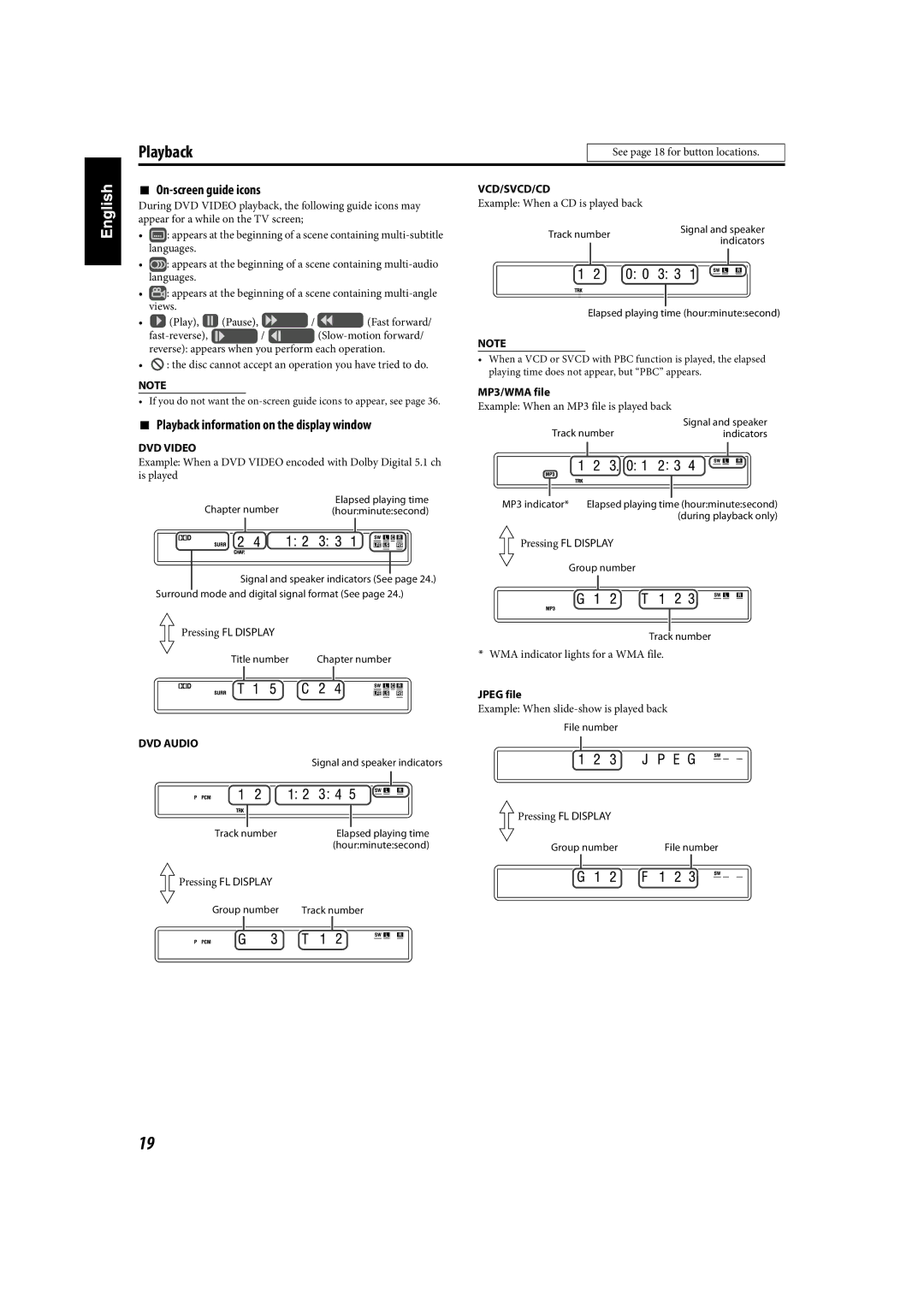
Playback information on the display window
MP3/WMA file
One Touch Replay
Press y or
Press and hold x or
Disc information on the display window
Skip to the beginning of a desired selection
Skipping at about 5-minute intervals
About the play mode on a DVD VR disc
Playing back a bonus group
Select the bonus group
Press Cursor Y/5 to select the desired Title/playlist
Using the surround mode
Advanced operations
Auto Surround Auto SUR
Dolby Surround
Using the on-screen bar
Selecting the surround mode
Advanced operations
Showing the on-screen bar
Changing the time information
Press on Screen twice
Press Cursor 3/2 to highlight
Desired information
Locating a desired scene using a VCD/SVCD menu with PBC
Locating a desired chapter/track using the on- screen bar
Using the file control display
To cancel a misentry
Locating a desired position by specifying the time
Beginning of the disc
Selecting the subtitle
Resume Playback
Selecting a view angle
Selecting the audio
Special picture playback
Frame-by-frame playback
Playing back in slow-motion
Zooming
Changing the VFP setting
Selecting browsable still picture recorded on DVD Audio
Press Play Mode
Program Playback
Press 3 play button
Repeatedly until program
Random Playback
Repeat Playback
Repeating the current selection or all discs
Press Repeat
Setting the sound balance
Tray lock
Repeating a desired part A-B Repeat
On the center unit only
Menu description
Setting DVD preferences
Using the setup menus
Audio menu Audio
Setting DVD preferences Picture menu Picture
Speaker setting menu SPK. Setting
Setting the AM tuner interval spacing
Manual tuning
Setting DVD preferences
Other setting menu Others
Preset tuning
Selecting the FM reception mode
Reducing the noise of AM broadcast
Tuner operations
Karaoke operations
Basic Karaoke operations
Reserving songs
Selecting audio
Karaoke operations
Selecting audio channels Audio
Adding an echo effect to your voice
Shifting the pitch of the playback sound
Maintenance
Troubleshooting
Cleaning the system
References
Specifications
References
Satellite Speakers SP-XTHC20
Satellite Speakers SP-XTHC90
Satellite Speakers SP-XTHC60
Mains AC Line Instruction

 : appears at the beginning of a scene containing
 : appears at the beginning of a scene containing
 : appears at the beginning of a scene containing
 (Play),
 (Pause),
 /
 (Fast forward/
 /

 : the disc cannot accept an operation you have tried to do.