5813
Lanier Worldwide, Inc. September
⇒ P.229 Power Connection
Means Power ON. c means Stand by
Page
Safety Information
Safety During Operation
Iii
Energy Star Program
Specification
Recycled Paper
How to Read this Manual
Symbols
Preparation
Limitation
Table of Contents
101
116
121
Viii
125
128
130
131
181
182
187
189
233
235
239
240
Xii
Page
What You Can Do with This Machine
Page
Guide to Components
Main power switch
Stopper
Copy tray
Ventilation hole
Options
Operation Panel
Clear/Stop key
Start key
Number keys
Touch panel display
Using the Touch Panel Display
Selecting Functions
Manual Auto Paper Select key
Entering Numbers
Checking the functions you have selected
Check Modes key
Color Sample Chart
Page
Turning On the Power
Turn on the Main Power
Power Switches
Operation switch right side of the operation panel
When the machine is set for user codes
When the Energy Saver indicator is lit
Press the operation switch to make the On indicator go on
Starting the Machine
Turning off the main power
Press the operation switch to make the On indicator go off
Turn off the main power switch
Shutting down the machine
When you place originals on the exposure glass
When you load originals in the document feeder
Originals
Recommended Originals
Non-recommended Originals for the Document Feeder
Placing Originals on the Exposure Glass
Lower the platen cover or the document feeder
Adjust the guide to the original size
Loading a Stack of Originals Document Feeder
Basics
Loading one Original at a Time in the Document Feeder
Press the Start key
Basics
Loading Originals of Different Sizes in the Document Feeder
Placing Custom Sized Originals
Select the copy paper size
Press the Custom Size Orig. key
Placing Custom Sized Originals
Removing the Platen Cover to Copy a Large Original
Basic Procedure
Enter the number of copies required with the number keys
Adjusting Copy Image Density
Auto image density
Press the Auto Image Density key
Manual image density
Combined auto and manual image density
Selecting a Color Mode
Auto color select mode
Full color copy mode
Black & White copy mode
Single color mode
Press the Black & White key
Press the Single Color key
User colors
Press the User Color key Select the color
Scanned color
Place your original, and then press the Scanned Color key
Twin Color Mode
Color Copy
Red & Black
Twin Color Color Copy
Twin Color Red & Black Copy
Auto original type select mode
Text/Photo mode
Selecting the Original Image Type
Text mode
Make sure that the Text / Photo key is selected
Photo mode
Special original mode
Press the Special Original key
Selecting the Copy Paper Size
Auto paper select
Make sure that the Auto Paper Select key is selected
Manual paper select
Image Rotation
Select the copy paper
Copying from the Bypass Tray
Copied onto. ⇒ P.49 Copying onto the reverse side of paper
Copying onto standard size paper with the bypass tray
Open the bypass tray
Press the Normal, Thick, Extra Thick, or OHP key
Copying
Copying onto custom size paper with the bypass tray
Press the Custom Size key
Select Custom1, Custom2, Custom3 or Enter Size keys
Copying
Making A3, 11 ⋅ 17 full bleed copies
Left guide
Copying onto the reverse side of paper
Press the OK key Adjust the paper guides to the paper size
Open the bypass tray Insert the paper into the bypass tray
Press the Normal, Thick or Extra Thick key
Press the Duplex Back key
Auto Reduce/Enlarge
Press the Auto Reduce/Enlarge key
Energy Saver Mode
Auto Off Mode
Press the Energy Saver key to enter the Energy Saver mode
Interrupt Copying
Auto Start
Recall
Storing your settings
Program
Recalling your settings
Press the Program key
Check Modes
Counter
Preset R/E
Make sure that the Preset R/E / Zoom key is selected
Reduce/Enlarge
Reducing
Enlarging
Using the and + keys
Zoom
Using the number keys
Size Magnification
Enter the reproduction ratio with the number keys
Place your originals, and then press the Start key
Directional Magnification %
Horizontal % Vertical %
Press the Reduce/Enlarge key Press the Directional Mag. key
Directional Size Magnification inch
C D
Poster Mode
Using the Number of Pages key
Using the Direct. Mag. % key
Press the Poster Mode key
Press the Direct. Mag. % key
Enter the ratio
Duplex
Sided → 2 Sided
Press the Duplex/Combine key
Press the 1 Sided → 2 Sided key
Press the Duplex/Combine key Press the 2 Sided → 2 Sided key
Book → 2 Sided
Multi → 2 Sided
Original Copy Paper
Series Copies
Book → 1 Sided
Series Copies
Sided → 1 Sided
Setting Originals Originals set in the document feeder
Combine
Combine 2 Originals
Press the Duplex/Combine key
Combine 4 Originals
Shifting the Image
Shift
Press the Shift/Book key Press the Shift key
Margin Adjustment
Select the direction in which you want to shift the image
Press the Margin Adjustment key
Press the Shift/Book key
Shifting the Image
Erase
Center Erase Border Erase
⇒ P.121 Combination Chart
Center/Border Erase
You can adjust the width in the range of 3 50mm, 0.1
When you use front cover mode with 1 Sided → 1 Sided mode
Cover Sheet
Front Cover
Copying
Front & Back Cover
Back Cover Copy
Back Cover Blank
Sided mode
Press the Front&Back Cover key
Cover Sheet
Color Creation
Color Conversion
Press the Color Creation key
Press the Color Conversion key
Color Erase
Press the Color Erase key
Color Background
Press the Color Background key
Select the color for background
Type Mask
Press the Background key
100
Press the Text key and select the color for the text
Image Creation
Outline Image
101
Press the Image Creation key Press the Outline Image key
Shadow Image
102
Offset Block
Same color shadow
103
Press the Image Creation key Press the Shadow Image key
Select color shadow
104
Press the Block or Offset key
105
Press the Shadow Color / Density key
Select the color, and then press the OK key
Slanted Image
106
Press the Image Creation key Press the Slanted Image key
Adjust the angle by pressing the arrow keys
107
Mirror Image
108
Press the Image Creation key
Repeat Image
109
Press the Mirror Image key
When using the D.Size Mag.inch key
110
When using the Number of Images key
111
Press the Image Creation key Press the Repeat Image key
When using the Editor Area key
112
Press the Number of Images key
113
Diagonally mark opposite corners of area to be repeated
Press the OK key Press the Start key
Positive/Negative
114
115
Press the Positive/Negative key
Finishing
Sort
116
Stack
117
Staple
118
119
Having copies stapled automatically after copying
Stapling copies manually after copying
120
Combination Chart
121
122
123
124
What is Image Overlay?
125
Press the Image Overlay key
126
Press the Confirm Selection key
Make any adjustments you require
127
Color/Image Adjustment
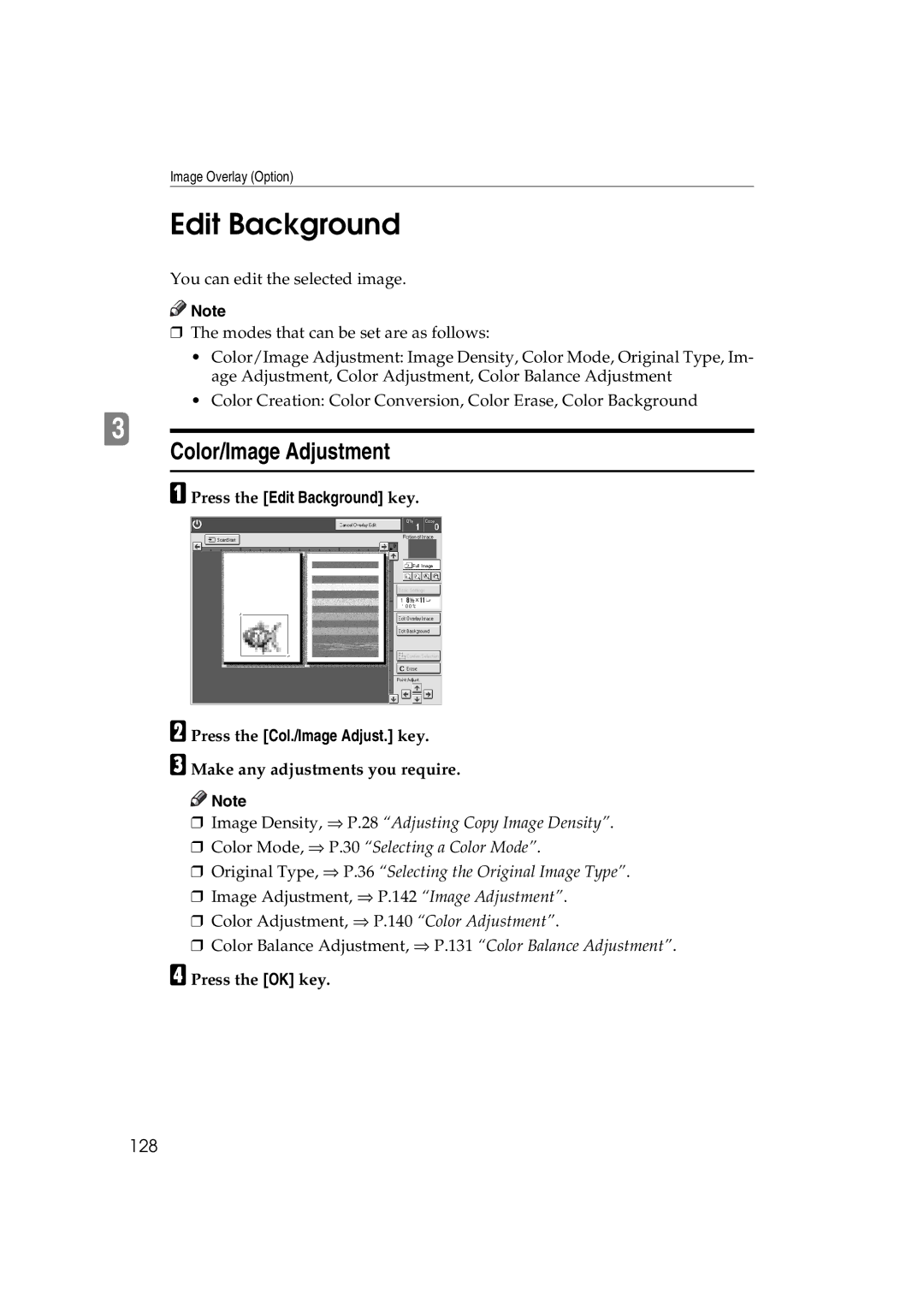
Edit Background
128
Color Creation
129
Press the Edit Background key Press the Color Creation key
Basic Settings
Press the Basic Settings key
130
Color Balance Adjustment
Press the Adjustment/Memory key
Color Balance
131
Storing the adjusted color balance
Press the Program key Select a number for this setting
Color Balance Program
132
Recalling the color balance
133
Make sure that the Color Balance Adj. key is selected
Color Balance Sample
134
Sampled area
Make sure the Color Balance Adj. key is selected
135
Press the Color Balance Sample key
Selecting the sampled area
136
Selected position Sampled area
137
138
Press the Sample Area Selection key
139
Press the Print Start key
Color Adjustment
140
141
Image Adjustment
142
Adjust the settings
Soft/Sharp, Contrast, Background Density, and Pastel
143
144
Adjusting Colors Based on the Selected Color
Program User Color
145
146
Mixing Colors Manually with the Number Keys
147
Select the number that you want to store the user color
148
Sampling the User Colors
149
150
What is Area Editing?
151
How to Edit Areas
152
Press the Area Editing key
Designating Areas
153
Designate Area Display
154
Designate Area Tools
155
Area Shapes
Rectangle
156
Right Angle Polygon and Polygon
157
Press the Area Editing key Press the R.A. Polygon or
Mark the next points
Closed Loop
Multi-Closed Loop
158
Press the Closed Loop key
159
Frame/Line
Rectangle frame
Right Angle Polygon frame and Polygon frame
160
Line
161
Press the Right Angle Polygon key or the Polygon key
Press the Line key Mark the first point with the editor pen
162
163
164
Selecting Modes for Designated Areas
165
166
Original Type ⇒ P.36 Selecting the Original Image Type
Area Editing
Basic modes
167
Delete Area
168
Designated area
Save Area
169
Editing color and widths
170
Selecting Modes for Outside Designated Areas
171
172
Save Area
173
Changing Basic Settings for the Entire Image
174
Designated area Area that will be shifted
Change the job settings Press the OK key
175
Checking and Changing Areas
Change Modes
176
Press the Confirm Areas key
Press the Change Setting key
177
Change the modes, and then press the OK key
Press the Previous key
Adding Areas
178
Select an area that you want to cancel
Erasing an Area
179
Press the Delete Area key. Press the Yes key
Select a group that you want to cancel
Erasing a Group
Press the Delete Group key. Press the Yes key
Press the Cancel Editing key
Exiting Area Editing
181
Press the Yes key
Combination Chart for Area Editing
182
Combination Chart for Area Editing
183
184
185
186
If Your Machine Does not Operate as You Want
187
Troubleshooting
188
If You Cannot Make Copies as You Want
189
190
Justment
Image Adjustment
191
Loading Paper
Non-recommended Paper for Paper Trays
192
Loading Paper in the Paper Tray
193
Loading Paper in the Large Capacity Tray
194
Press the Down key if it is not lit
195
Place the paper in the tray along the edge on the left
Close the top cover
Changing The Toner Cartridge
196
197
Clearing Misfeeds
Check the Misfeed Location Display
198
Clearing Paper Misfeeds
199
When P is Displayed
200
Adding Staples
201
202
Removing Jammed Staples
203
204
205
206
Changing Paper Size
1st Tray Paper Size
207
208
2nd and 3rd Tray Paper Size
Changing Paper Size with the User Tools
209
Press the System Settings key
210
Accessing the User Tools
Press the System Settings or Copier Features key
User Tools
211
Exiting from the User Tools
212
Select the desired user tools menu
System settings
213
214
215
216
# key
General Features
217
Default Press Print
218
219
Select the User Ratio 1 or User Ratio 2 key
220
Program
Change
Clear
Delete All
Reset Counters
Image Adjustment
Counter List Print
222
223
Duplex/ADF/Sorter
Special Mode Programs
224
Auto Color Calibration
225
226
Dos and Donts
227
Where to Put Your Machine
Machine Environment
Optimum environmental conditions
Environments to avoid
Power Connection
Access to Machine
229
Maintaining Your Machine
Exposure Glass
Platen Cover
230
Document Feeder
231
Remarks
Copier
232
Use and Storage of Supplies
Copy Paper
233
Paper Storage
Toner Storage
234
Mainframe
Copy paper capacity
Copying speed Full size Full color 4 colors
Black, Yellow, Magenta, Cyan
Blue Magenta + Cyan, Green Yellow + Cyan
First copy time
Non-reproduction area
Toner replenishment
Warm-up time
Power consumption
Noise Emission *1 Sound power level
Dimensions W ⋅ D ⋅ H up to the exposure glass
Weight
Document Feeder Option
Bin Sorter Stapler Option
241
Paper weight
Large Capacity Tray LCT Option
Paper size
Paper capacity
Multi-access
243
Sample operations
244
Index
245
246
247
T1202-6001


 Note
Note
 Note
Note