Installation and User Manual
2.7Hardwire Connection of Output Power Cable to UPS
◗This type of connection must be carried out by qualified electrical personnel.
◗Before carrying out any connection, check that the battery circuit breaker and the upstream protection device (Normal AC source) is open "0" (off).

 RS-232
| TIO | N: |
CAU |
| |
|
|
| 0V~,2 | 4A |
| ||
|
|
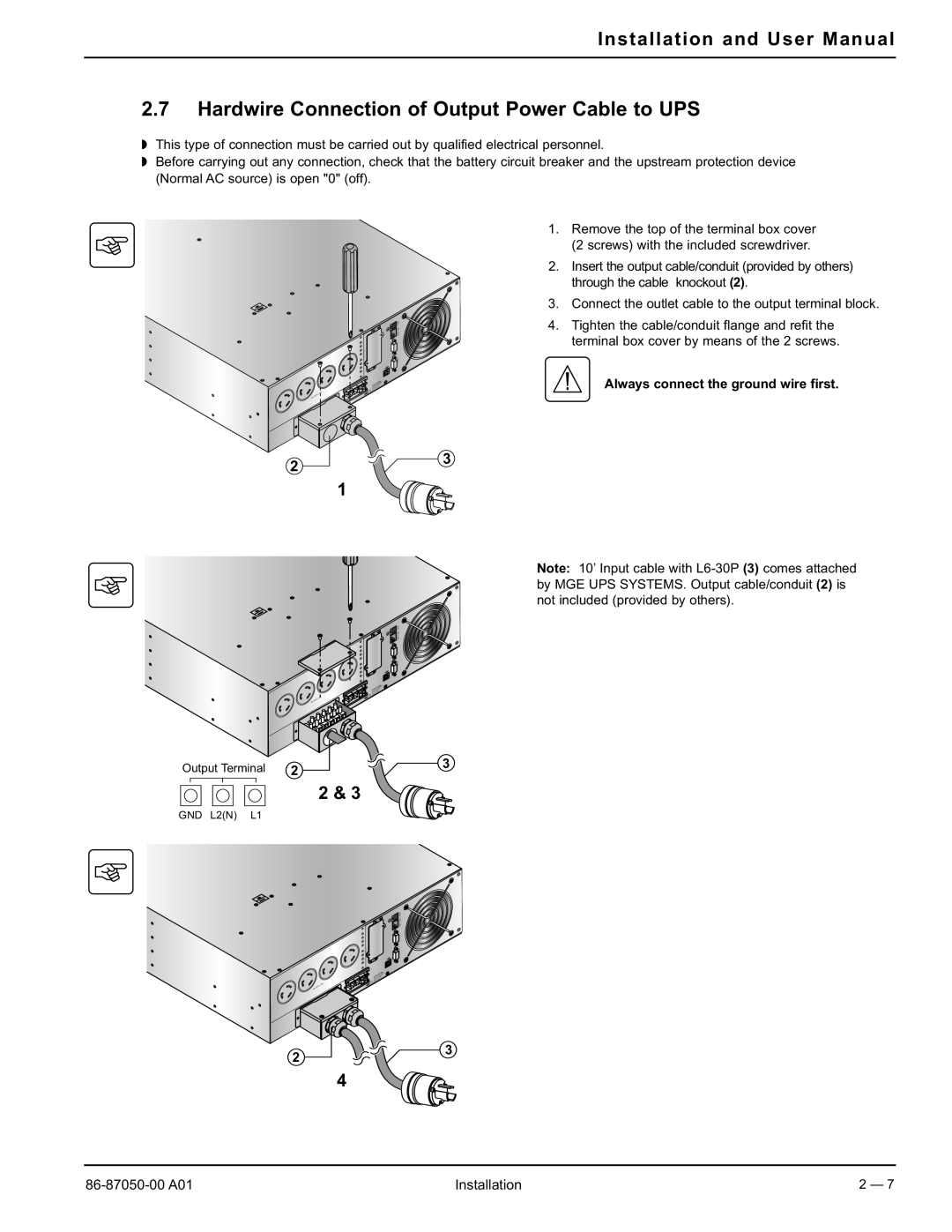
1.Remove the top of the terminal box cover (2 screws) with the included screwdriver.
2.Insert the output cable/conduit (provided by others) through the cable knockout (2).
3.Connect the outlet cable to the output terminal block.
4.Tighten the cable/conduit flange and refit the terminal box cover by means of the 2 screws.
Always connect the ground wire first.
2  3
3
1
0  20
20
Note: 10’ Input cable with


 RS-232
| TIO | N: |
CAU |
| |
|
|
~,24A | |
|
Output Terminal | 2 | 3 |
|
2 & 3
GND L2(N) L1
|
|
|
| BATT.NO. RPO |
|
|
|
| |
|
|
| TIO | N: |
|
| CAU |
|
|
| 0V~,2 | 4A |
|
|
|
|
| ||
|
|
|
|
2 
 3
3
4
Installation | 2 — 7 |