8)EVENT RECORD IPS:
Recording is activated by event (alarm and motion trigger). Select the images per second for event record, The options are as the followings:
NTSC: FRAME: 120, 60, 30, 15 | PAL: FRAME: 100, 50, 25, 12 |
CIF: 480, 240, 120, 60 | CIF: 400, 200, 100, 50 |
9)TIMER RECORD IPS:
Recording is activated by timer schedule. Select the images per second of TIMER RECORD, The options are as the followings:
NTSC: FRAME: 120, 60, 30, 15 | PAL: FRAME: 100, 50, 25, 12 |
CIF: 480, 240, 120, 60 | CIF: 400, 200, 100, 50 |
10)TOTAL IPS SHARE:
There are two IPS settings: (Take 16ch as example)
FIX: IPS per channel = RECORD IPS ÷ 16 channels
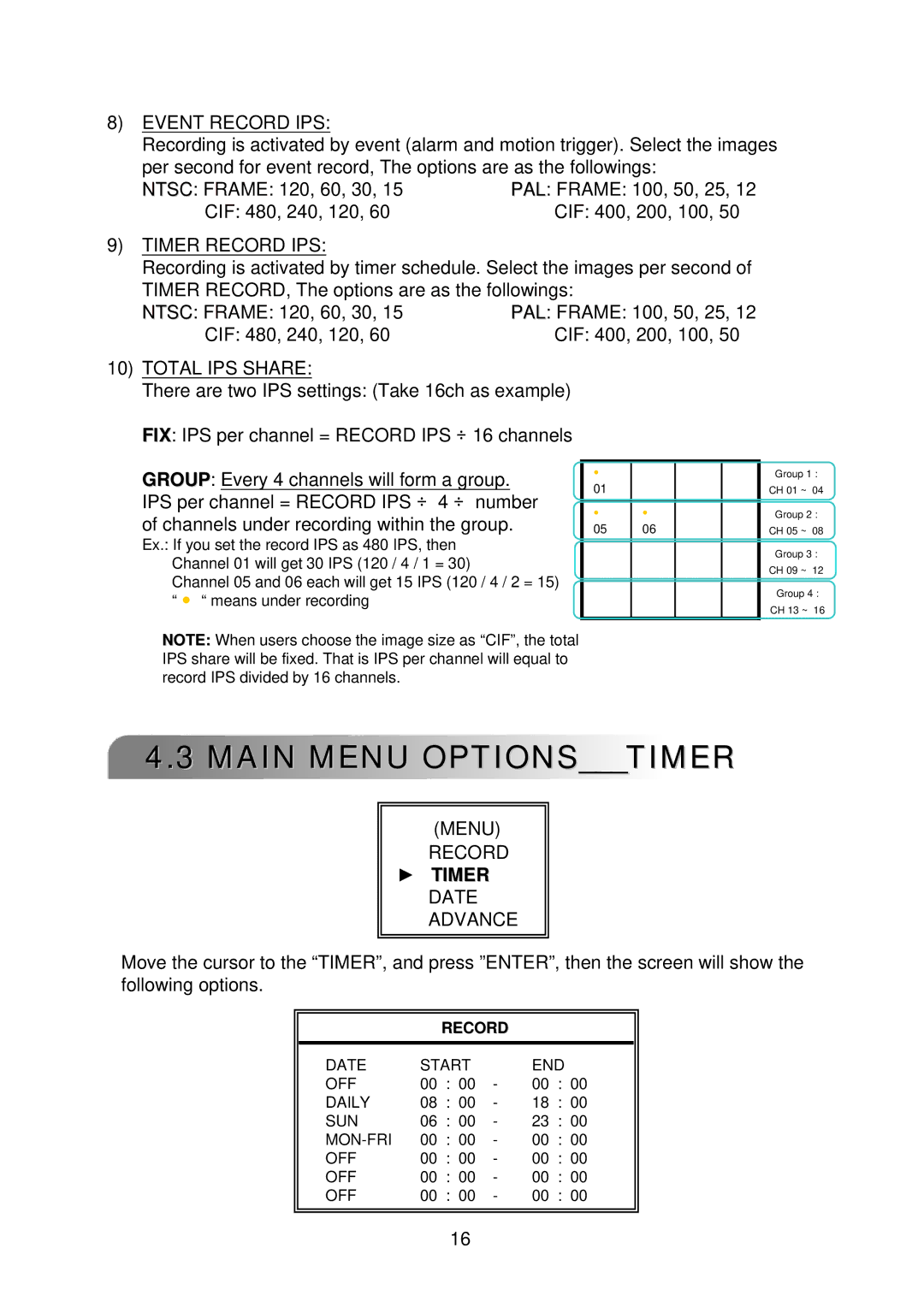
GROUP: Every 4 channels will form a group. IPS per channel = RECORD IPS ÷ 4 ÷ number
of channels under recording within the group.
Ex.: If you set the record IPS as 480 IPS, then Channel 01 will get 30 IPS (120 / 4 / 1 = 30)
Channel 05 and 06 each will get 15 IPS (120 / 4 / 2 = 15) “ ● “ means under recording
NOTE: When users choose the image size as “CIF”, the total IPS share will be fixed. That is IPS per channel will equal to record IPS divided by 16 channels.
● |
|
|
|
01 |
|
|
|
|
|
|
|
● | ● |
|
|
05 | 06 |
|
|
|
|
|
|
|
|
|
|
|
|
|
|
Group 1 :
CH 01 ~ 04
Group 2 :
CH 05 ~ 08
Group 3 :
CH 09 ~ 12
Group 4 :
CH 13 ~ 16
4.3 MAIN MENU OPTIONS___TIMER
(MENU)
RECORD
►TIMER DATE ADVANCE
Move the cursor to the “TIMER”, and press ”ENTER”, then the screen will show the following options.
RECORD
DATE | START |
| END | ||
OFF | 00 | : 00 | - | 00 | : 00 |
DAILY | 08 | : 00 | - | 18 | : 00 |
SUN | 06 | : 00 | - | 23 | : 00 |
00 | : 00 | - | 00 | : 00 | |
OFF | 00 | : 00 | - | 00 | : 00 |
OFF | 00 | : 00 | - | 00 | : 00 |
OFF | 00 | : 00 | - | 00 | : 00 |
16