7 Install the Toner Cartridges
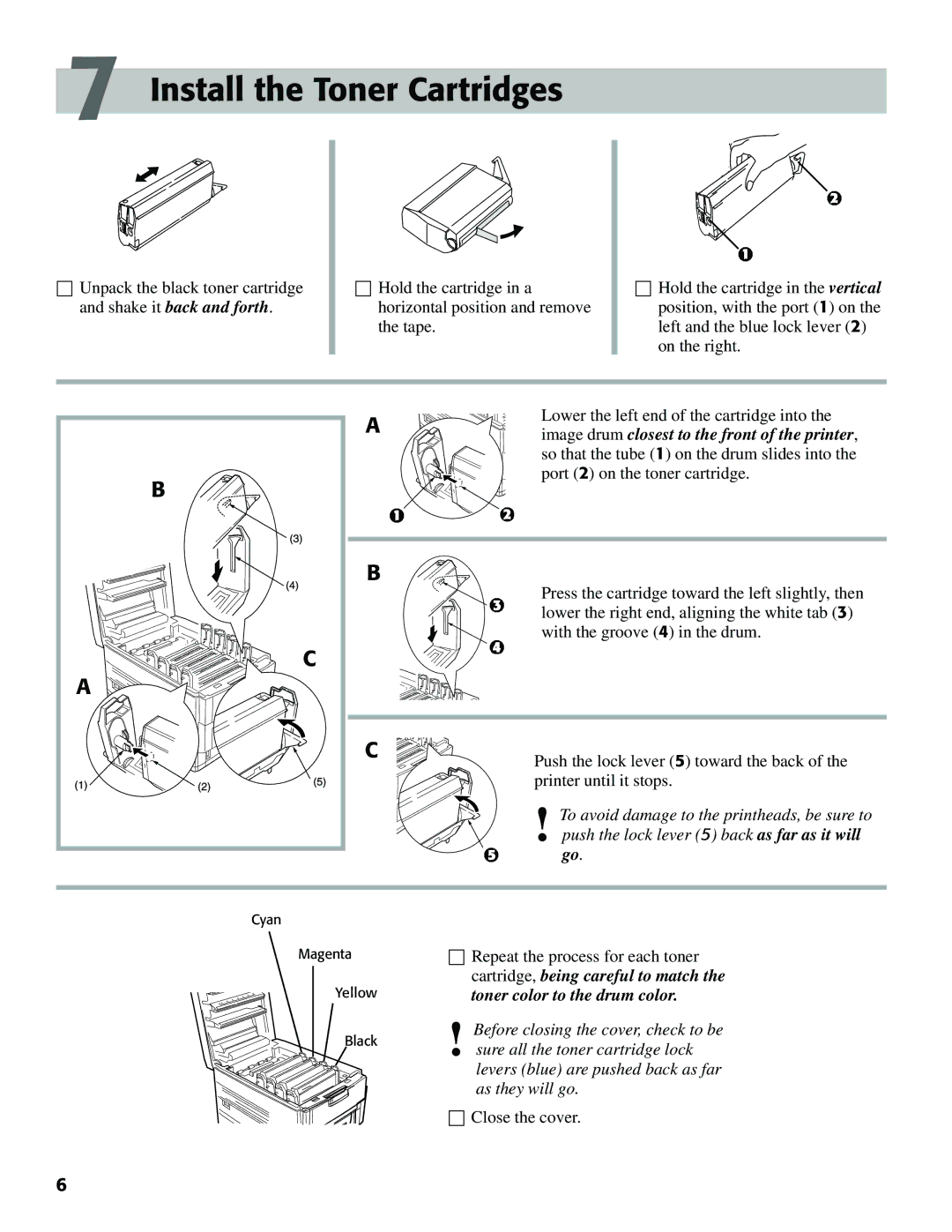
☐Unpack the black toner cartridge and shake it back and forth.
☐Hold the cartridge in a horizontal position and remove the tape.
☐Hold the cartridge in the vertical position, with the port (1) on the left and the blue lock lever (2) on the right.
A | Lower the left end of the cartridge into the | |
image drum closest to the front of the printer, | ||
| ||
| so that the tube (1) on the drum slides into the | |
B | port (2) on the toner cartridge. | |
| ||
B | Press the cartridge toward the left slightly, then | |
| ||
| lower the right end, aligning the white tab (3) | |
| with the groove (4) in the drum. | |
C |
| |
A |
| |
C | Push the lock lever (5) toward the back of the | |
| ||
| printer until it stops. | |
| To avoid damage to the printheads, be sure to | |
| ! push the lock lever (5) back as far as it will | |
| go. | |
Cyan |
| |
Magenta | ☐ Repeat the process for each toner | |
Yellow | cartridge, being careful to match the | |
toner color to the drum color. | ||
Black | Before closing the cover, check to be | |
! sure all the toner cartridge lock | ||
| ||
| levers (blue) are pushed back as far | |
| as they will go. | |
| ☐ Close the cover. | |
6 |
|