Night Mode, Remote Control Settings 59
Night Mode
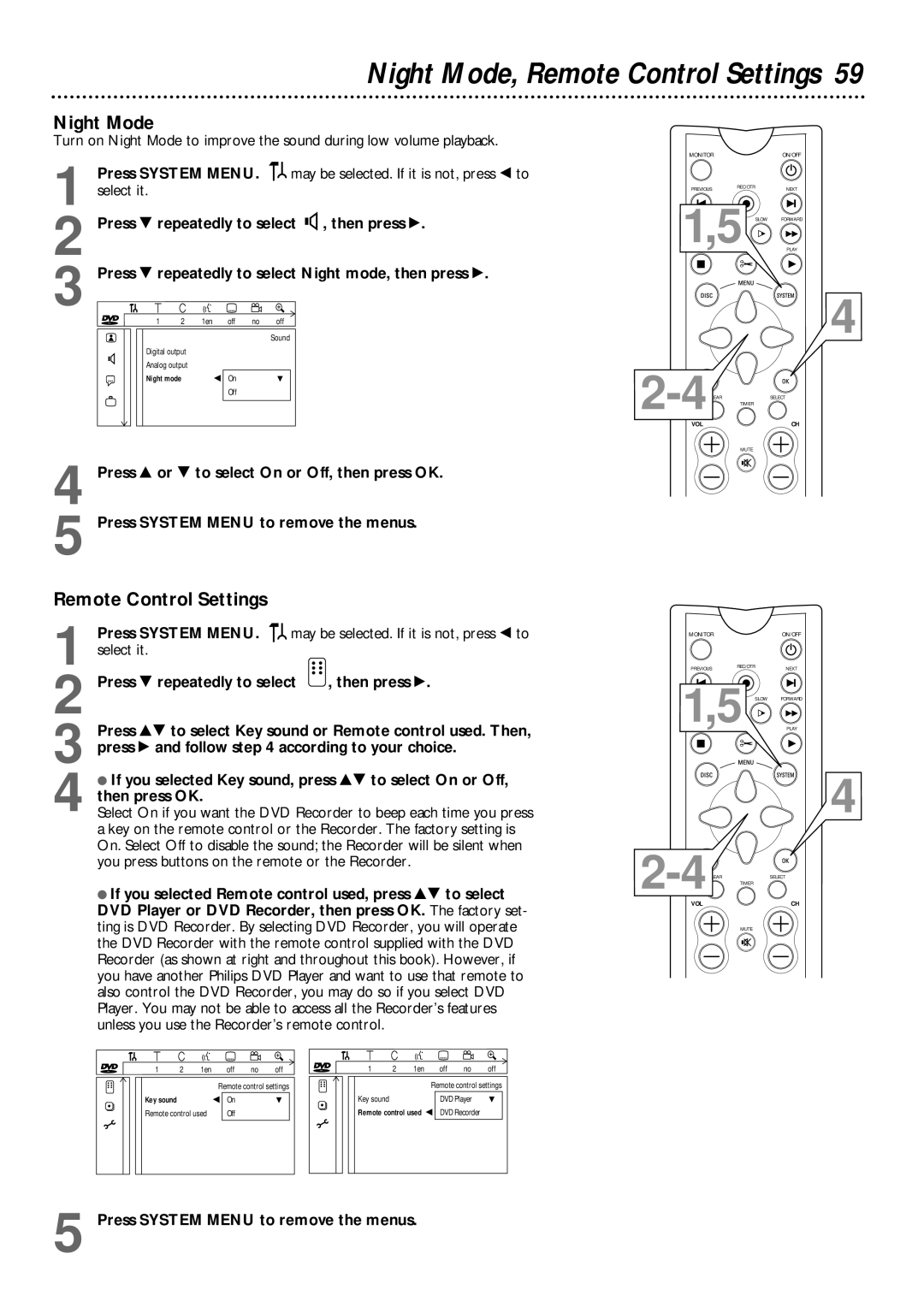
Turn on Night Mode to improve the sound during low volume playback.
MONITOR | ON/OFF |
1
2
3
4
5
Press SYSTEM MENU. 
 may be selected. If it is not, press ; to select it.
Press 9 repeatedly to select G, then press :.
Press 9 repeatedly to select Night mode, then press :.
| W | X | Y | Z | a |
~ | 1 | 2 | 1en | off no | off |
|
|
| Sound |
G | Digital output |
|
|
Analog output |
|
| |
|
|
| |
r | Night mode | s On | L |
| Off |
| |
|
|
|
Press 8 or 9 to select On or Off, then press OK.
Press SYSTEM MENU to remove the menus.
PREVIOUSREC/OTRNEXT
1,5 SLOW FORWARD
PLAY
4
VOL | CH |
MUTE
Remote Control Settings
1
2
3
4
Press SYSTEM MENU. 
 may be selected. If it is not, press ; to select it.
Press 9 repeatedly to select  , then press :.
Press 89 to select Key sound or Remote control used. Then, press : and follow step 4 according to your choice.
●If you selected Key sound, press 89 to select On or Off, then press OK.
Select On if you want the DVD Recorder to beep each time you press a key on the remote control or the Recorder. The factory setting is On. Select Off to disable the sound; the Recorder will be silent when you press buttons on the remote or the Recorder.
●If you selected Remote control used, press 89 to select DVD Player or DVD Recorder, then press OK. The factory set- ting is DVD Recorder. By selecting DVD Recorder, you will operate the DVD Recorder with the remote control supplied with the DVD Recorder (as shown at right and throughout this book). However, if you have another Philips DVD Player and want to use that remote to also control the DVD Recorder, you may do so if you select DVD Player. You may not be able to access all the Recorder’s features unless you use the Recorder’s remote control.
MONITOR | ON/OFF |
PREVIOUSREC/OTRNEXT
1,5 SLOW FORWARD
PLAY
4
VOL | CH |
MUTE
| W | X | Y | Z | a |
|
~ | 1 | 2 | 1en | off no | off | ~ |
|
|
|
| Remote control settings |
| |
| Key sound |
|
| s On | L |
|
| Remote control used | Off |
|
| ||
W X Y Z  a
a
1 | 2 | 1en | off | no | off |
|
|
| Remote control settings | ||
Key sound |
|
| DVD Player | L | |
Remote control used | s DVD Recorder |
| |||