AR-FX13
Telecommunication Line cable
Important safety information
Page
Table of Contents
TWO-SIDED Reception AR-M201 only
HOW to USE the FAX Function
Memory transmission mode Direct transmission mode
Using the Rspf p.51 Using the document glass p.52
Quick Reference Guide
Sending a fax
Dialing methods
To set up a timer transmission, see Timer Operations p.78
Selecting the reception mode
Sending a fax to multiple destinations Broadcasting p.70
Storing a fax job while another job is in progress
List of FAX Functions
Menu item Settings factory default setting appears in bold
SEC
Hour
Auto
M. Mode
Press the Mode Select key to select fax mode
Selecting Settings for the Function
Select a setting or enter information
Press the Menu key
Connecting the Telephone Line Cord
Connections
For other countries
Final Preparations
Connecting Other Devices
Online Manual on the CD-ROM
Comments
Rspf Option
Part Names
Bypass tray
Following illustration shows the part names of the AR-FX13
Reception Mode key
Memory key / indicator
Resolution key
Shift key / indicator
Mode Select key / Mode indicators
Line Status indicator
Rspf indicator
Error indicator
Adjusting the Beep Volume
Using the Arrow Keys
Example
Pressed, the item is selected or entered
18RINGER Volume
Adjusting the Ringing Volume
Press the key or key to set the ringer volume
Press the Menu key Press the OK key
Selections are as follows 13SEC
17BEEP Length
Press the key or key to set the alarm volume
19BEEPER Volume
HOW to Enter Characters
FAX Setup
2ENTRY Mode
Entering Your Name and FAX Number
3OWN Passcode SET
Press the OK key Press the Menu key
Setting the Date and Time
2DATE&TIME SET
Ange Datum 2008- 02/01/2008
1TIME Format
21DATE&TIME Format
Press the key or key to select 112HOUR or 224HOUR
Selection Exit
Selections are as follows 1MMDDYYYY 2DDMMYYYY 3YYYYMMDD
2DATE Format
Follow these steps to enable Daylight Saving Time
Daylight Saving Time Setting
5DAY Light Saving
Press the key or key to select 1ON or 2OFF
Memory transmission the Memory indicator is lit
Selecting the Transmission Mode
Direct transmission the Memory indicator is off
Transmission takes place as follows in each mode
Selecting the Reception Mode
# of Rings Auto
Setting the Number of Rings for Auto Reception
Press a numeric key to select the number of rings
Select the number of rings you would like to use 0 to
Selecting the Reception Paper Size
# of Rings Manual
Select the number Rings you would like to Use 0 to
Setting the Tray Selection
24TRAY Selection
Press the key or key to select the tray selection
When the line is busy
Setting the Number of Recall Times
8RECALL Times Busy
Press the Menu key to Exit
9RECALL Times ERR
When a communication error occurs
10RECALL INT. Busy
Setting the Recall Interval
Press the numeric keys to select the recall interval
Selected
Enter the recall interval 00 to
11RECALL INT. ERR
20INDEX Print
Setting the Index Function
Press the key or key to select the transmission resolution
Setting Resolution Priority
3RESO. Priority
Selections are as follows 1STANDARD
Setting UP the Machine for USE with a PC Modem
15FAX Signal RCV
Press the Menu key.5 Press the OK key
Using the Remote Reception Function
14REMOTE Reception
Turning on Remote Reception
Setting a Fax Remote Number
13FAX Remote Number
Press a numeric key to enter the Fax Remote Number
PBX Setting
PBX setting
22PBX Setting
Storing numbers
Storing Numbers for Automatic Dialing
1FAX Number
Enter the fax number with the numeric keys
Enter the name of the destination with the numeric keys
Press the key or key to select a Chain Dial setting
2CLEAR
Use the following procedure to clear numbers
Return to to clear Another number
Press the Menu key a number of times until you exit
Storing Numbers Under Group Keys
3GROUP KEY
Enter the numbers that you wish to store in the Group Key
Enter a name for the Group Key with the numeric keys
Numeric keys as Described in HOW to
Return to to program another Group key
To exit, press the key or key to select 2END
Enter the numbers that you wish to delete
2END
Deleting numbers from Group Keys
To 10. setting 00 turns 2 off Quiet Detect Time
Using the Machine with AN Answering Machine
Quiet Detect Time
1QUIET Detect Time
Answering Machine Backup
If Quiet Detect Time is not working properly
2AUTO Receive
When using the Rspf
Size and Weight
When using the document glass
Originals Suitable for Faxing
Unsuitable Originals
Sending Originals
Setting the Original
Press the # key
Gently close the Rspf
Original Size
Optional Transmission Settings
1DOC. Glass Size
Press the key or key to select the original size
Contrast
Resolution
Press the Cover Sheet key Press the OK key
Cover Sheet
1COVER Sheet SET
One of five messages can also be added to the cover sheet
2TX Message SET
Message Function
Press the key or key to select a message
If you do not wish to add a message, select 1NO Message
To cancel this function, select OFF
Press the 2-SIDED TX key until the desired setting appears
TWO-SIDED Original Transmission Function
Place the originals in the Rspf
Direct Keypad Dialing
Dialing and Transmitting
Rapid KEY Dialing
Speed Dialing
To adjust the volume, press the left and key or key
Normal Dialing Using the Speaker KEY
Chain Dialing
Dial the fax number of the receiving machine
Using the Search KEY
Redialing
Press the REDIAL/PAUSE key Press the Start key
Canceling Deleting a Stored FAX JOB
If the Memory Becomes Full While Scanning AN Original
3MEMORY Status
Using MAN. Mode
Using Auto Mode
Using A.M. Mode
Receiving Faxes
Sided RX Press the key or key to select 1ON or 2OFF
Optional Reception Settings
16RCV Reduce
Receive Reduce
When Using Manual Sending and Receiving
Substitute Reception into Memory
Memory
0RX Data Transfer
Data Transfer
2FAX Number
Digits by pressing Numeric keys
1YES
1DATA Transfer
Follow these steps to use the fax transfer function
If not Stored FW.# appears
Transmission Reservation
Adjust the resolution and/or contrast settings if desired
Broadcasting
Press the Broadcast key Press the OK key
Transmission will begin
Press the appropriate Group key. Transmission will begin
Broadcasting using a Group key
Polling
8POLLING Mode
Polling
Follow these steps to use the polling function
9SERIAL Poll Mode
Serial Polling
Follow these steps to use the serial polling function
Setting up polling transmission
7MEMORY Poll Mode
Polling Transmission Memory Polling
Deleting originals from polling memory
Adding a original to polling memory
Press the key or key to select 1ON
Restricting Polling Machines Polling Security
1ON
11SECURITY Select
Programming/deleting passcode numbers
4PASSCODE # Mode
To delete a passcode number
Select 2CLEAR and press the OK key
Timer Operations
1TIMER Mode
Press the key or key to select 1SET
Canceling a Timer Transmission JOB
Anti Junk FAX
5ANTI Junk FAX
1ANTI Junk Select
If you wish to store another fax number, return to step
To store junk fax numbers, use the following procedure
To clear junk fax numbers, use the following procedure
Operation in COPY, PRINTER, SCANNER, and FAX Modes
You can print out a list of group dialing numbers
Printing OUT Reports
Fax numbers designated as Anti Junk Fax numbers
Passcode List
Currently activated User Program settings
Use the following procedure to print out reports
Press the Report key Press the OK key
Activity Report Auto Listing
6AUTO Listing
Press the key or key to select 1ON and press the OK key
7PRINT Selection
Printing Transaction Reports
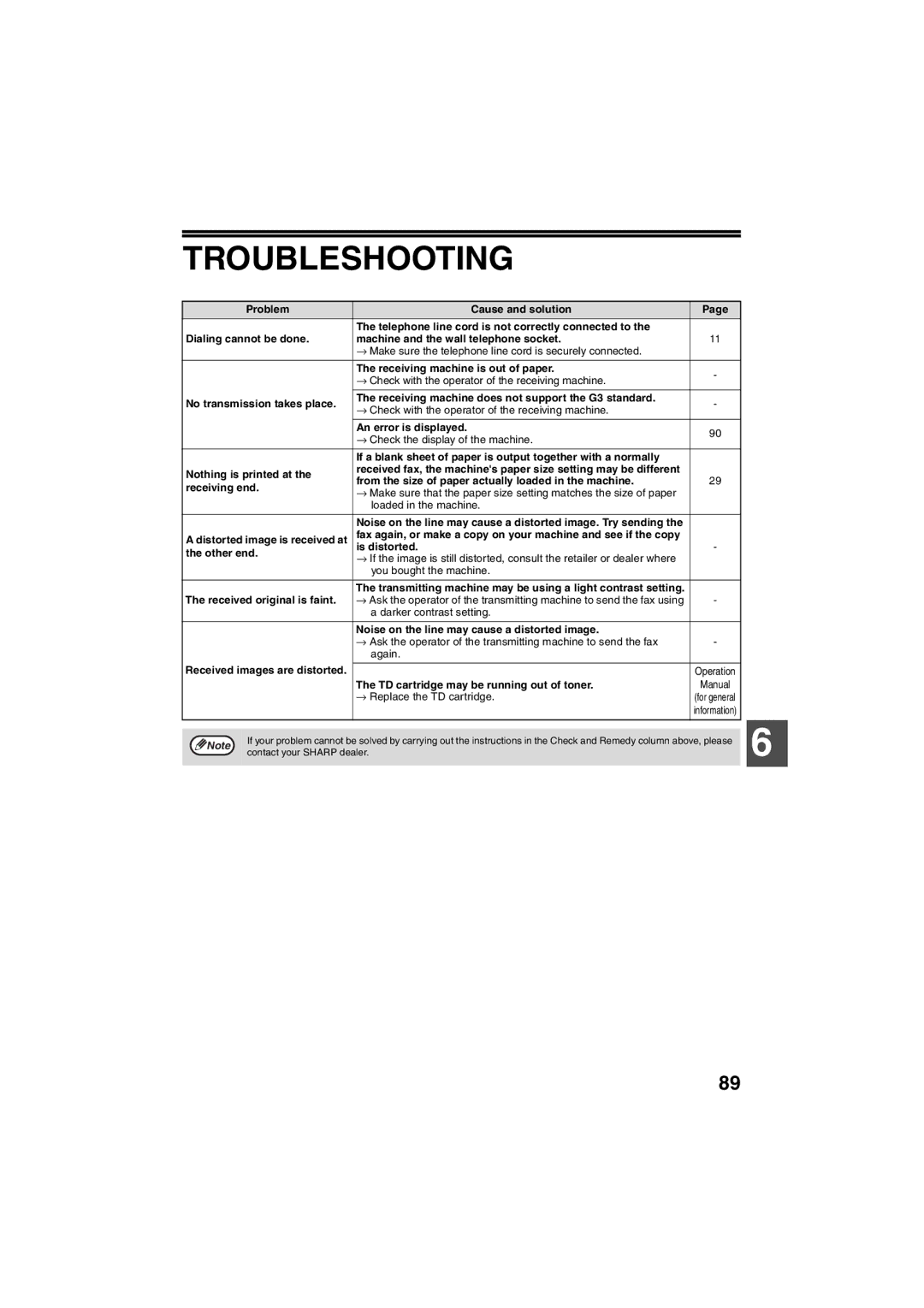
Troubleshooting
Messages and Signals
Audible Signals
Display Messages
Specifications
Index
Transmission mode
Reception mode
Reports
Storing numbers
Storing/settings
Fax setup
Faxes, sending and receiving
Sending originals
Memo
Memo
Memo
AR-FX13v1
Sharp Electronics Europe GmbH