Sending a Fax by Normal Dialing
Sending a Fax by Normal Dialing
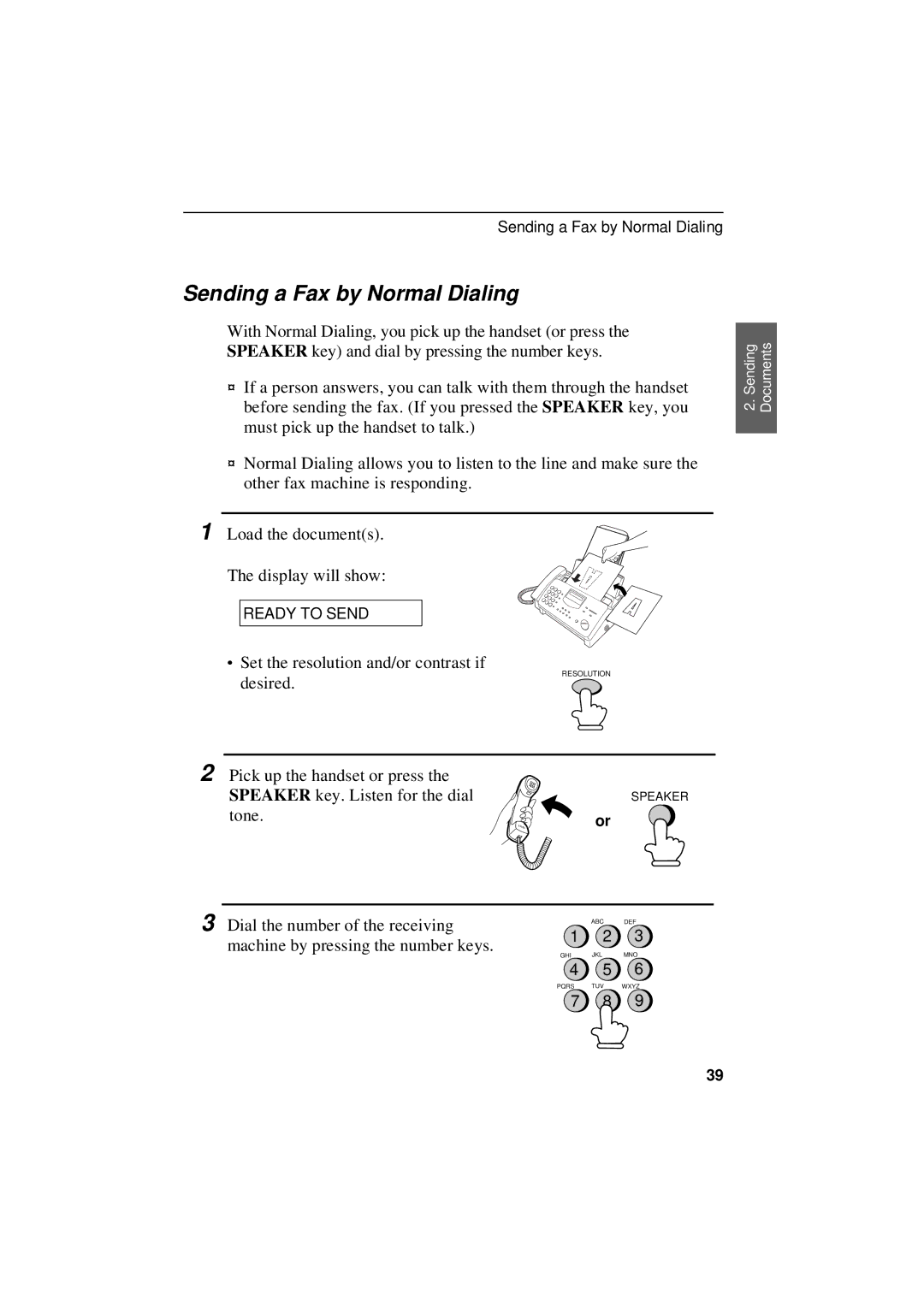
With Normal Dialing, you pick up the handset (or press the SPEAKER key) and dial by pressing the number keys.
♦If a person answers, you can talk with them through the handset before sending the fax. (If you pressed the SPEAKER key, you must pick up the handset to talk.)
♦Normal Dialing allows you to listen to the line and make sure the other fax machine is responding.
1 Load the document(s).
The display will show:
READY TO SEND
∙Set the resolution and/or contrast if
RESOLUTION
desired.
2 Pick up the handset or press the |
|
SPEAKER key. Listen for the dial | SPEAKER |
tone. | or |
|
2. Sending Documents
3 Dial the number of the receiving machine by pressing the number keys.
ABC DEF
1 2 3
GHI JKL MNO
4 5 6
PQRS TUV WXYZ
7 8 9
39