Americas Headquarters
Page
Common Phone Tasks
Button Icons
Contents
Viewing or Removing Conference Participants
Using a Handset, Headset, and Speakerphone
Cisco One-Year Limited Hardware Warranty Terms Index
Getting Started
Using this Guide
If you want to Then
Using External Devices
Safety and Performance Information
Power Outage
Finding Additional Information
Accessibility Features
Cisco Product Security Overview
Connecting Your Phone
Adjusting the Handset Rest Optional
Removing the Hookswitch Clip Required
Adjusting the Footstand Optional
Headset Information
Registering with Taps
Audio Quality Subjective to the User
An Overview of Your Phone
Understanding Buttons and Hardware
Description
Understanding Lines vs. Calls
Understanding Line and Call Icons
Understanding Touchscreen Features
Icon Line or call state Description
Understanding Feature Buttons and Menus,
To choose a
Cleaning and Maintaining the Touchscreen
Choosing Touchscreen Items
Do this
Understanding Feature Buttons and Menus
Accessing the Help System on Your Phone
Understanding Feature Availability
Feature Softkey
Understanding SIP vs. Sccp
For more information
Basic Call Handling
Placing a Call-Basic Options
If you want to Then See
Placing a Call-Additional Options
Corporate
Answering a Call
If you want to Then For more information, see
Answer
Ending a Call
Tip
Or EndCall
Using Hold and Resume
If you want to
Using Mute
Switching Between Multiple Calls
Switching an In-Progress Call to Another Phone
Viewing Multiple Calls
Transferring Calls
Sending a Call to a Voice Message System
Forwarding Calls to Another Number
Press CFwdALL or Forward All
Using Do Not Disturb
Settings on the Web,
User Options Web Pages,
Making Conference Calls
Using Conference Features
Press DND or Do Not Disturb
Using Conference
See Viewing or Removing Conference Participants,
Using Join
Using cBarge
Viewing or Removing Conference Participants
See Using Conference,
Placing or Receiving Intercom Calls
Press ConfList or Conference List
You cannot place an intercom call on hold
Speed Dialing
Web pages. See Accessing Your User Options Web Pages,
Advanced Call Handling
Directory on Your Phone,
Picking Up a Redirected Call on Your Phone
Storing and Retrieving Parked Calls
Understanding Shared Lines
Using a Shared Line
Logging Out of Hunt Groups
Remote-in-Use Icon
Privacy
Using Barge to Add Yourself to a Shared-Line Call
Sharing Call Information and Barging
CBarge and Barge
Using Barge Features
Press Private
Using BLF to Determine a Line State
Making and Receiving Secure Calls
Prioritizing Critical Calls
Tracing Suspicious Calls
Press Mcid or Malicious Call ID
If you Then
See Switching an In-Progress Call to Another Phone,
Using Cisco Extension Mobility
Access Lists for Mobile Connect,
See Answering a Call,
Phone,
See Placing a Call-Additional Options,
User
Using a Handset, Headset, and Speakerphone
Preferences Audio Preferences Wideband Handset. If
Using AutoAnswer
Obtaining a Headset
User Preferences Rings
Changing Phone Settings
Customizing Rings and Message Indicators
Options Web Pages,
User Preferences Viewing Angle
Customizing the Touchscreen
User Preferences Brightness
User Preferences Background Images
Missed Calls, Placed Calls, or Received Calls
Using Call Logs and Directories
Using Call Logs
Press Delete
Tip
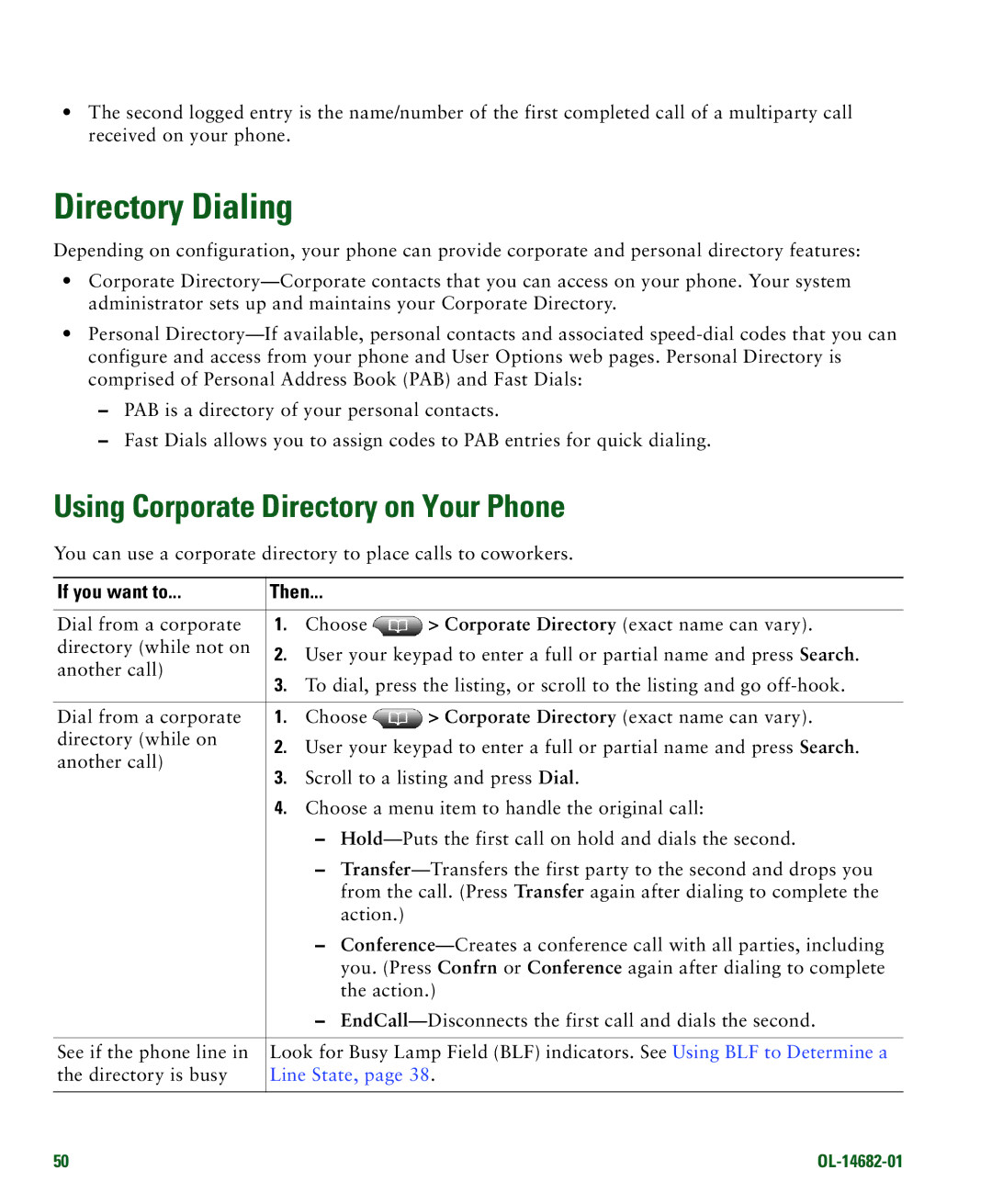
Directory Dialing
Using Corporate Directory on Your Phone
Corporate Directory exact name can vary
Using Personal Directory on Your Phone
Press Fast Dial
Personal Directory Personal Fast Dials
Tips
Accessing Voice Messages
Customizing Rings and Message Indicators,
If you want to Then do this
Using the User Options Web Pages
Accessing Your User Options Web Pages
Options Device
If you want to Then do this after you log
Configuring Features and Services on the Web
Using Personal Directory on the Web
Choose User Options Personal Address Book
Choose User Options Fast Dials
Create a PAB entry. See Using Your Personal Address Book on
Click Add New
Choose User Options Device
Setting Up Speed Dials on the Web
See Configuring Fast Dials on the Web,
Click Speed Dials
Setting Up Phone Services on the Web
Click Phone Services
Click Service URL
Controlling User Settings on the Web
Choose User Options User Settings
Controlling Line Settings on the Web
Click Line Settings
Change the audible
Setting Up Phones and Access Lists for Mobile Connect
Choose User Options Mobility Settings Access Lists
Choose User Options Mobility Settings Remote Destinations
Click Remote Destinations
Using Cisco WebDialer
Network Configuration Host Name
Using a Shared Line,
Understanding Additional Configuration Options
If you Then For more information
See Using Cisco Extension
See Using AutoAnswer,
See Using BLF to Determine a Line
Advanced Call Handling
Symptom Explanation
Troubleshooting Your Phone
General Troubleshooting
See Cleaning and Maintaining
Using the Quality Reporting Tool
Viewing Phone Administration Data
If you are asked to Then
Cisco One-Year Limited Hardware Warranty Terms
Duration of Hardware Warranty
Replacement, Repair, or Refund Policy for Hardware
To Receive a Return Materials Authorization RMA Number
Index
OL-14682-01
FAC 18
PAB
Page
Taps
Page
USA