Page
Languages
Congratulations
LCD Icons
Camera Overview
Top/Front
Bottom/Back
Table of Contents
Regulatory Information
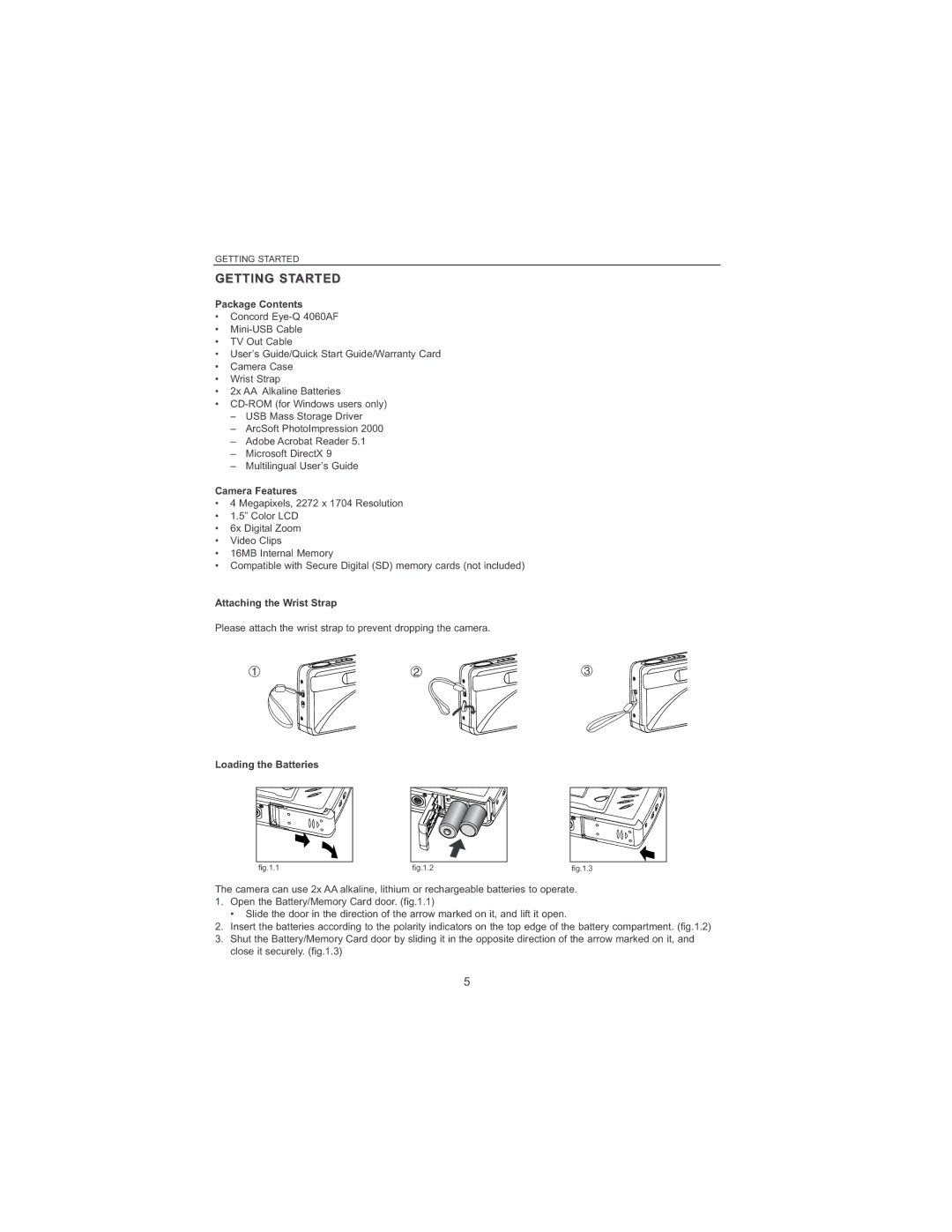
Attaching the Wrist Strap
Package Contents
Camera Features
Getting Started
There are 5 battery levels that are displayed on the LCD
Checking the Battery Level
Turning the Camera on and OFF
Date Format Setting
Setting the LANGUAGE, Date and Time
Setting the Language
Setting the Date
Turning the LCD/ICONS on and OFF
Setting the Time
Time is displayed in hour, minute format Press the joystick
Inserting the Memory Card
Internal MEMORY/INSERTING the Memory Card
Internal Memory
Status Memory in Use
Video Clip Mode
Setting the CAMERA’S Operational Mode
Camera Mode
Review Mode
Taking a picture with the viewfinder
Taking a Picture with the Viewfinder at Distant Mode
Single Shot
Flash Ready LED
To use the focus lock
Taking a Picture with the LCD AT Distant Mode
AUTO-FOCUS Lock
Taking a picture with the LCD
Setting the Flash
Taking a Picture with Digital Zoom
How to use digital zoom
Photography Hints
Using the Main Menu in Camera Mode
Using the Main Menu
Capture Mode Options
Capture Mode Option Description
Setting Macro Mode
SELF-TIMER
Macro Mode CLOSE-UP Shooting
How to use Self-Timer
Continuous Shooting
Image Resolution
Using Continuous shooting
How to change the resolution
White Balance
How to change the quality
How to change the White Balance
Image Quality
Picture lighter
Exposure Compensation Description Mode
How to use Exposure Compensation
Exposure Compensation
How to set the scene selection
Preset Scene Description
Scene Selection
Reviewing Your Files
Taking Video Clips
To record a video clip
Enlarging Stored Pictures
How to review a video clip
How to enlarge
Resolution Maximum Enlargement
Delete File
Using the Delete Menu
Using the Delete Menu in Review mode
Review
Delete All
How to delete all files
Deleting Your Files
Delete One
How to view your files
Using Thumbnail Mode
Review
Customizing the Camera Settings
Sound
Adjust Time Camera
Time Format
Camera Info
Setup Menu and Features Setup Setting Options Description
Using the Setup menu
Setting the Date
Customizing the Camera Settings
Setting the Auto OFF Time
Setting the Language
Adjust Time
Setting the LCD Brightness
Setting the Time
How to set the LCD Brightness
Formatting the Internal Memory or the Memory Card
To restore the default settings in your camera
Restore the Camera to Factory Default Settings
Option Default Status
Macintosh
Software Installation Guide
Installation Requirements
Computer System Requirements Windows
Color
Using the Installer Splash Screen
Option Description
Identifying your operating system
Flow Diagram for Software Installation
System Proceed to
Identifying Your Operating System
Click Next
Installing the Driver and Directx 9 Windows 98/98SE
Install Camera Drivers
Step
Your computer will automatically reboot
Step Click Install
Install progress bar
Next screen will begin the DirectX setup. Click Next
Microsoft DirectX Step
Installing Directx 9- Windows
Installation screen will appear, click on Install
Next screen will begin the DirectX setup
Install ArcSoft PhotoImpression Step
Installing Arcsoft Photoimpression ALL Windows Users
Step Click Next
Step Click Finish
Screen will show the status of the installation
Status bar
Adobe Acrobat Reader Step
Computer later
Installation progress
Selecting a different folder in your computer
Click Next Step
Downloading Pictures and Video Clips onto your computer
Connecting the Camera to the Computer
Downloading Pictures and Video Clips Onto Your Computer
Downloading files from the camera
Windows ME/2000/XP
Using Arcsoft Photoimpression
Unplugging Your Camera from the Computer
Windows 98/98SE
Connecting the Camera to the Television
TV Mode Viewing and Deleting Your Files on TV
Error Messages
Symptom Possible Cause Possible Solution
Troubleshooting
LCD
Viewing Video Clips on the Computer Windows 98/98SE/2000
Camera Information Computer Information
Troubleshooting Section
Website Customer Support/FAQ Before You E-mail or Call us
Getting Help
4MP
Camera Specifications
Battery Life
Cleaning the lens, viewfinder and LCD
Safety Tips and Maintenance
Safety Tips
Cleaning the camera body
Precautions for SD Memory Cards
Precautions for batteries
User Information
Regulatory Information
FCC Information
Tested to comply With FCC standards For Home or Office USE
Felicitations
Icônes DE L’AFFICHAGE À Cristaux Liquides
VUE D’ENSEMBLE DE L’APPAREIL Photo
Vue du haut/devant
Vue du dessous/ derrière
Table DES Matières
104
100
102
103
Fixation de la dragonne
Description ET Préparation DE L’APPAREIL Photo
Contenu de l’emballage
Caractéristiques de l’appareil photo numérique
’écran ACL affiche cinq niveaux de charge des piles
Mise EN Marche ET Arrêt DE L’APPAREIL Photo
Remarque
Vérification de la charge des piles
Sélection DE LA Langue ET Réglage DE LA Date ET DE L’HEURE
Réglage Heure
Réglage de l’heure
Appuyez sur le bouton de navigation
Le réglage désiré Appuyez sur le bouton de navigation
État
Mémoire interne
Insertion de la carte mémoire
Mode Séquence vidéo
Réglage DU Mode DE Fonctionnement DE L’APPAREIL Photo
Mode Fixe
Mode Visualisation
DEL DE Flash
Photo Individuelle
Prise de photo avec le viseur
Pour verrouiller l’auto-focus
Prise DE Photo AU Moyen DE L’ÉCRAN ACL EN Mode Distant
Verrouillage DE L’AUTO-FOCUS
Prise de photo avec l’écran ACL
Réglage DU Flash
Mode flash Description
Comment régler le flash
Comment utiliser le zoom numérique
Prise DE Photo À L’AIDE DU Zoom Numérique
Trucs de photographe
SÉLECT. Scènes Caméra
Utilisation DU Menu Principal EN Mode Fixe
Caméra Résolution
Qualité
Modes DE Prise DE VUE Disponibles
Mode de prise de vue Description
Partir du menu principal
Retardateur
Mode Macro Prise DE VUE EN Gros Plan
Programmation du mode Macro
Prise de photo en mode Macro
Comment prendre des photos en rafale
Résolution DE L’IMAGE
Comment modifier la résolution de l’image
Photos EN Rafale
Comment modifier l’équilibrage des blancs
Qualité DE L’IMAGE
Équilibrage DE Blancs
Comment modifier la qualité de l’image
Deviendront plus pâles et mieux éclairées
Comment utiliser le mode de réglage du temps de pose
Réglage DU Temps DE Pose
Compensation EV Description
Réglage pré-établi en Description
Sélection DU Milieu Ambiant
Comment programmer le choix du milieu ambiant
Visualisation DES Fichiers
Utilisation du mode Visualisation
Utilisation du mode Visualisation
Prise DE Séquences Vidéo
Comment procéder au grossissement
Visualisation DES Fichiers
Visualiser LES Séquences Vidéo
Comment visualiser une séquence vidéo
Supprimer
Mode Visualisation
Utilisation DU Menu DE Supprimer
Utilisation de Supprimer
Suppression de tous les fichiers
Suppression DES Fichiers
Suppression d’un seul fichier
Une fois effacé, un fichier ne peut plus être récupéré
Mode Visualisation
Utilisation DU Mode Vignette
Comment visualiser vos fichiers
Personnalisation DES Réglages DE L’APPAREIL
Formatage Heure
Réglage Heure Caméra
Info APP. Photo
SON
Pour utiliser le menu de configuration
Pour choisir la langue
Personnalisation DES Réglages DE L’APPAREIL Photo
Réglage DU Délai Avant L’ARRÊT Automatique
Choix DE LA Langue
Réglage DE L’HEURE
Réglage DE Luminosité Écran
Réglage la luminosité dACL
Formatage DE LA Mémoire Interne OU LA Carte Mémoire
Caméra Configuration
Option Réglage PAR Défaut
Afin de rétablir les réglages par défaut de votre appareil
Système Windows Macintosh
Guide D’INSTALLATION DE Logiciels
Configuration nécessaire Windows
Exigences relatives à l’installation
Appareil photo
Utilisation DE L’ÉCRAN Fugitif DE L’INSTALLATEUR
Couleur
Ordinateur
Windows 98/98SE p.95
Ordinogramme DE L’INSTALLATION DES Logiciels
Système Rendez vous à
Identification DE Votre Système D’EXPLOITATION
Installation des pilotes de la caméra
Installation DU Pilote ET DE Directx 9 Windows 98/98SE
Étape
Installez la barre de progression
Cliquez sur Installer
’écran d’installation sera affiché, cliquez sur
Installation DE Directx 9 Windows
Installation de Microsoft DirectX Étape
Cliquez sur Yes
Installation de ArcSoft PhotoImpression Étape
Cliquez sur Finish
Barre d’état
100
101
Progression de l’installation
102
Connexion DE L’APPAREIL Photo À L’ORDINATEUR
Uniquement pour Windows
Utilisation D’ARCSOFT Photoimpression
Débranchement DE Votre Appareil Photo DE L’ORDINATEUR
103
104
Branchement DE L’APPAREIL Photo AU Téléviseur
105
Messages D’ERREUR
106
Diagnostic Danomalies
107
ACL
108
109
Comment Obtenir DE L’AIDE
110
Specification DE Votre APPAREIL-PHOTO
Connectivité
111
Conseils DE Sécurité
Consignes DE Sécurité ET D’ENTRETIEN
112
113
Precautions pour le carte mémoire SD
114
Renseignements DE Nature Règlementaire
Testé conforme aux exigences Des normes de la FCC pour
115
Glückwunsch
Unterseite/Rückseite
Kamerabeschreibung
116
Oberseite/Front
117
118
119
LOS GEHT’S
Überprüfen der Batterieleistung
EIN- UND Ausschalten DER Kamera
120
Hinweis
121
Einstellen VON SPRACHE, Datum UND Uhrzeit
Zeiteinstellung
EIN- UND Ausschalten DES LCD
122
Einstellen der Uhrzeit
Einlegen der SD-Speicherkarte
123
Interner Speicher/Einlegen der SD-Speicherkarte
Status Speicher in Verwendung
Wiedergabe-Modus
Einstellen DER Arbeitsmodi DER Kamera
124
Kamera-Modi
Fotografieren mit dem Sucher
Einzelbild
BLITZBEREITSCHAFTS-LED
125
Fotografieren mit dem LCD
Fotografieren MIT DEM LCD IM Abstandsmodus
AUTOFOKUS-SPEICHERUNG
126
127
Einstellung DES Blitz
Tipps zum Fotografieren
Fotografieren MIT DEM Digitalen Zoom
128
Wie Sie den digitalen Zoom verwenden
Szenenauswahl Kamera
129
Qualitätseinsetllung
Kamera Auflösung
Verwenden des Hauptmenüs
Verwendung DES Hauptmenüs IM Kameramodus
Optionen IM Aufnahmemodus
130
Makromodus Nahaufnahmen
Selbstauslöser
131
Verwendung der Serienbildfunktion
Serienbildaufnahme
Bildauflösung
132
Wie Sie die Qualität einstellen
Bildqualität
133
Qualität Jpeg Kompression Beschreibung
Verwendung des Belichtungsausgleich
Belichtungsausgleich
134
Wie Sie den Weißabgleich einstellen
Wie Sie die Szenenauswahl einstellen
Szenenauswahl
135
Voreingestellte Szene Beschreibung
Wie man einen Videoclip aufzeichnet
Aufnehmen VON Videoclips
Wiedergabe DER Aufnahmen
136
Wie Sie einen Videoclip wiedergeben
Wiedergabe DER Aufnahmen
Wiedergabe VON Videoclips
137
138
Verwenden DES Menüs ZUM Löschen DER Bilder
Verwenden des Löschmenüs im Wiedergabe-Modus
Alle Löschen
Löschen Ihrer Dateien
139
Eine Datei löschen
140
Verwendung DES Thumbnail Modus
Wie Sie Ihre Dateien anschauen können
Sprachauswahl
Anpassen DER Kameraeinstellungen
141
Auto OFF Time
Kamerainfo
142
Zeiteinstellung Kamera
Zeitformat
143
Verwenden des Setup-Menüs
144
Anpassen DER Kameraeinstellungen
Um die Sprache einzustellen
Wie Sie die Helligkeit des LCD verändern
Einstellen DER LCD-HELLIGKEIT
145
Einstellen DER Uhrzeit
146
Formatieren DES Internen SPEICHERS/DER SD-SPEICHERKARTE
Achtung
Option Werkseinstellung
Zurücksetzen DER Kamera AUF DIE Werkseinstellungen
147
Um die Werkseinstellungen der Kamera wieder herzustellen
148
Ratschläge ZUR Installation
Software Ratschläge zur Installation Windows
Installationsanforderungen
Option Beschreibung
Verwenden DES Installationsprogramms
149
Farbe Beschreibung
150
Ablaufdiagramm ZUR Installation DER Software
151
Erkennen DES Betriebssystems
System Gehen Sie auf Seite
152
Installieren DES Treibers UND VON Directx 9 Windows 98/98SE
Schritt
153
Klicken Sie auf Install
Fortschrittsanzeige
Computers ein
Installieren VON Directx 9- Windows
154
Schließen Sie alle anderen Anwendungen
Klicken Sie auf Yes
155
Der Computer eingeschaltet ist und Windows gestartet ist
Wählen Sie eine Sprache. Klicken Sie auf
156
Die Anzeige zeigt Ihnen den Status der Installation an
Klicken Sie auf Finish
Ist
157
Wählen Sie eine Sprache
Computer ändern Klicken Sie auf Next
158
\Program Files\Adobe\Acrobat 5.1 gespeichert
Sie können diese Voreinstellung durch klicken auf
Download VON Bildern UND Videoclips AUF Ihren Computer
Verbinden DER Kamera MIT DEM Computer
159
Nur für Windows
Verwenden VON Arcsoft Photoimpression
Verbindung Zwischen Kamera UND Computer Lösen
160
Verbinden DER Kamera MIT DEM Fernseher
TV Modus Wiedergae UND Löschen Ihrer Dateien AM Fernseher
161
162
Fehlermeldungen
163
Fehlerbehebung
164
Symptom Mogliche Ursache Mogliche Losung
Betrachten VON Videoclips AM Computer Windows 98/98SE/2000
165
Informationen zur Kamera
Hilfe Erhalten
166
Fehlerbeseitigung
167
Kameraspezifikationen
168
Sicherheitshinweise
Sicherheitstipps UND Pflege
169
Vorsichtsmaßnahmen für Batterien
170
Vorsichtsmaßnahmen für SD-Speicherkarten
171
Informationen ZU Gesetzlichen Bestimmungen
Informationen FÜR Benuter
172
Felicitaciones
Parte Inferior/ Posterior
Vista General DE LA Camara
173
Parte Superior/Frontal
174
175
176
Iniciacion
Colocando LA Correa DE LA Muñeca
Verificando el Nivel de la Batería
Encendiendo Y Apagando LA Camara
177
Nota
178
Seleccion DEL IDIOMA, Fecha Y Hora
Ajustando LA Fecha
179
Encendiendo Y Apagando LA Pantalla LCD
Ajustando LA Hora
Estado Memoria en uso
Memoria INTERNA/INSERCIÓN DE UNA Tarjeta DE Memoria
180
Memoria interna
Modo de Revisión
Fijando EL Modo Operacional DE LA Camara
181
Modo de Cámara
LED Flash Listo
Fotografia Normal UNA POR VEZ
182
Cómo hacer una foto con el visor
Para usar el bloqueo de enfoque
Bloqueo DE Enfoque Automatico
183
Cómo se toma una fotografía con el LCD
184
Modo DE Flash
Sugerencias Fotográficas
Tomando Fotografias CON EL Zoom Digital
185
Cómo usar el zoom digital
186
Usando EL Menu Principal EN EL Modo DE Camara
Obturador
Opciones DE Modo DE Captura
187
Usando el Menú Principal
Cómo usar el disparador automático
Disparador Automático
Modo Macro Disparos EN Primer Plano
188
Resolucion DE LA Imagen
Tomas Continuas
189
Cómo cambiar la calidad
Calidad DE Imagen
Balance Blanco
190
Cómo se usa la Compensación de Exposición
Compensacion DE Exposicion
191
Modo de Compensación Descripción De Exposición
Cómo fijar la selección de escenario
Seleccion DE Escenarios
192
Pre-selección de Escenario Descripción
Para grabar clips de video
Toma DE Porciones DE Video Clips
Revisando SUS Archivos
193
Cómo revisar un clip de video
Revisando SUS Archivos
194
Revisando LOS Clips DE Video
195
Usando EL Menu Para Borrar
Usando el Menú de Borrar en el Modo de Revisión
Borrar Todo
Borrando SUS Archivos
196
Borrar Una Imagen
Mientras está en el menu de
Usando EL Modo DE Visualizacion DE FOTO-INDICE
197
Cómo ver sus archivos
198
Adaptando LOS Ajustes DE LA Camara
INF. Cámara
199
Ajuste Hora Cámara
Formato Hora
200
Usando el Menú de Iniciación Setup
201
Adaptando LOS Ajustes DE LA Camara
Para seleccionar el Idioma
Fijando EL Brillo DE LA Pantalla LCD
Cámara Config
202
Fijando LA Hora
203
Para restablecer los ajustes originales de fábrica
204
Opcion Estado DEL Ajuste
205
Guia DE Instalacion DE Software
Opción Descripción
Usando LA Ventana Inicial Splash DE Instalacion
206
Color Descripción
207
Diagrama DE Flujo Para LA Instalacion DEL Software
Windows 98/98SE p.209
208
Identificando SU Sistema Operativo
Sistema Proceda a la página
209
Instalando LOS Controladores Y Directx 9 Windows 98/98SE
Paso
Haga clic en Instalar
210
Barra de progreso de instalación
211
Instalacion DE Directx 9 Windows
Paso Haga clic en en Instale Microsoft DirectX
Haga clic en en Instale ArcSoft PhotoImpression
212
Haga clic en Yes
La ventana mostrará el estado de la instalación
213
Haga clic en Finish
214
Install y proceda al Paso
Barra de estado
Progreso de la instalación
215
Un archivo diferente en su computador
Clic en Siguiente Paso
Descargar archivos de la cámara fotográfica
Conectando LA Camara AL Computador
Descargando Fotografías Y Clips DE Video a SU Computador
216
Windows solamente
Usando Arcsoft Photoimpression
Desconectando SU Camara DEL Computador
217
Conectando LA Camara AL Televisor
Modo TV Visualizar Y Borrar SUS Archivos EN TV
218
219
Mensajes DE Error
220
Problemas EN LA Toma DE Fotografias
221
Instalacion DE Software Y Drivers
222
Versión FW Número de Parte FW Fecha Comentario
Sección Problemas en la Toma de Fotografías
Consultas
223
224
Especificaciones DE LA Camara
Conectividad
225
Limpiando los lentes, visor y LCD
Sugerencias DE Seguridad
226
Limpieza de la cámara
Precauciones para las baterías
227
Precauciones para las Tarjetas de Memoria SD
Informacion DEL Usuario
Informacion Sobre Regulaciones
228
Informacion FCC
229
Congratulazioni
Vista inferiore/posteriore
Panoramica Della Fotocamera
230
Vista superiore/anteriore
231
232
233
Introduzione
234
Accensione E Spegnimento Della Fotocamera
Verifica del livello di carica delle batterie
235
Impostazione DI LINGUA, Data E ORA
Regola ORA Regola ORA Regola ORA
Accensione E Spegnimento DEL Monitor LCD
236
Impostazione dell’ora
Inserimento della scheda di memoria
237
Memoria interna/Inserimento della scheda di memoria
Stato Memory in Use Memoria in uso
Modalità Rassegna
Impostazione Della Modalità Operativa Della Fotocamera
238
Modalità Fotocamera
Spia di flash pronto Stato della spia di flash pronto
Scatto Singolo
239
Acquisizione di una fotografia tramite il mirino
Per usare il fissaggio della messa a fuoco
Blocco Della Messa a Fuoco Automatica
240
Acquisizione di una fotografia tramite il monitor LCD
241
Impostazione DEL Flash
Consigli per la fotografia
Acquisizione DI Unimmagine Tramite LO Zoom Digitale
242
Suggerimenti per le fotografie
243
Utilizzo DEL Menu Principale in Modalità Fotocamera
Opzioni della modalità di Descrizione Acquisizione immagini
Opzioni Della Modalità DI Acquisizione Immagini
244
Utilizzo del menu principale
Modalità Macro Primo Piano
Autoscatto
245
Utilizzo dello scatto continuo
Scatto Continuo
Risoluzione Delle Immagini
246
Qualità Jpeg Rapporto di Descrizione Compressione
Qualità DELL’IMMAGINE
Bilanciamento DEL Bianco
247
Per utilizzare la compensazione dell’esposizione
Compensazione DELL’ESPOSIZIONE
248
Per modificare il bilanciamento del bianco
Altre condizioni di luce diffusa in ambienti chiusi
Selezione Della Scena
249
Scena predefinita Descrizione
Per registrare un video clip
Registrazione DI Videoclip
Visualizzazione DEI File
250
Per ingrandire le immagini
Visualizzazione DEI File
251
Per visualizzare un videoclip
252
Utilizzo DEL Menu Delete Elimina
Utilizzo del menu Elimina in modalità Rassegna
Elimina tutti
Eliminazione DI File
253
Elimina uno
254
Utilizzo Della Modalità Miniature
Per visualizzare i file
Opzione Lingua
Personalizzazione Delle Impostazioni Della Fotocamera
255
Opzioni TV
Informazioni Fotocamera
256
Regola ORA
Formato ORA
257
Utilizzo del menu Setup Impostazione
258
Personalizzazione Delle Impostazioni Della Fotocamera
Per impostare la lingua
Per impostare la luminosità del monitor LCD
259
Impostazione DEL’ORA
Impostazione Della Luminosità DEL Monitor LCD
Attenzione
260
Alcuni modelli
Ripristino Delle Impostazioni Predefinite Della Fotocamera
261
Opzione Stato Predefinito
Requisiti di sistema per il computer Windows
Guida Allinstallazione Software
Requisiti per l’installazione
262
Colore
263
Opzione Descrizione
Identificazione del sistema operativo
264
265
Identificazione DEL Sistema Operativo
Sistema Consultare la pagina
266
Installazione DEI Driver E DI Directx 9 Windows 98/98SE
Passaggio
Scegliere Avanti
Scegliere Installa
Indicatore di stato dell’installazione
267
268
Installazione DI Directx 9 Windows
DirectX Passaggio
Scegliere Sì
269
Scegliere Finish
270
271
Indicatore di stato
Acrobat Reader Passaggio
Riavviarlo successivamente Scegliere Finish
Avanzamento dell’installazione
272
Oppure
Download di file dalla fotocamera
Collegamento Della Fotocamera AL Computer
Download DI Immagini E Videoclip NEL Computer
273
Solo per Windows
Utilizzo DI Arcsoft Photoimpression
Scollegamento Della Fotocamera DAL Computer
274
Collegamento della fotocamera al televisore
Collegamento Della Fotocamera Alla Televisione
275
Per modificare l’impostazione della modalità TV
276
Messaggi DI Errore
277
Risoluzione DEI Problemi
278
Schermo LCD
279
280
Assistenza
281
Specifiche Della Fotocamera
Connettività
282
Suggerimenti PER LA Sicurezza
Suggerimenti PER LA Sicurezza E Manutenzione
283
Precauzioni per le batterie
284
Precauzioni per le schede di memoria SD
Informazioni PER L’UTENTE
Normative
285
Norme DI Conformità Internazionali
286
Gefeliciteerd
Achter/Onder
Overzicht Camera
287
Boven/Voor
288
289
290
Beginnen
Op het LCD-scherm worden vijf batterijniveaus aangeduid
DE Camera AAN- EN Uitzetten
DE Batterijlading Controleren
291
292
TAAL, Datum EN Tijd Instellen
Tijd Instellen
HET LCD-SCHERM AAN- EN Uitzetten
293
De tijd instellen
Status
Intern GEHEUGEN/DE Geheugenkaart Plaatsen
294
Intern geheugen
Camerastand
DE Bedrijfsstand VAN DE Camera Instellen
Videoclipstand
295
Een foto maken met de zoeker
Enkele Opname
LED Flitser Klaar
296
Een foto maken met het LCD-scherm
EEN Foto Maken MET HET LCD-SCHERM OP Afstand
Scherpstelvergrendeling
297
298
DE Flitser Instellen
Tips voor het fotograferen
EEN Foto Maken MET Digitale Zoom
299
Digitaal inzoomen
300
Werken MET HET Hoofdmenu in Camerastand
Optie Opnamestand Omschrijving
Opties Opnamestand
301
Werken met het hoofdmenu
Macrostand Dichtbijopnames
Timer
302
Beeldresolutie
Serieopname
303
De kwaliteit veranderen
Beeldkwaliteit
Witbalans
304
Werken met belichtingscompensatie
Belichtingscompensatie
305
Belichtings-compensatie
Beeldkeuze instellen
Beeldkeuze
306
Beeldkeuze Omschrijving
Een videoclip opnemen
Videoclips Maken
UW Bestanden Bekijken
307
Vergroten
UW Bestanden Bekijken
308
Een videoclip bekijken
309
Werken MET Menu Wissen
Werken met het menu Wissen in Bekijken
Wis alles
UW Bestanden Wissen
310
Wis één
Bekijken
Werken MET Kleine Afbeeldingen
311
Uw bestanden bekijken
TV-KEUZE
DE CAMERA-INSTELLINGEN Aanpassen
312
Auto UIT Tijd
Speaker
313
Tijd Instellen Camerastand
Tijdformaat
314
Werken met het Setup-menu
De taal instellen
DE CAMERA-INSTELLINGEN Aanpassen
315
DE Taal Instellen
DE LCD-HELDERHEID Instellen
Druk in het Setup-menu, op de joystick
316
DE Tijd Instellen
317
HET Geheugen of DE Geheugenkaart Formatteren
PAS OP
Optie Standaardinstelling
Herstel DE Standaardinstellingen VAN DE Camera
318
Herstel de standaardinstellingen van uw camera als volgt
Vereisten computersysteem Windows
Installatiehandleiding
Installatievereisten
319
Optie Omschrijving
Werken MET HET Installatiescherm
320
Kleur
Windows 98/98SE pag.323 Installeer de USB
Stroomschema SOFTWARE-INSTALLATIE
321
322
UW Besturingssysteem Vaststellen
Systeem Ga naar pagina
Stap
323
Klik Volgende
Stap Klik Volgende Klik Voltooien
Stap Klik Installeer
Installatie-vooortgangsbalk
324
325
Installeren Directx 9- Windows
326
Installeren Arcsoft Photoimpression Alle Windowsgebruiker
Stap Klik Volgende
Op het scherm kunt u de voortgang van de installatie volgen
327
Klik Volgende
Statusbalk
328
Stap
Kies een taal
329
Installatievoortgang
Klik Volgende Stap
Bestanden van de camera overbrengen
DE Camera OP DE Computer Aansluiten
Opnames EN Videoclips Naar UW Computer Overbrengen
330
Alleen Windows
Werken MET Arcsoft Photoimpression
UW Camera VAN DE Computer Loskoppelen
331
DE Camera OP DE Televisie Aansluiten
TV-STAND UW Bestanden Bekijken EN Wissen OP EEN TV
332
333
Foutmeldingen
334
Problemen Oplossen
335
Videoclips Bekijkenop DE Computer *WINDOS 98/98SE/2000
336
337
Hulp Krijgen
Klantenondersteuning
338
Cameraspecificaties
Flitser
Aansluitingen
339
Veiligheidstips
Veiligheidstips EN Onderhoud
340
Voorzorgen voor batterijen
341
Voorzorgen voor SD Geheugenkaarten
342
Wettelijke Informatie
Beproefd volgens de FCC-normen voor gebruik
Version 1.2.0
Technical Support Hot Line