W . d e l l . c o m s u p p o r t . d e l l . c o m
Abbreviations and Acronyms
Contents
Uninterruptible Power Supplies
Customizing the Touch Pad Contents
Power Management Modes Configuring Power Management Settings
Using Blank CDs and DVDs
Installing an ExpressCard Removing an ExpressCard or Blank
Installing a Media Memory Card Removing a Media Memory Card
Physically Connecting to a Network or Broadband
Checking Your Wireless Network Card
CD and DVD drive problems
Mail, Modem, and Internet Problems
External Keyboard problems
Windows operating system Solid blue screen appears
Ensuring Sufficient Power for Your Computer
Reinstalling Drivers and Utilities
Using Microsoft Windows XP System
Using Dell PC Restore by Symantec
111
114
Returning a Hard Drive to Dell 116
117
Using the System Setup Program
Computer, Keyboard, and Display
Finding Information
What Are You Looking For? Find It Here
Drivers for my computer
My device documentation
What Are You Looking For? Find It Here Warranty information
At support.dell.com Finding Information
Use the Service Tag to identify your
Computer when you use
Microsoft Windows License Label
Support
How to use the Windows operating
How to personalize my desktop
Problem
Appropriate support site
Microsoft Windows System Restore
Dell PC Restore Dell PC Restore
Restore your operating system
Returns your computer to an earlier
Finding Information
About Your Computer
Determining Your Computer’s Configuration
About Your Computer
Speakers Touch pad buttons
Display latches Power button Device status lights
Front View
V I C E S T a T U S L I G H T S
About Your Computer
Y B O a R D a N D W I R E L E S S S T a T U S L I G H T S
Left Side View
Air vent
Optical drive bay
Optical-drive-tray eject button
USB connectors About Your Computer
Right Side View
Hard drive ExpressCard slot
Card reader
USB C O N N E C T O R S
Back View
AC adapter connector Network connector
RJ-45 RJ-11 USB connectors Video connector
Connects an external VGA-compatible monitor
Battery Hard drive
Bottom View
Release
Module cover
About Your Computer
Setting Up Your Computer
Connecting to the Internet
Setting Up Your Internet Connection
Setting Up Your Computer
Transferring Information to a New Computer
Setting Up Your Computer
Setting Up Your Computer
Setting Up Your Computer
Setting Up a Printer
Connecting a USB Printer
Printer Cable
Click Finished and restart the new computer
Power Protection Devices
Line Conditioners
Uninterruptible Power Supplies
Surge Protectors
Using the Display
Adjusting Brightness
Switching the Video Image
Setting Display Resolution
Using the Display
Numeric Keypad
Using the Keyboard and Touch Pad
Using the Keyboard and Touch Pad
Key Combinations
Adjusting Keyboard Settings
Speaker Functions
Microsoft Windows Logo Key Functions
Opens the Search Results-Computer dialog box
Touch Pad
Touch pad
Customizing the Touch Pad
Using the Keyboard and Touch Pad
Using a Battery
Using a Battery
Battery Performance
Microsoft Windows Power Meter
Checking the Battery Charge
Dell QuickSet Battery Meter
Low-Battery Warning
Check the Battery Charge
Check the Battery Health
Charge Gauge
Standby Mode
Conserving Battery Power
Power Management Modes
Hibernate Mode
Configuring Power Management Settings
Charging the Battery
Replacing the Battery
To remove the battery
Battery-bay latch release
Storing a Battery
Playing a CD or DVD
Using Multimedia
CD/DVD tray Using Multimedia
Adjusting the Volume
Adjusting the Picture
How to Copy a CD or DVD
Copying CDs and DVDs
Media Type Read Write Rewritable
Using Blank CDs and DVDs
To copy the CD or DVD
Helpful Tips
DVD-Writable Drives
Using Multimedia
Using Cards
Installing an ExpressCard
Using Cards
ExpressCards
ExpressCard
Removing an ExpressCard or Blank
Release latch
Installing a Media Memory Card
Media Memory Cards
Removing a Media Memory Card
Media memory card slot
Using Cards
Setting Up a Network
Setting Up a Network
Physically Connecting to a Network or Broadband Modem
What You Need to Establish a Wlan Connection
Network Setup Wizard
Wireless Local Area Network Wlan
Connecting a Wireless Router and a Broadband Modem
Checking Your Wireless Network Card
Setting Up a New Wlan
Setting Up a Network
Connecting to a Wireless Local Area Network
Determining the Wireless Network Device Manager
Completing the Connection to the Wlan
Enabling/Disabling the Wireless Network Card
Setting Up a Network
Passwords
Securing Your Computer
Security Cable Lock
Securing Your Computer
Computer Tracking Software
If Your Computer Is Lost or Stolen
Securing Your Computer
Securing Your Computer
Solving Problems
Dell Diagnostics
When to Use the Dell Diagnostics
Starting the Dell Diagnostics From Your Hard Drive
Press and hold the Fn key while powering the system on
During the assessment, answer any questions that appear
Tracing the problem quickly
Symptom Tree
Problem you are having
Option Function Express Test
Errors
Problem description
Configuration
Encountered
Drive Problems
CD and DVD drive problems
Problems writing to a CD/DVD-RW drive
Or DVD creation software
Mail, Modem, and Internet Problems
Hard drive problems
E a D I F F E R E N T T E L E P H O N E L I N E
Error Messages
Do not use these characters in filenames
Solving Problems
Solving Problems
See Contacting Dell on
ExpressCard Problems
Keyboard Problems
External Keyboard problems
Contact the ExpressCard manufacturer
Unexpected characters
Lockups and Software Problems
Computer does not start up
Computer stops responding
Program stops responding or crashes repeatedly
Other software problems
Solid blue screen appears
Run the Dell Diagnostics see Dell Diagnostics on
Memory Problems
Network Problems
Power Problems
Printer Problems
Ensuring Sufficient Power for Your Computer
Scanner Problems
Sound and Speaker Problems
Disable mute or reenable the integrated speakers
No sound from integrated speakers
No sound from external speakers
No sound from headphones
Touch Pad or Mouse Problems
Video and Display Problems
Glare, which can cause poor picture quality
If the display is blank
If the display is difficult to read
What Is a Driver?
Drivers
If only part of the display is readable
Identifying Drivers
101
Reinstalling Drivers and Utilities
Using Windows XP Device Driver Rollback
Using theDrivers and Utilities Media
Save and close any open files, and exit any open programs
103
Manually Reinstalling Drivers
Resolving Software and Hardware Incompatibilities
104
Using Microsoft Windows XP System Restore
Restoring Your Operating System
105
Using Dell PC Restore by Symantec
106
107
108
Using the Operating System Media
Before You Begin
109
Reinstalling Windows XP
Press the arrow keys to select CD-ROM, and press Enter
Solving Problems
Adding and Replacing Parts
Before You Begin
Recommended Tools
Turning Off Your Computer
Before Working Inside Your Computer
Press the power button to ground the system board
113
Optical Drive
Hard Drive
114
Optical drive Device security screw
115
Hard drive screws
Foam packaging
Returning a Hard Drive to Dell
116
Memory
117
Clips
Per connector
Memory module
119
Notch
Modem
120
121
Hinge Cover
Hinge cover
Keyboard
123
Keyboard
Keyboard cable Plastic bar on Keyboard connector
124
Mini-Card
Wireless Mini-Card
125
Metal securing tab Mini-Card
127
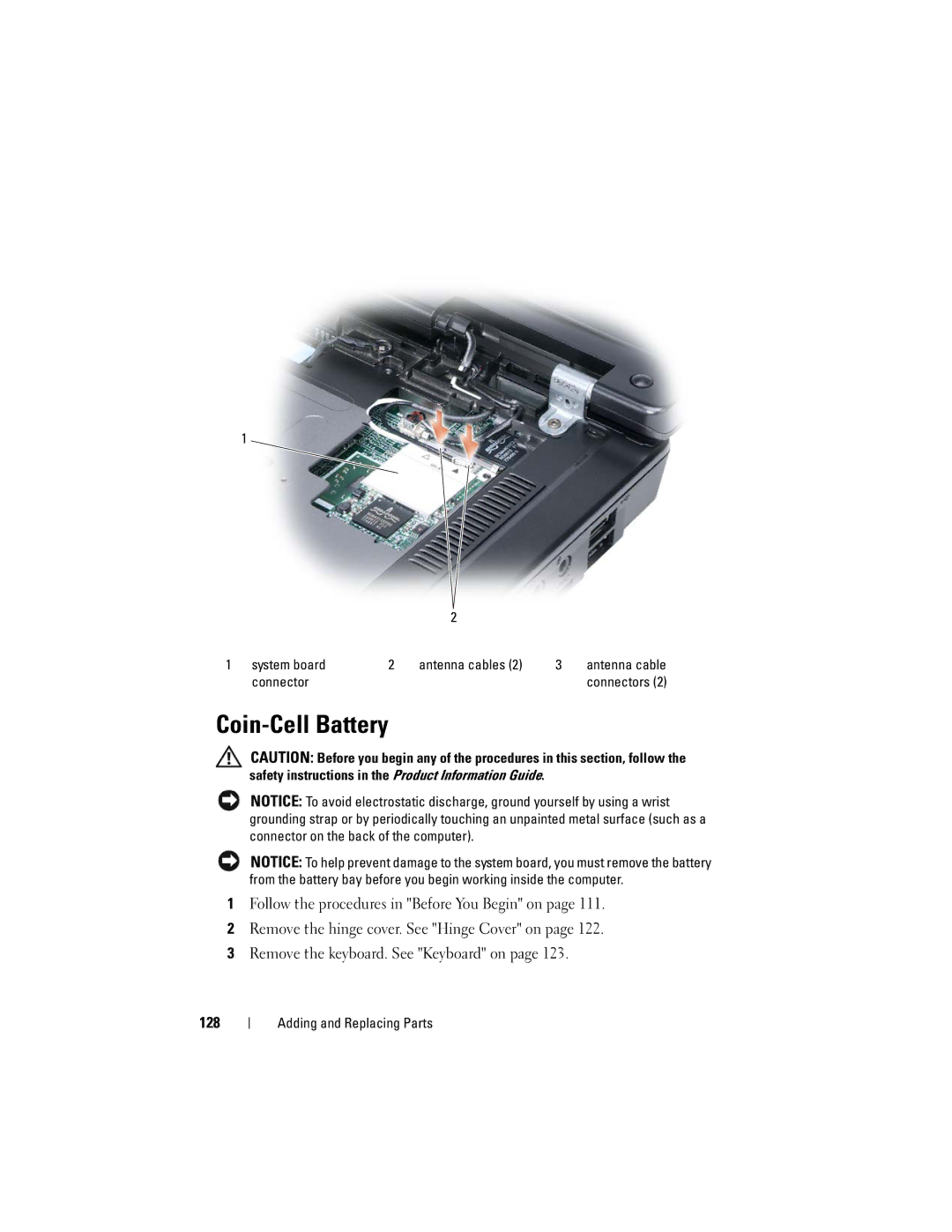
System board Antenna cables
Coin-Cell Battery
Connector
Display
129
Board
Lift the display away from the computer 130
Screws Display cable
131
132
133
Dell QuickSet Features
Dell QuickSet Features
134
Traveling With Your Computer
Identifying Your Computer
Packing the Computer
135
Travel Tips
136
Traveling by Air
137
138
Contacting Dell
Contacting Dell
139
140
Specifications
141
142
143
ATI R485M
144
145
Reduced under certain power-intensive
Conditions. See Power Problems on
Information on battery life
146
147
148
Environmental Altitude maximum Operating
Using the System Setup Program
Appendix
149
Appendix
Entering System Setup
Commonly Used Options
151
Changing the Boot Sequence
152
Cleaning Your Computer
Performing a One-Time Boot
Computer, Keyboard, and Display
153
Touch Pad
Mouse
155
Floppy Drive
CDs and DVDs
156
FCC Notice U.S. Only
FCC Class B
Macrovision Product Notice
157
158
Glossary
159
160
161
162
163
164
165
166
167
168
169
170
171
172
173
Video resolution See resolution
174
175
176
Index
Index
177
See also hard drive See also optical drive
178
179
180
181
182
183
184