Regulatory Model E14S Series Regulatory Type E14S001
Dell Inc
Contents
Installing System Components
Safety First-For You And Your System
Troubleshooting Your System
Jumpers And Connectors
Using System Diagnostics
Technical Specifications System Messages
Getting Help
Indicator, Button, or Icon Description Connector
Front-Panel Features And Indicators
Health indicator Condition
Diagnostic Indicators
Hard-drive indicator Condition
Corrective Action
Electrical indicator Condition
Hard-drive indicator Condition Corrective Action
Memory indicator Corrective Action
Program
PCIe indicator Condition
Hard-Drive Indicator Patterns
Error
Drive-Status Condition Indicator Pattern RAID Only
Seconds
Back-Panel Features And Indicators
Green Link indicator is
NIC Indicator Codes
Other Information You May Need
Power Indicator Codes
Page
Keystroke Description Enters the System Setup F10
Entering System Setup
Responding To Error Messages
System Setup Options
Using The System Setup Navigation Keys
System Setup Main Screen
System Information Screen
Memory Settings Screen
Processor Settings Screen
Boot Settings Screen
Serial Communications Screen
Integrated Devices Screen
System Profile Settings Screen
System Security Screen
Miscellaneous Settings
System And Setup Password Features
Assigning a System And/Or Setup Password
Operating With a Setup Password Enabled
Using Your System Password To Secure Your System
Embedded System Management
Using The Boot Manager Navigation Keys
Boot Manager Screen
Entering The iDRAC Settings Utility
IDRAC Settings Utility
Page
Inside The System
Recommended Tools
Removing The Front Bezel
Front Bezel Optional
Opening The System
Installing The Front Bezel
Opening And Closing The System
Removing The Cooling Shroud
Cooling Shroud
Closing The System
Removing and Installing the Cooling Shroud
Installing The Cooling Shroud
System Memory
Channel 0 slots A1, A5, and A9
Processor
Mode-Specific Guidelines
General Memory Module Installation Guidelines
Removing Memory Modules
Memory Configuration
Removing and Installing a Memory Module
Installing Memory Modules
Hard Drives
Removing a 3.5 Inch Hard-Drive Blank
Installing a 2.5 Inch Hard-Drive Blank Back
Removing a 2.5 Inch Hard-Drive Blank Back
Removing a Hot-Swap Hard Drive
Installing a 3.5 Inch Hard-Drive Blank
Removing and Installing a Hot-Swap Hard Drive
Installing a Hot-Swap Hard Drive
Removing a Hard Drive From a Hard-Drive Carrier
Installing a Hard Drive Into a Hard-Drive Carrier
Cooling Fans
Removing a Cooling Fan
Removing and Installing a Cooling Fan
Removing The Cooling-Fan Assembly
Installing a Cooling Fan
Replacing The Internal USB Key
Installing The Cooling-Fan Assembly
Internal USB Memory Key Optional
Removing The PCIe Card Holder
PCIe Card Holder
Opening And Closing The PCIe Card Holder Latch
Installing The PCIe Card Holder
Removing The Cable Retention Bracket
Cable Retention Bracket
Expansion Cards And Expansion-Card Risers
Installing The Cable Retention Bracket
Expansion Card Installation Guidelines
Gaseous Contamination
102
System Error Messages
ASR0002 Message
ASR0001 Message
ASR0003 Message
BAT0002 Message
CPU0010 Message
CPU0005 Message
CPU0023 Message
CPU0204 Message
CPU0704 Message
CPU0702 Message
CPU0703 Message
Action Reinstall or reconnect the hardware HWC2003 Message
If the issue persists, see Getting Help
FAN0000 Message
Details Fan operating speed is out of range Action
MEM0007 Message
MEM0001 Message
MEM0701 Message
MEM0702 Message
PCI1302 Message
MEM8000 Message
PCI1304 Message
PCI1308 Message
PDR0001 Message Fault detected on drive number Details
Reinstall the device
Configurations
PSU0001 Message Power supply number failed Action
PSU0006 Message
PSU0003 Message
PSU0016 Message
PSU0031 Message
PSU0034 Message
PSU0033 Message
PSU0035 Message
PSU0036 Message
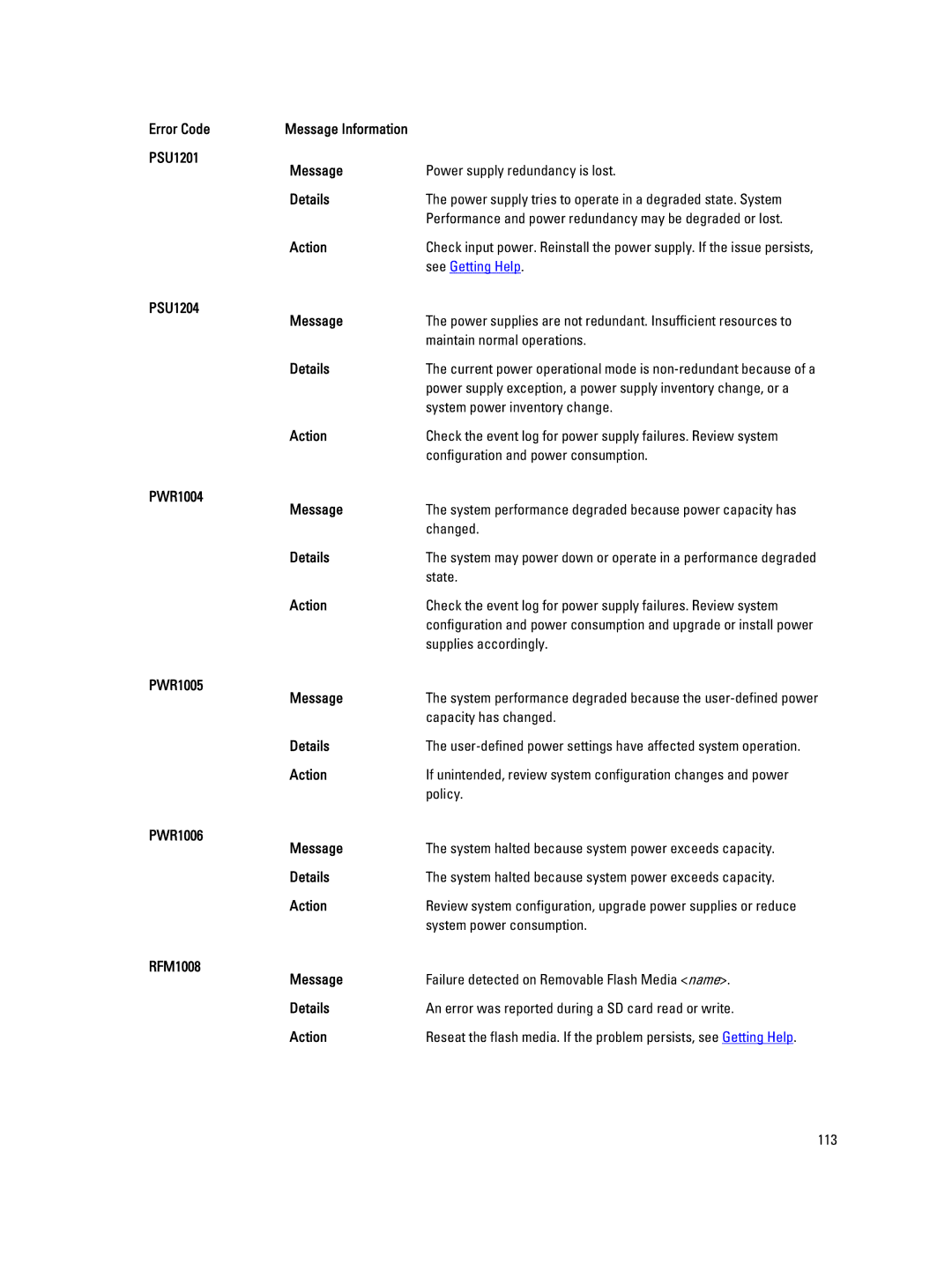
System power inventory change
PSU1201 Message Power supply redundancy is lost Details
Configuration and power consumption
System power consumption
RFM1201 Message
RFM1014 Message
RFM2001 Message
RFM2002 Message
Appear if the user disabled event logging
SEL0006 Message All event logging is disabled Details
Power. If problem persists call support
Issues persists, contact support
Failed
Diagnostic Messages
Failures
TMP0121 Message
Alert Messages
118
Visit support.dell.com
Contacting Dell