Manuals
/
Huawei
/
Household Appliance
/
Water System
Huawei
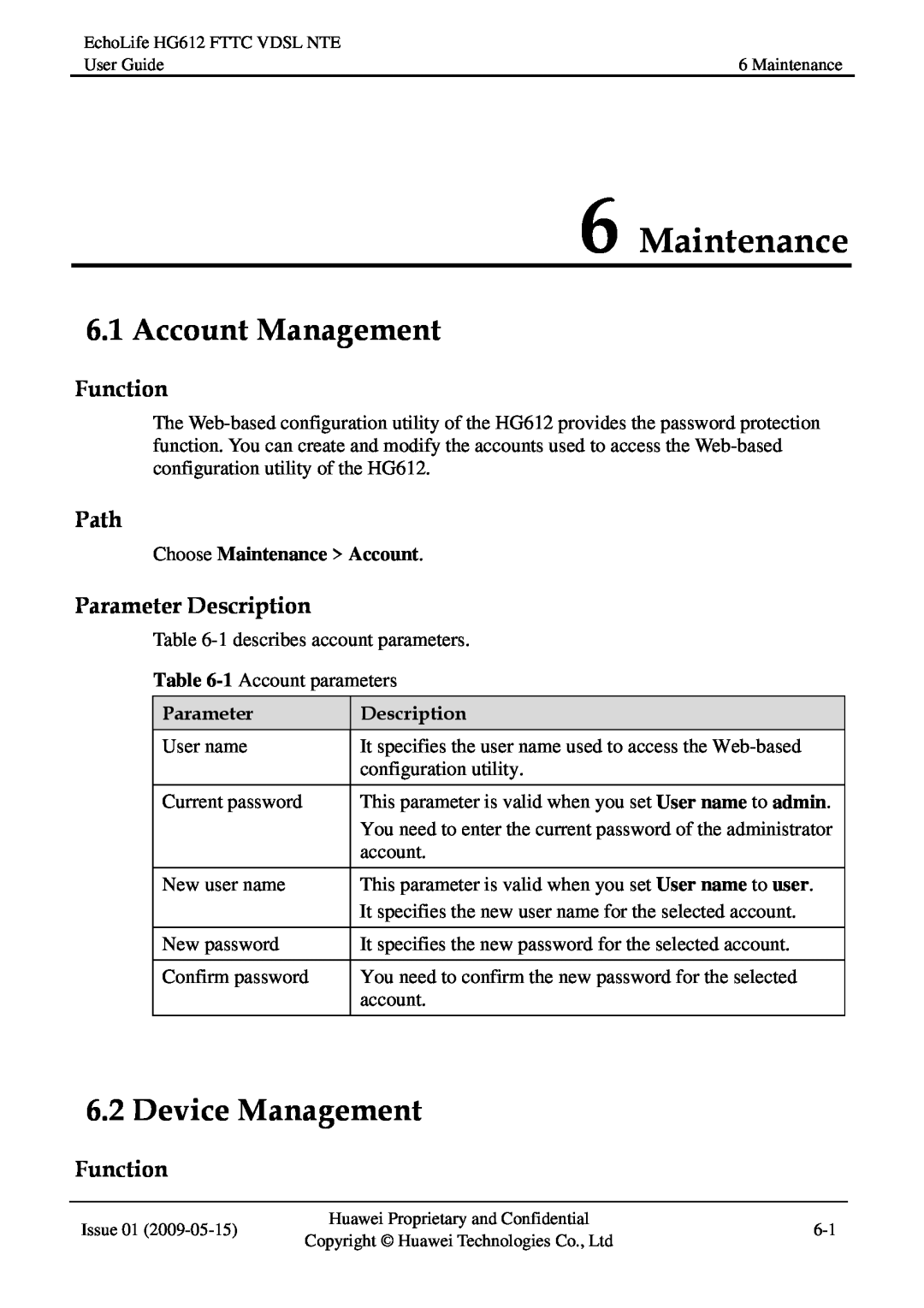
HG612FTTC VDSL NTE Maintenance, Account Management, Device Management, Function, Path
Models:
HG612FTTC VDSL NTE
1
47
58
58
Download
58 pages
21.64 Kb
44
45
46
47
48
49
50
51
Specifications
FAQ
Symbol Conventions
Indicators
Connecting the Cables
Warranty
Maintenance
ATM Mode Configuration
Media Access Control
Command Conventions
Page 47
Image 47
Page 46
Page 48
Page 47
Image 47
Page 46
Page 48
Contents
EchoLife HG612 FTTC VDSL NTE
User Guide
terminal@huawei.com
EchoLife HG612 FTTC VDSL NTE V100R001
Import and Export Regulations
NO WARRANTY
Trademarks and Permissions
User Guide
Contents
Issue 01
EchoLife HG612 FTTC VDSL NTE
B Default Settings
7 FAQs
6 Maintenance
A Technical Specifications
Figures
Figures
Page
5-12
Tables
5-10
5-11
EchoLife HG612 FTTC VDSL NTE
5-16
Tables
User Guide
Intended Audience
About This Document
Purpose
Related Versions
Description
Conventions
Symbol Conventions
Symbol
Boldface
Command Conventions
General Conventions
Convention
Folder
GUI Conventions
Keyboard Operations
Mouse Operations
Operation Requirements
1 Safety Precautions
Basic Requirements
Environmental Requirements
Environmental Protection
Cleaning Requirements
2.2.1 Appearance
2.1 Product Features
2 Product Overview
2.2 Hardware Structure
Color
2.2.2 Indicators
2.2.3 Interfaces and Buttons
Indicator
Description
3 Getting Started
3.1 Connecting the Cables
3.2 Powering on the HG612
Requirement
3.3 Logging In to the Web-Based Configuration Utility
6. Select Enable for NAT as required
3.4 ATM Mode Configuration
3.4.1 Configuring the ATM Route-PPPoA
3. Select Enable for WAN connection
7. Set Connection type to DHCP
3.4.2 Configuring the ATM Route-DHCP
3. Set DSL link type to EoA
3.4.4 Configuring the ATM Route-PPPoE
3.4.3 Configuring the ATM Route-Static
7. Set Connection type to PPPoE
3.4.5 Configuring the ATM Bridge
2. Set DSL latency to Path0 or Path1
3.5 PTM Mode Configuration
3.5.1 Configuring the PTM Route-DHCP
3.5.2 Configuring the PTM Route-Static
7. Set Connection type to Static
3.5.3 Configuring the PTM Route-PPPoE
3.5.4 Configuring the PTM Bridge
Function
4 Checking the Status
4.1 Checking Device Information
4.2 Checking xTM Information
4.4 Checking LAN Information
4.3 Checking WAN Information
Description
z G.Dmt
5 Parameter Settings
5.1 Configuring the DSL
5.2 Configuring the ATM
z VCMUX
z LLC
Description
z Normal Priority z High Priority
5.3 Configuring the PTM
5.4 Configuring the WAN
Choose Basic WAN
Static
Auto
5.5 Configuring the LAN
PPPoE
Description
Choose Advanced Routing
5.6 Configuring the Routing Function
through Default gateway
Choose Advanced Firewall
5.7 Configuring the Firewall
5.8 Configuring the NAT
z TCP/UDP
Choose Advanced NAT
z TCP
z UDP
Choose Advanced IGMP
5.9 Configuring the IGMP
5.10 Configuring the QoS
MAC , Dest MAC , Source IP , and Source IP Mask
Choose Advanced QoS
Choose Advanced CWMP
5.11 Configuring the SNTP
5.12 Configuring the CWMP
Choose Advanced SNTP
Description
Choose Advanced LED
5.13 Configuring the UPnP
5.14 Configuring the LED
Choose Advanced UPnP
Choose Maintenance Account
6 Maintenance
6.1 Account Management
6.2 Device Management
Choose Maintenance Device
Choose Maintenance Diagnose
6.3 Diagnosis
Choose Maintenance Log
6.4 Log Management
Parameter
7 FAQs
Specification
A Technical Specifications
B Default Settings
B Default Settings
Default Value
Content Distribution Network
C Acronyms and Abbreviations
Automatic Configuration Server
Broadband Access Server
Internet Group Management Protocol
Media Access Control
Quality of Service
IGMP
Unspecified Bit Rate
SNTP
Simple Network Time Protocol
Transfer Control Protocol
Part Number
Huawei Industrial Base Bantian, Longgang Shenzhen
Peoples Republic of China
Top
Page
Image
Contents