ENGLISH
Preparation Introduction
Printing
For Your Reference
For Your Reference
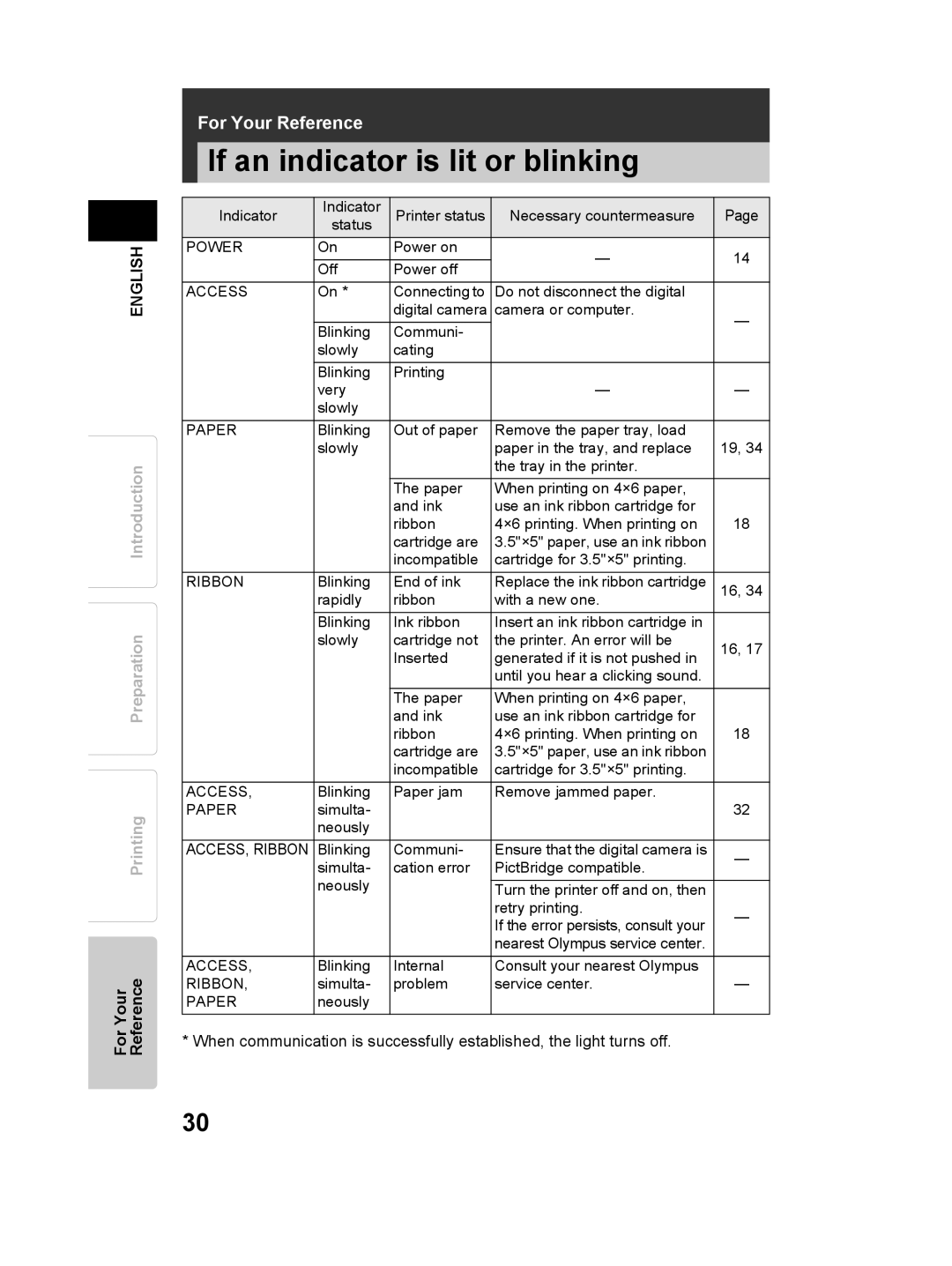
If an indicator is lit or blinking
Indicator | Indicator | Printer status | Necessary countermeasure | Page |
| status |
|
|
|
POWER | On | Power on | — | 14 |
| Off | Power off | ||
|
|
| ||
ACCESS | On * | Connecting to | Do not disconnect the digital |
|
|
| digital camera | camera or computer. | — |
| Blinking | Communi- |
| |
|
|
| ||
| slowly | cating |
|
|
|
|
|
|
|
| Blinking | Printing |
|
|
| very |
| — | — |
| slowly |
|
|
|
PAPER | Blinking | Out of paper | Remove the paper tray, load |
|
| slowly |
| paper in the tray, and replace | 19, 34 |
|
|
| the tray in the printer. |
|
|
| The paper | When printing on 4×6 paper, |
|
|
| and ink | use an ink ribbon cartridge for |
|
|
| ribbon | 4×6 printing. When printing on | 18 |
|
| cartridge are | 3.5"×5" paper, use an ink ribbon |
|
|
| incompatible | cartridge for 3.5"×5" printing. |
|
RIBBON | Blinking | End of ink | Replace the ink ribbon cartridge | 16, 34 |
| rapidly | ribbon | with a new one. |
|
| Blinking | Ink ribbon | Insert an ink ribbon cartridge in |
|
| slowly | cartridge not | the printer. An error will be | 16, 17 |
|
| Inserted | generated if it is not pushed in | |
|
|
| ||
|
|
| until you hear a clicking sound. |
|
|
|
|
|
|
|
| The paper | When printing on 4×6 paper, |
|
|
| and ink | use an ink ribbon cartridge for |
|
|
| ribbon | 4×6 printing. When printing on | 18 |
|
| cartridge are | 3.5"×5" paper, use an ink ribbon |
|
|
| incompatible | cartridge for 3.5"×5" printing. |
|
ACCESS, | Blinking | Paper jam | Remove jammed paper. |
|
PAPER | simulta- |
|
| 32 |
| neously |
|
|
|
ACCESS, RIBBON | Blinking | Communi- | Ensure that the digital camera is | — |
| simulta- | cation error | PictBridge compatible. | |
|
| |||
| neously |
|
|
|
|
| Turn the printer off and on, then |
| |
|
|
| retry printing. | — |
|
|
| If the error persists, consult your | |
|
|
|
| |
|
|
| nearest Olympus service center. |
|
|
|
|
|
|
ACCESS, | Blinking | Internal | Consult your nearest Olympus |
|
RIBBON, | simulta- | problem | service center. | — |
PAPER | neously |
|
|
|
* When communication is successfully established, the light turns off.
30