Hooking Up the TV/VCR (cont’d) 7
D.
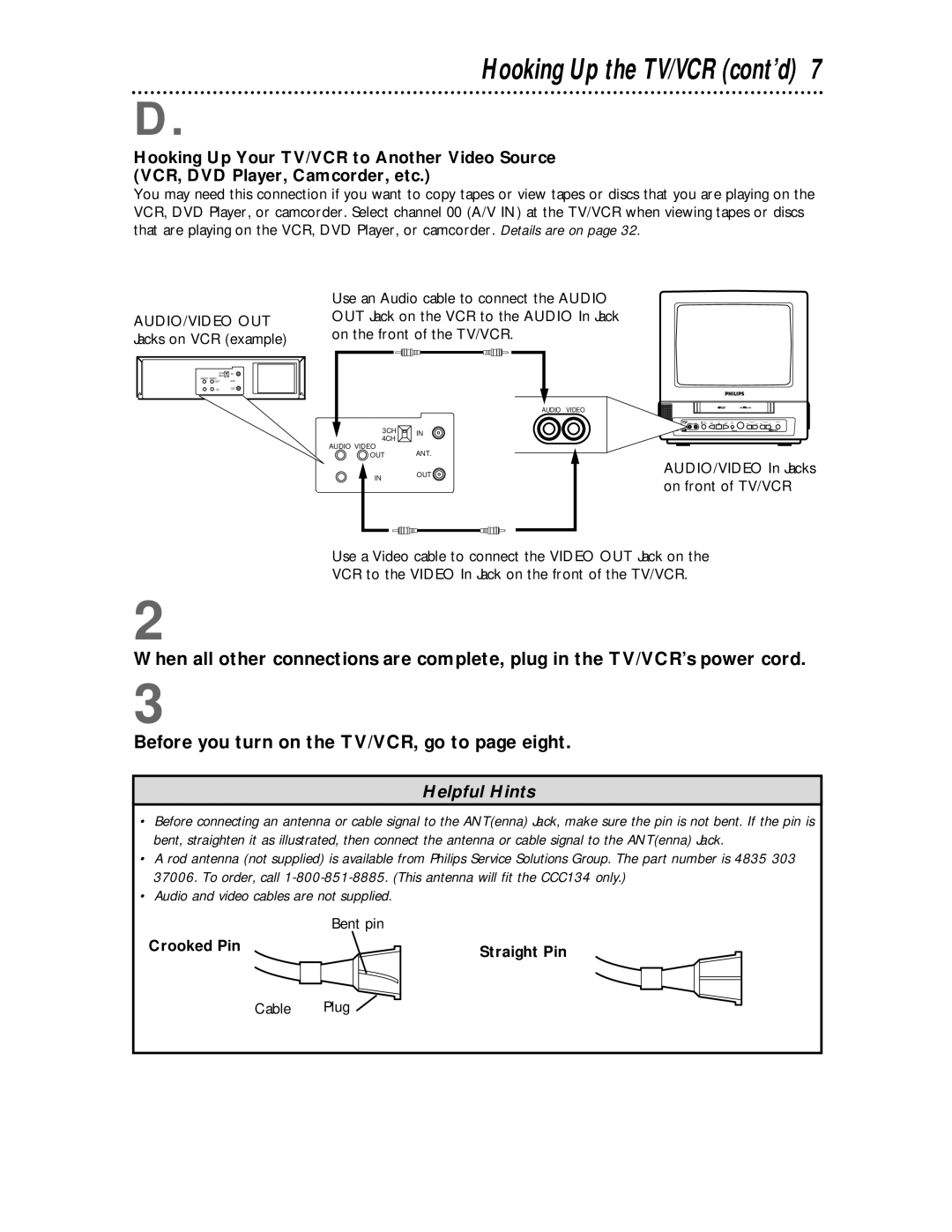
Hooking Up Your TV/VCR to Another Video Source (VCR, DVD Player, Camcorder, etc.)
You may need this connection if you want to copy tapes or view tapes or discs that you are playing on the VCR, DVD Player, or camcorder. Select channel 00 (A/V IN) at the TV/VCR when viewing tapes or discs that are playing on the VCR, DVD Player, or camcorder. Details are on page 32.
AUDIO/VIDEO OUT Jacks on VCR (example)
3CH 

 IN 4CH
AUDIO VIDEO
 OUT ANT.
INOUT 
Use an Audio cable to connect the AUDIO OUT Jack on the VCR to the AUDIO In Jack on the front of the TV/VCR.
AUDIO VIDEO
3CH | IN | |
4CH | ||
|
AUDIO VIDEO
OUT ANT.
INOUT
AUDIO/VIDEO In Jacks on front of TV/VCR
Use a Video cable to connect the VIDEO OUT Jack on the
VCR to the VIDEO In Jack on the front of the TV/VCR.
2
When all other connections are complete, plug in the TV/VCR’s power cord.
3
Before you turn on the TV/VCR, go to page eight.
Helpful Hints
•Before connecting an antenna or cable signal to the ANT(enna) Jack, make sure the pin is not bent. If the pin is bent, straighten it as illustrated, then connect the antenna or cable signal to the ANT(enna) Jack.
•A rod antenna (not supplied) is available from Philips Service Solutions Group. The part number is 4835 303 37006. To order, call
•Audio and video cables are not supplied.
| Bent pin |
Crooked Pin | Straight Pin |
|