E n g l i s h
Optional Connections (continued)
IN |
|
|
| OUT | Back of a Cable Box |
VIDEO |
| AUDIO | or Satellite Receiver | ||
RF |
| ||||
| R | L | |||
|
|
|
|
| (Example only) |
Antenna/cable TV
signals
2
1
3
TV
Connecting to a Cable Box or Satellite Receiver
Option 1
If your Cable Box/Satellite Receiver has only an antenna output jack (RF OUT or TO TV,)
refer to “Connecting the antenna cables” on page 12 for the complete connection to your TV.
Option 2
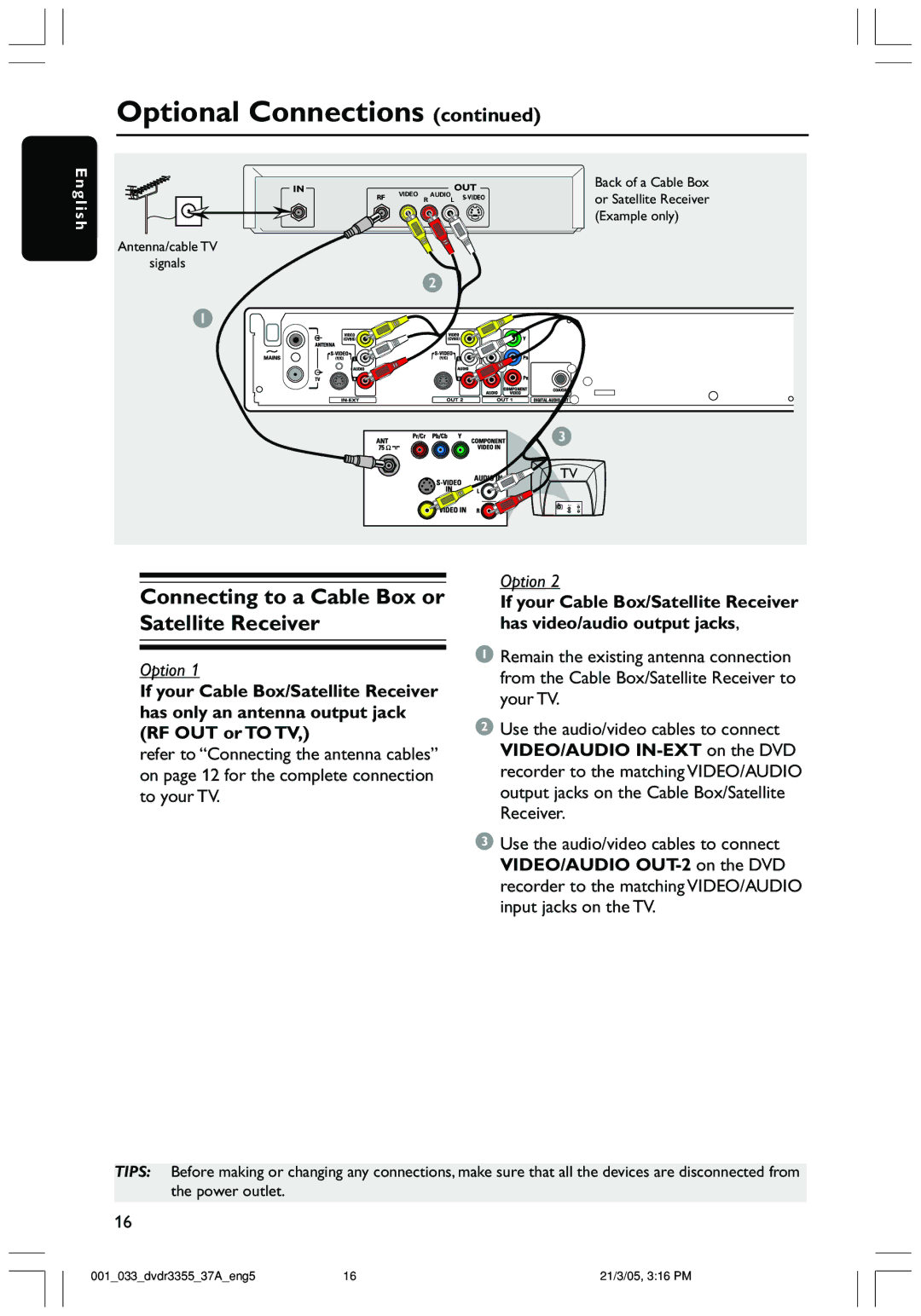
If your Cable Box/Satellite Receiver has video/audio output jacks,
1Remain the existing antenna connection from the Cable Box/Satellite Receiver to your TV.
2Use the audio/video cables to connect VIDEO/AUDIO
3Use the audio/video cables to connect VIDEO/AUDIO
TIPS: Before making or changing any connections, make sure that all the devices are disconnected from the power outlet.
16
001_033_dvdr3355_37A_eng5 | 16 | 21/3/05, 3:16 PM |