LC-8021
Trademark acknowledgments
Chapter
About this manual
Contents
Appendix a Troubleshooting
Using the EDS Mode
Using the Printer with MS-DOS
Optional Accessories
Page
Choosing a place for the printer
Printer Setup
Unpacking the printer
General guide
Removing the front cover
Opening the front cover
Removing the protective materials
Installing the ribbon cartridge
Page
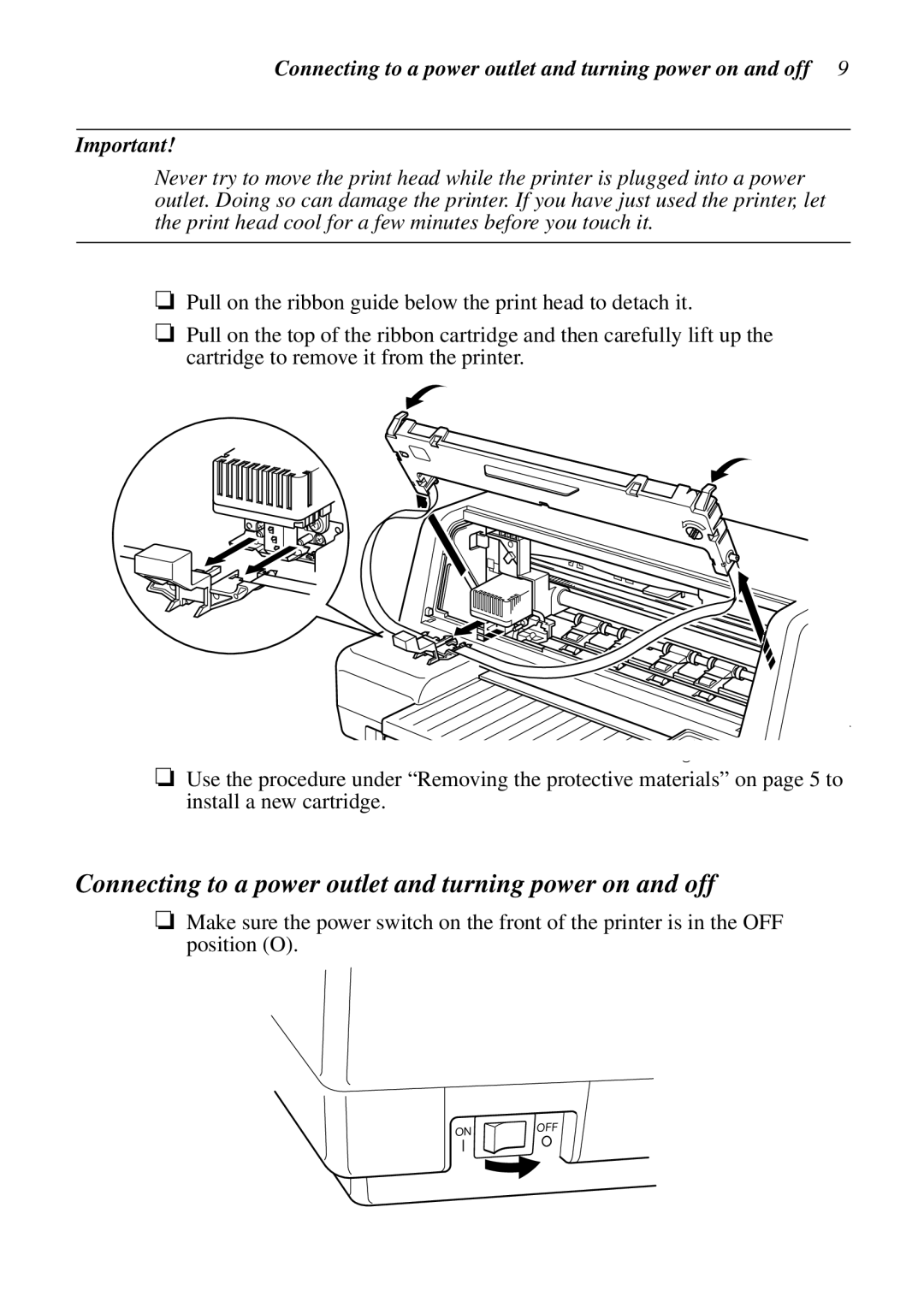
Removing the ribbon cartridge
Connecting to a power outlet and turning power on and off
Connecting to a power outlet and turning power on and off
Loading paper
Connecting to your computer
Connecting to your computer
To connect with a parallel cable
To connect with a serial cable
Printer Setup
Control Panel Operations
Switching between on-line and off-line
Paper eject
Selecting a font
Line feed
Form feed
Changing the auto load position
Entering the Multi-part Mode
Clearing the printer’s buffer
Initializing the printer
Using the EDS Mode
About EDS Mode settings
Entering the EDS Mode
Selecting a bank
Using the EDS Mode
Exiting the EDS Mode
Selecting a switch
Changing a switch setting
Printing the current switch settings
Switch 4 RAM Usage
EDS-1 Settings
Switch 1 Emulation
Switch 2 Not used Switch 3 Character Table
Switch 4 Auto LF with CR
Switch 6 Multi-Part Mode
Switch 1 Graphics Direction
Switch 2 Not used Switch 3 Line Spacing
Switches 3, 4, 5 Print Pitch
Switches 1, 2 Print Mode
Switches 1, 2, 3, 4 Page Length
Switch 5 Cut-sheet eject direction
Switch 6 Skew sensor for cut-sheet paper
Bank E
Name Country Remarks
Russia Preferred by Microsoft
International
Bank F
Switches 1, 2, 3, 4, 5, 6 LQ Font Selection
Switch 3 Parity
EDS-2 Settings
Switch 1 Data Length
Switch 2 Parity Check
Switches 4, 5, 6 Not used
Switch 4 Protocol
Switches 5, 6 Not used
Switch 1, 2, 3 Baud Rate
Switches 5, 6 Waiting period for paper loading
Switches 1, 2 Top and bottom margins
Switch 3 Head gap sensing for on each line
Switch 4 Control code FF
Setting up for printing with MS-DOS
Using the Printer with MS-DOS
Passbook
Paper Handling
Selecting paper types
Cut-Sheet Paper
Feeding a passbook into the printer
Feeding cut-sheet paper into the printer
Print area
Serial Interface Unit IS-NP192
Optional Accessories
Serial-to-Parallel Interface Converter SPC-8K
Appendix a Troubleshooting
Short test
Long test
Hexadecimal dump
Adjusting the dot alignment
Adjusting the dot alignment
Problem Possible Cause
Troubleshooting guide
Troubleshooting guide
Forms are smudged Ribbon is jammed Make sure that the ribbon
Right during printing
Character set is selected
Mode LPT1=COM1 or Mode LPT1=COM2
Checking system software settings in MS-DOS
Printing Speed Pitch Draft cps/dpi
Appendix B Specifications
Emulation
Appendix C Interface Pin Outs
Parallel Interface
Serial Interface
Standard Italic Character Set International Character Set
Appendix D Character Sets
Character Sets
Code Page #861 Icelandic
IBM Special Character Set
Code Page #860 Portuguese
Code Page #850 Multi-lingual
Code Page #3840 IBM-Russian
Code Page #863 Canadian French
Code Page #866 Russian
Code Page #865 Nordic
Code Page #3845 Hungarian
Code Page #3841 Gost-Russian
Code Page #3844
Code Page #3843 Polish
Code Page #852 Latin-2
Code Page #3846 Turkish
Code Page #3848 Brazil-ABICOMP
Code Page #3847 Brazil-ABNT
Code Page #851 Greek
Code Page #1001 Arabic Code Page #737 Greek
Code Page #772 Lithuanian
Code Page #869 Greek
Code Page #2001 Lithuanian-KBL
Code Page #928 Greek
Code Page #3011 Latvian1
Code Page #774 Lithuanian
Code Page #3002 Estonian2
Code Page #3001 Estonian1
Code Page #3041 Maltese
Code Page #3012 Latvian2
Code Page #3031 Hebrew
Code Page #3021 Bulgarian
Code Page #3863
Code Page #3850 Standard KU
Code Page #3861 Microwiz KU
Code Page #3860 Rajvitee KU
Code Page #3865 Newsic TIS
Code Page #3864 Popular TIS
Appendix E Printer Control Codes
Standard Mode
Printer Control Codes
Select 1/8″ line spacing
Denmark
OCR-B
Set left margin
IBM Mode
Select print pitch and download
Set base unit of line spacing
Appendix F Glossary
Multi Eject On Line Part
Appendix G Control Panel Operation Guide
AUTOEXEC.BAT 47
MS-DOS
Page