Chapter 2: Installation
Force-Power-On Enable/ Disable
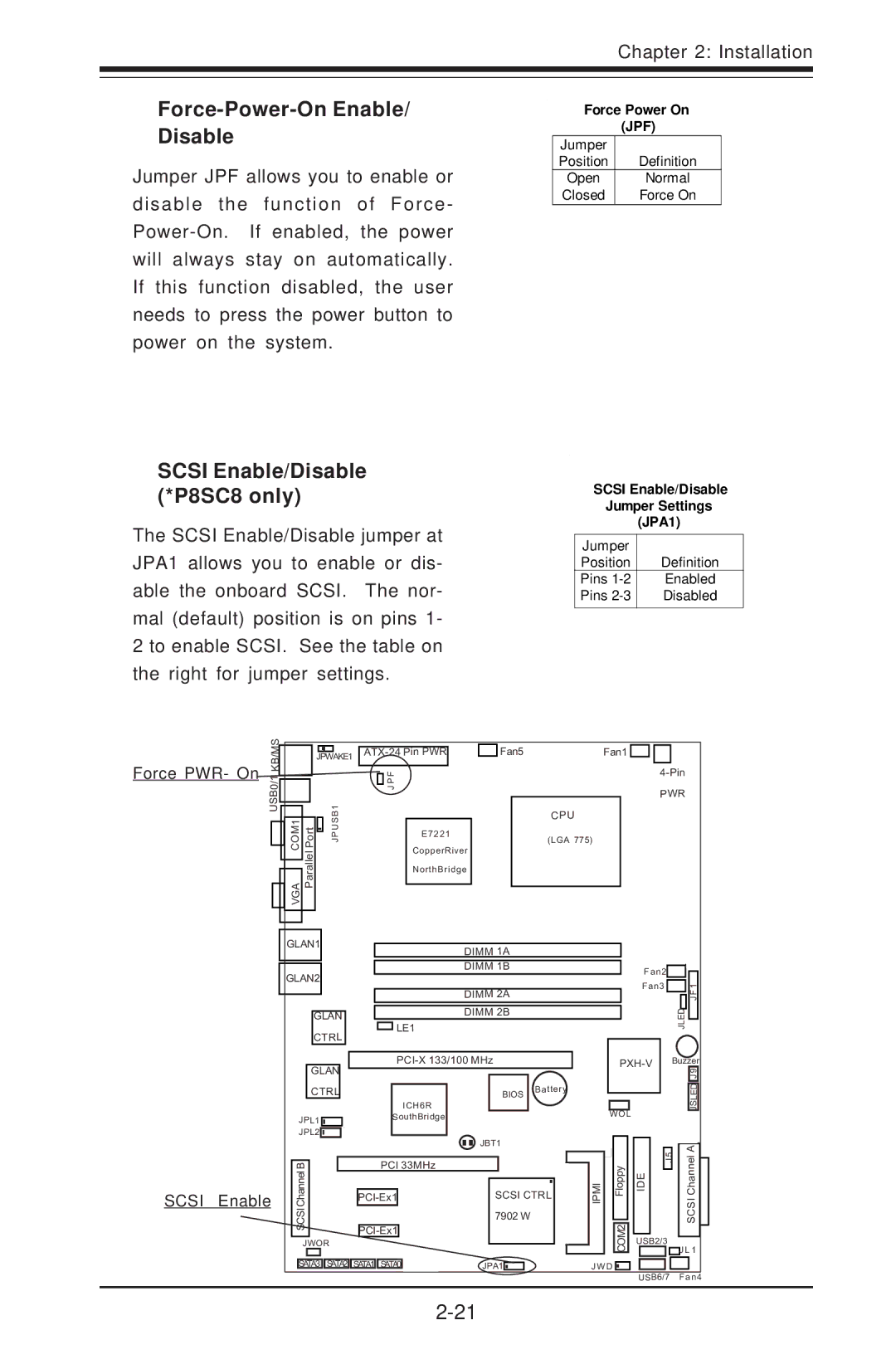
Jumper JPF allows you to enable or disable the function of Force-
Force Power On (JPF)
Jumper |
|
Position | Definition |
Open | Normal |
Closed | Force On |
SCSI Enable/Disable (*P8SC8 only)
The SCSI Enable/Disable jumper at JPA1 allows you to enable or dis- able the onboard SCSI. The nor- mal (default) position is on pins 1- 2 to enable SCSI. See the table on the right for jumper settings.
SCSI Enable/Disable
Jumper Settings
(JPA1)
Jumper |
|
Position | Definition |
Pins | Enabled |
Pins | Disabled |
|
|
Force PWR- On
USB0/1 KB/MS
|
| JPWAKE1 |
| Fan5 | Fan1 | |||
|
|
|
|
|
|
| ||
|
|
|
|
| JPF |
|
| |
|
|
|
|
|
|
| ||
|
|
|
|
|
|
|
|
|
|
| B1 |
|
|
|
| CPU | |
VGACOM1 PortParallel | PJUS |
|
|
|
| |||
| E7221 |
| (LGA 775) | |||||
|
|
|
|
|
|
|
| |
|
|
|
|
| CopperRiver |
|
| |
|
|
|
|
| NorthBridge |
|
| |
GLAN1 |
| DIMM | 1A |
|
|
|
| |
|
|
|
|
|
| |||
GLAN2 |
| DIMM | 1B | Fan2 |
|
|
| |
|
|
| ||||||
|
|
| ||||||
|
|
| ||||||
|
|
|
|
|
|
| ||
|
|
|
| Fan3 | 1 | |||
|
|
|
|
| ||||
|
| DIMM | 2A |
|
|
| F | |
|
|
|
|
| J | |||
|
| LE1 |
|
| JLED | |||
GLAN |
| DIMM 2B |
|
|
|
| ||
CTRL |
|
|
|
|
|
|
|
|
|
|
|
|
|
|
|
| |
GLAN |
|
| Buzzer | |||||
|
|
|
|
| 9 | |||
|
|
|
|
|
|
|
| J |
SCSI Enable
CTRL
JPL1 

JPL2
ICH6R SouthBridge
BIOS | Battery |
|
WOL
ED JSL
SCSI BChannel
PCI 33MHz
JBT1
 JBT1
JBT1
SCSI CTRL
7902 W
IIPM | Floppy |
| 2M |
 5J IDE
SCSI AChannel
JWOR |
O |
USB2/3
|
|
|
|
|
|
|
|
|
|
SATA3 | SATA2 | SATA1 | SATA0 |
| |||||
 JPA1
JPA1 

|
| C |
J W D | ||
J L 1
USB6/7
Fan4