Connections (DTR-5.3)
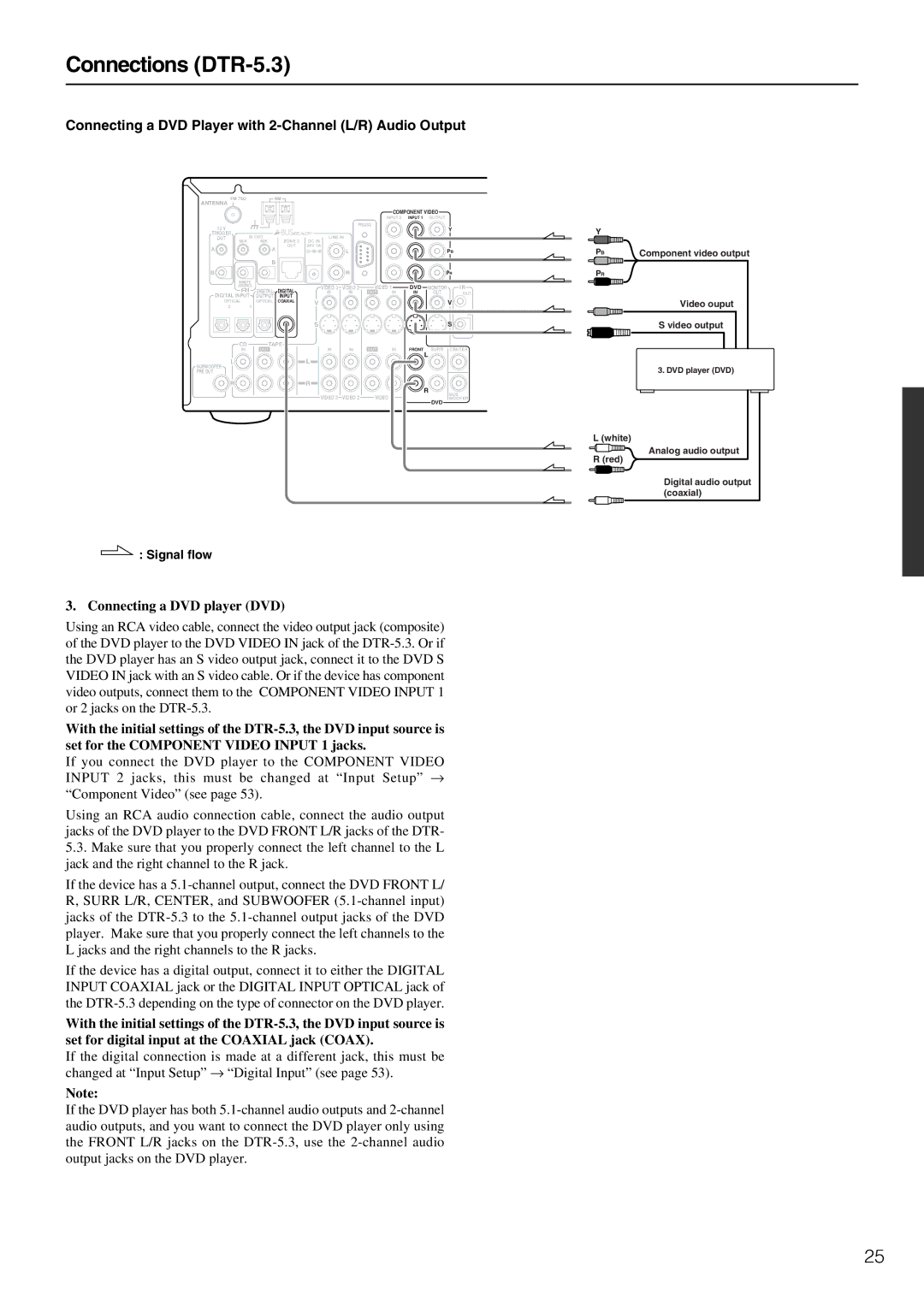
Connecting a DVD Player with 2-Channel (L/R) Audio Output
ANTENNA | FM 75 | AM |
|
|
|
|
|
|
| |
|
|
|
|
|
|
|
|
|
| |
|
|
|
|
|
|
| COMPONENT VIDEO |
| ||
|
|
|
|
|
| INPUT 2 | INPUT 1 | OUTPUT |
| |
12 V |
|
|
|
| RS232 |
|
|
| Y | |
|
|
|
|
|
|
|
|
| ||
TRIGGER | IR OUT |
| LINE IN |
|
|
|
|
| ||
OUT | 56K | ZONE 2 |
|
|
|
|
| |||
| 40K | DC IN |
|
|
|
|
|
| ||
A |
| A | OUT | 24V 1A | L |
|
|
|
| PB |
|
|
|
|
|
|
| ||||
|
|
|
|
|
|
|
|
| ||
|
| B |
|
|
|
|
|
|
|
|
B |
|
|
|
| R |
|
|
| PR | |
| REMOTE |
|
|
|
|
|
|
|
| |
| CONTROL |
| VIDEO 3 | VIDEO 2 | VIDEO 1 |
| DVD | MONITOR | IR | |
|
| DIGITAL | DIGITAL | IN | IN | OUT | IN | IN | OUT | OUT |
DIGITAL INPUT OUTPUT | INPUT |
|
|
|
|
|
|
| ||
OPTICAL | OPTICAL | COAXIAL | V |
|
|
|
|
| V | |
| 2 | 1 |
|
|
|
|
|
| ||
|
|
|
|
|
|
|
|
| ||
|
|
|
|
|
|
|
|
|
| IN |
|
|
|
| S |
|
|
|
|
| S |
| CD | TAPE |
| IN | OUT |
|
| SURR | CENTER | |
| IN | OUT | IN | IN | IN | FRONT | ||||
| L |
|
| L |
|
|
|
| L |
|
SUBWOOFER |
|
|
|
|
|
|
|
| ||
|
|
|
|
|
|
|
|
|
| |
PRE OUT |
|
|
|
|
|
|
|
|
|
|
| R |
|
| R |
|
|
|
| R |
|
|
|
|
|
|
|
|
|
| SUB | |
|
|
|
| VIDEO 3 | VIDEO 2 | VIDEO 1 |
|
|
| |
|
|
|
|
|
|
| WOOFER | |||
DVD
 : Signal flow
3. Connecting a DVD player (DVD)
Using an RCA video cable, connect the video output jack (composite) of the DVD player to the DVD VIDEO IN jack of the
With the initial settings of the
If you connect the DVD player to the COMPONENT VIDEO INPUT 2 jacks, this must be changed at “Input Setup” → “Component Video” (see page 53).
Using an RCA audio connection cable, connect the audio output jacks of the DVD player to the DVD FRONT L/R jacks of the DTR-
5.3.Make sure that you properly connect the left channel to the L jack and the right channel to the R jack.
If the device has a
If the device has a digital output, connect it to either the DIGITAL INPUT COAXIAL jack or the DIGITAL INPUT OPTICAL jack of the
With the initial settings of the
If the digital connection is made at a different jack, this must be changed at “Input Setup” → “Digital Input” (see page 53).
Note:
If the DVD player has both
Y
PB | Component video output |
PR
Video ouput
S video output
3. DVD player (DVD)
L (white)
 Analog audio output R (red)
Digital audio output (coaxial)
25