Setting Up Your Voicemail
Accessing Your Voicemail
Understanding Your Phone
Features of Your Phone
Open View of Your Phone
Understanding Your Phone
Earpiece allows you to hear the other caller
Features
Understanding Your Phone
Page
Side Views of Your Phone
Camera lens is used to take pictures
Back View of Your Phone
Viewing the Display Screen
Display Layout
Icons
Icons Content Soft Key functions
Icon Description
Silence All profile in use
Backlight
My Account
Brightness
Correcting the Number
Call Functions
Making a Call
Making an International Call
Redialing the Last Number
Ending a Call
To recall any of these numbers
Call Functions
Adjusting the Call Volume
Making a Call from the Contacts
Call Logs
Answering a Call
Missed Calls
All Calls
Viewing Missed Calls
Received Calls
Dialed Calls
Call Duration
Options During a Call
Vibrating Mode
Call Waiting
Switching off the Microphone Mute
To place a call on hold
Putting a Call on Hold
To make a new call while you have a call in progress
To switch between the two calls
Using the Speakerphone
Muting or Sending Key Tones
Searching for a Number in Address Book
Making a Conference Call
Setting up a Conference Call
Having a Private Conversation With One Participant
Dropping a Participant
While you are in a Conference Call
Menu Navigation
Accessing a Menu Function
Menu Navigation
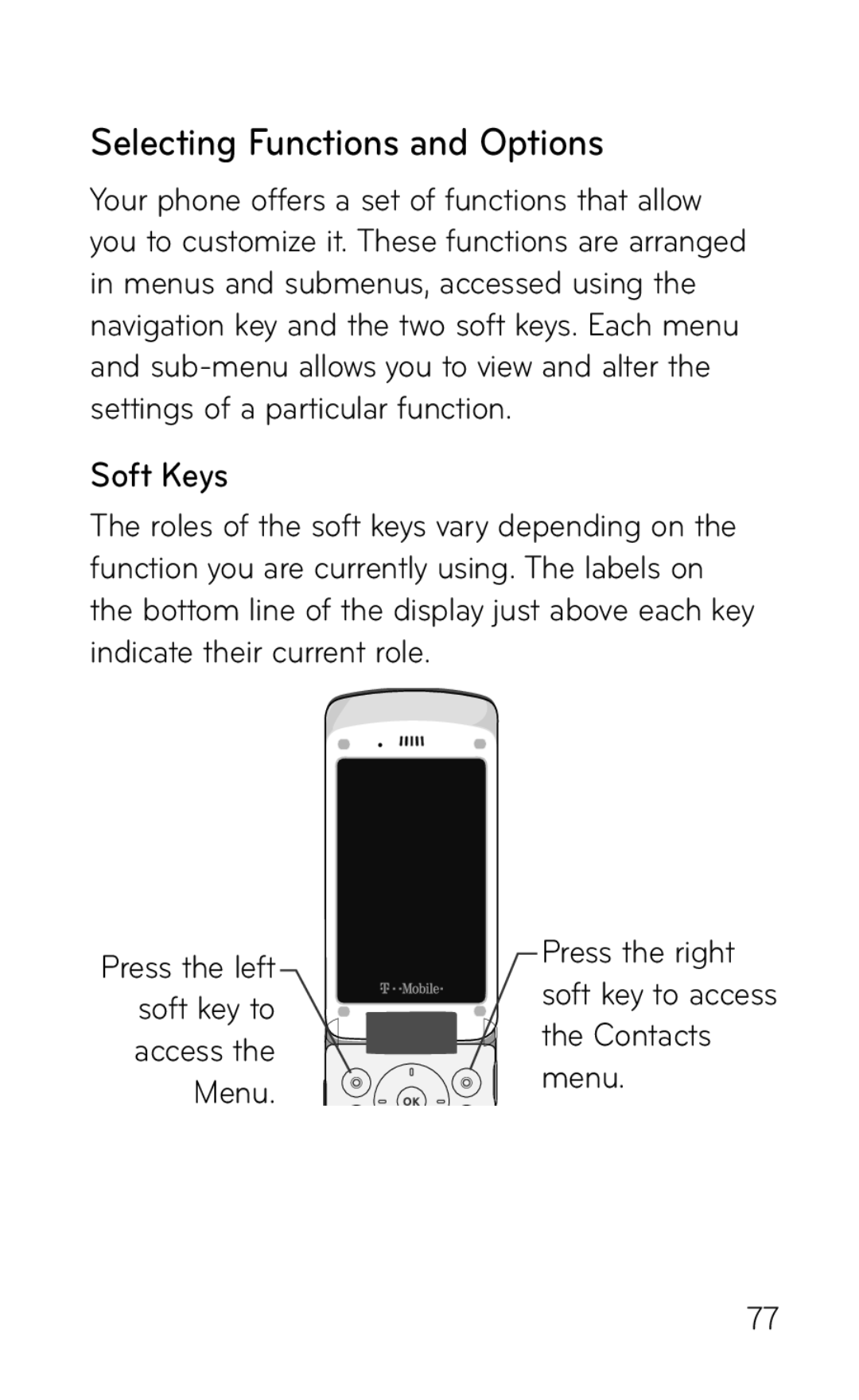
Soft Keys
Selecting Functions and Options
Navigating Menus and Options
Menu Navigation
Press for Phone Settings
Using Shortcuts
Entering Text
Changing the Text Input Mode
Your phone has the following text input modes
ABC mode
To enter a word in T9 mode
Using T9 Mode
Entering Text
Tips
To add a new word into the T9 dictionary
Using Number Mode
Using Symbol Mode
Using ABC Mode
Storing a Number in the Phone’s Memory
Understanding Your Contacts
Select Add New Contact
Messenger ID allows you to save the AIM ID
Understanding Your Contacts
Storing a Number in the SIM Card
Finding Contacts Entry
Page
Understanding Your Contacts
Dialing a Number from Contacts
To create a new group
Creating and Editing a Caller Group
To edit a group
Speed Dialing
Deleting all of the Contact Entries
Setting Up Speed Dial Entries
My Name Card My Info
Mobile Backup
Types of Messages
Messages
Creating a Simple Text Message
Create Text Messages
Messages
Creating and Sending a Multimedia Message
Create Multimedia Messages
Conversations
Conversations/Standard View
Inbox
Standard View
Viewing a Text Message from the Inbox
Viewing a Multimedia Message from the Inbox
Sentbox
Viewing an Audio Postcard from the Inbox
Voicemail
From Idle mode, press Menu g Messaging g Email
Setting up your email
Retrieving your email
Audio Postcard
Starting your Instant Messaging
Instant Messaging IM
Using the Instant Messenger Options
Drafts
Message Settings
Messages
Browse HiFi Ringers
Changing Your Settings
Browse MegaTones
Sounds
Changing Your Settings
Volume
Ringtone
Keypad Tone
Power On/Off Tone
Message Tone
Alert Tone
External Display
Browse Wallpapers
Wallpaper
Color Theme
Brightness
Backlight Timer
Secret Lighting
Fonts
My devices
About Bluetooth
Turn Bluetooth On or Off
My Bluetooth Info
Time and Date
Faves
Motion Mute
Languages
Security
Set Flight Mode
Phone Lock
PIN Code Request
Fixed Dial Number
PIN
Change Codes Security Code
Auto Rotation
Reset Settings
Phone Information
Mass Storage, Data Service, Always Ask Music Sync
USB Connection Mode
My Account
Always Ask
Using your phone as a mass storage device Mass Storage
Network Selection
Network Selection
Search Now
Auto Redial
Show My Number
Minute Minder
Answer Mode
Call Reject
Hearing Aid
Dial Readout
Browser
Voice Command
Online Album
Messaging
Press for Software Update
Set Storage Defaults
Check Memory Status
Web2go
Web2goSM Browsing
Home
Saved Pages
Web2goSM Browsing
Enter URL
Bookmarks
RSS Reader
Browser Settings
Press for Voice Command
Voice Command
Organizer
Listen Voicemail
Call Name or Number
Time & Date
Voice Command Options
Organizer
Messages
Telenav GPS Navigator
Sensitivity High/Medium/Low Spk. On Mode
Best Match
Press for Telenav GPS Navigator
Alarm Clock
Access to Google Maps
Maps and Info
Adding an event to your calendar
Calendar
Organizer
Calculator
World Clock
Tip Calculator
Tasks
Press for Tip calculator
Press for Unit Converter
Unit Converter
Camera
Using the Camera
Taking and Sending a Photo
Camera