SR7009
Connections
Listening to music on a Bluetooth device
Basic operation
Playing an iPod
Playing a USB memory device
Viewing photographs on the Flickr site 113
Listening to Pandora 117
Listening to SiriusXM Internet Radio 124
AirPlay function 127
Selecting a sound mode 142
Sleep timer function 157
Hdmi control function 156
Smart select function 159
Speakers 210 Audyssey Setup
Manual Setup 221
Inputs 206
Network 247
Setting the back light 276
Resetting factory settings 299
265
Operating learn function 273
Accessories
Operating range of the remote control unit
Inserting the batteries
Put the rear cover back on
Features
High quality sound
High performance
4K 60Hz input/output supported
4K 60p
Up to 1080p
Out
Playback of DSD and Flac files via USB and networks
【MAIN ZONE】 【ZONE2】/【ZONE3】
Energy-saving design
Easy operation
Part names and functions
Front panel
Power operation button
Power indicator
Remote control sensor
Volume knob
With the door open
Speaker A/B switching button Spkr A/B
Audyssey DSX button A-DSX
Hdmi OUT button
Dimmer button
Headphones jack Phones
Setup MIC jack
AUX1 Hdmi connector
AUX1 Input connector
Volume indicator Input source indicator
Display
Main Display
Standard display Tuner display
Sleep timer indicator ZONE2/ZONE3 power on display
Sub Display
Sleep timer indicator
Mute indicator
Volume indicator Information display
Front speaker indicator
Rear panel
Aq wB EC Dr EFt y Gu Hi JQ0 Aq KQ1 LQ2 MQ3 Q4N Q5O PQ6
Bluetooth/wireless LAN antenna connectors
Digital audio connectors Digital Audio
RS-232C connector Flasher in jack
Signal GND terminal
Video connectors Video
Hdmi connectors
Network connector
Analog audio connectors Audio
Remote control unit
ECO Mode button
Tuning up / Tuning down buttons Tune +
Sleep button
Channel/page search buttons CH/PAGE df
Sound Mode buttons
Remote control signal transmitter
Power button
Smart Select buttons 1
Volume buttons df
TV operation buttons TV X / TV Input
Light button
Mute button
Contents
Cables used for connections
Connecting speakers
Speaker installation
FL/FR Front
SBL/SBR
FHL/FHR Front
TML/TMR Top
RHL/RHR Rear
About Dolby enabled speakers
FDL/FDR Front
BDL/BDR Back
Height speakers layout
GViewed from the topH
Z122 30 z290 110 z3135
Z1 22 30 z2 55 60 z3 90 110 z4 135
When 5.1-channel speakers are installed
Z122 30 z2120
Layout including height speakers and top speakers
Dolby Atmos layout example
DTS NeoX layout example
Speaker connection
4ohms
Connecting the speaker cables
Connecting the subwoofer
Turn the speaker terminal clockwise to tighten it
SW2
How to attach the speaker cable label H
Speaker terminals
Speaker configuration and Amp Assign settings
Main Zone ZONE2 ZONE3
Wide/Height2 Front Wide Pre-out Top Rear
Standard configuration and connection n 5.1-channel playback
This serves as a basic 5.1-channel surround system
Channel playback surround back
Advanced connections n 9.1-channel playback
Channel playback
Channel playback bi-amp connection of front speakers
SBR SR SL SBR SBL FHR FHL
Exclusive 9.1-channel playback + 2-channel playback speakers
FL’
Channel playback + front speakers of second unit
FR FL SR SL SBR SBL FHR FHL ZONE2 ZONE2
Main Zone
Main Zone ZONE2 ZONE3 FR FL C SR SL ZONE2 ZONE2 ZONE3 ZONE3
ZONE2 ZONE3
Dolby Atmos
Channel system
FR FL C SR SL SBR SBL TMR TML
Connecting an external power amplifier
Connecting a TV
Hdmi ARC
OUT Optical
Connection 3 TV equipped without an Hdmi connector
Connecting a playback device
Connecting a set-top box Satellite tuner/cable TV
Connecting a DVD player or Blu-ray Disc player
Connecting a video camcorder or game console
Connecting a turntable
Connecting a device with a multi-channel output connector
Connecting an iPod or USB memory device to the USB port
USB memory Device IPod
Supported iPod/iPhone models
IPod classic IPod nano IPod touch IPhone
Connecting an HD radio receiver
Listening to an HD Radio stations v p
Using the AM loop antenna
AM loop antenna assembly
Suspending on a wall
Standing alone
Connecting to a home network LAN
Wired LAN
Wireless LAN
Connecting an external control device
Remote Control jacks
Remotely connecting Marantz devices
DC OUT jacks
DC/150 mA trigger-compatible device
Connecting the power cord
Contents Basic operation
Playback a device
Turning the power on
Power
Mute Volume df
Basic operation
Adjusting the volume
Playback a DVD player/Blu-ray Disc player
Turning off the sound temporarily Muting
Surround playback v p
Playing an iPod
Enter Back Home
Operations accessible through the option menu
Listening to music on an iPod
IPod Browse Mode settings
Press Option when the input source is iPod/USB
Select iPod Browse Mode, then press Enter
Use o p to select On-Screen, then press Enter
Operations accessible through the option menu
Press Option with iPod Browse Mode set to On- Screen
Performing repeat playback
Performing random playback
Press Enter
Playing a USB memory device
WMA
MP3
WAV MPEG-4 AAC Flac Alac Aiff DSD Jpeg
Playing files stored on USB memory devices
Operation buttons Function
Operations accessible through the option menu
Listening to music on a Bluetooth device
Pairing with a Bluetooth device
Press Bluetooth to switch the input source to Bluetooth
Playing a Bluetooth device
Start playing the Bluetooth device
Control of this unit
Playback
Operations accessible through the option menu
Pairing with the Pairing Mode
Press Option when the input source is Bluetooth
Use ui to select Pairing Mode, then press Enter
Pair a Bluetooth device with this unit
Listening to an HD Radio stations
Enter Back
Playback
Listening to an HD Radio broadcast
Press Option
Use ui to select FM/AM, then press Enter
TV screen H
Operations accessible through the option menu
Tuning in by entering the frequency Direct Tune
Changing the tune mode Tune Mode
Press Option when the input source is HD Radio
Use ui to select Direct Tune, then press Enter
Use ui to select Auto Preset Memory, then press
Maximum of 56 radio stations can be automatically preset
Selecting an audio program
Presetting the current broadcast station Preset Memory
Listening to preset stations
Use ui to select Preset Memory, then press Enter
Use CH/PAGE df or 0 9 to select the desired preset channel
Specify a name for the preset broadcast station Preset Name
Use ui to select Preset Name, then press Enter
Use ui to select a name label, then press Enter
Enter the characters, then press OK
Skipping preset broadcast stations Preset Skip
Use ui to select Preset Skip, then press Enter
To set the stations you want to skip by stations
To set the stations you want to skip by groups
Cancelling Preset Skip
Skip is cancelled
Checking the HD Radio reception information
Listening to Internet Radio
Listening to Internet Radio
Press Online Music
Use uio p to select Internet Radio, then press
Playing the last played Internet Radio station
Use ui p to select the station, then press Enter
Press Internet Radio
Operation buttons
Using vTuner to add Internet Radio stations to favorites
Check the MAC address of this unit. Information v p
Playing back files stored on a PC and NAS
Applying media sharing settings
When using Windows Media Player 12 Windows 7 / Windows
When using Windows Media Player
Sharing media stored in NAS
Playing back files stored on a PC
NAS
112
Viewing photographs on the Flickr site
Enter
Viewing photographs shared by particular users
Use ui to select Add Flickr Contact, then press
After inputting the Contact, press OK
Use ui to select the folder, then press Enter
Use ui p to select the photograph, then press Enter
Playback
Viewing all photographs on Flickr
Listening to Pandora
Listening to Pandora
Pandora
Input Email address and Password
Creating a new station
Use ui, select a file from the list, press Enter
Listening to an existing station
Listening to created radio stations at random
Use ui to select Shuffle, then press Enter
Giving feedback and managing stations
Press p while a track is playing
Sign Out
Disassociate this unit from your Pandora account
Listening to SiriusXM Internet Radio
Listening to SiriusXM Internet Radio
Select the Sign in, then press Enter
Top menu of SiriusXM is displayed
Selected file is displayed
Disassociate this unit from your SiriusXM account
AirPlay function
Playing songs from your iPhone, iPod touch or iPad
Playing iTunes music with this unit
Play the song on your iPhone, iPod touch or iPad
Tap the AirPlay icon
Selecting multiple speakers devices
Spotify Connect function
Playing Spotify music with this unit
Spotify App
Convenience functions
Supported input sources USB / Media Server / Bluetooth
While content is playing, press Option
Playing back content added to the Save to Favorites
Use ui to select the content you want to play, then
Registering to Favorites
Use ui to select Save to Favorites, then press
Deleting content added to favorites
Searching content with keywords Text Search
Supported input sources USB / Internet Radio / Media Server
Supported input sources USB
Supported input sources Internet Radio / Media Server
Play back a still picture
Play back a music file. v p Press Option
Setting the Slideshow Interval
Supported input sources USB / Media Server / Flickr
Use ui to select Channel Level Adjust, then press
Channel level adjust screen is displayed
DB +12.0 dB Default 0.0 dB
Adjusting the tone Tone
Use o p to adjust the tone, then press Enter
Use ui to select Tone, then press Enter
Use o p to set the tone control function to on/off
Press Option during audio playback
Press Option during video playback
Movie
Vivid
ISF Day
Stopping the All Zone Stereo mode
Playing the same music in all zones All Zone Stereo
During playback in All Zone Stereo mode, press
Selecting a sound mode
Music Game
Selecting a sound mode
Switching the sound mode
Press MOVIE, Music or Game to select a sound mode
Direct playback
Pure Direct playback
Press Pure to select Direct
Press Pure to select Pure Direct
Auto surround playback
Press Pure to select Auto
Auto surround playback begins
Description of sound mode types
Dolby sound mode Sound mode type Description
DTS sound mode Sound mode type Description
DTS-HD
148
Original sound mode Sound mode type Description
Auto sound mode Sound mode type Description
Direct sound mode Sound mode type Description
Sound mode that can be selected for each input signal
Movie Music Game
152
153
154
Views on the display
Shows a decoder to be used
Shows a decoder that creates sound output
Indicates that the Dolby Surround decoder is being used
Setting procedure
Enable the Hdmi control function of this unit
Hdmi control function
Set Hdmi Control to On. v p
Sleep timer function
Zone Select Sleep
Using the sleep timer
To cancel the sleep timer
Checking the remaining time
Smart select function
Zone Select
Calling up the settings
Button Input source Volume
Media Player
Online Music
Changing the settings
Set the items below to the settings you want to register
Changing the Smart Select Name
Web control function
Controlling the unit from a web control
Start up the web browser
Checking the IP address
Setup Menu
Enterbox. the IP address of this unit in browser’s address
Panel lock function
Disabling all key button operations
Disabling all button operations except
Ui Enter
Canceling the Panel lock function
Currently set mode
Panel lock function is canceled
Disabling the sensor function of the remote control unit
Remote lock function
Enabling the remote sensor function
Switches light illumination on/off
Light illumination
Press and hold Dimmer on the main unit for
Seconds
Connecting Zone
Connection 1 Connection through the Hdmi ZONE2 connector
Playback in ZONE2/ZONE3 Separate room
Assign Mode 7.1ch + ZONE2
Assign Mode 7.1ch + ZONE3
This unit
Assign Mode 7.1ch + ZONE2/3-MONO
ZONE2 ZONE3
Power amplifier
Main Zone
172
Mute Volume df
Playback in ZONE2/ZONE3
Adjusting the volume
Turning off the sound temporarily Muting
Menu map
DAX
Service technician or custom installation professional
Information Displays network information 247 Connection
252
253
Speaker Calibration Network Setup Input Setup
ECO
256
Press Zone Select to switch Main Press Setup
Menu operations
Menu is displayed on the TV screen
Inputting characters
Using the keyboard screen
Display the screen for inputting characters
Select a character to be input with uio p then press
GExampleH Source Rename screen
Dialog Level Adjust
Subwoofer Level Adjust
Audio
Off Cinema EQ is not used Default
Surround Parameter
Loudness Management
Cinema EQ
NWhen Input Mode is set other than to 7.1CH
Dynamic Compression
Low Frequency Effects
Center Gain
Set Defaults
Speaker Select
Subwoofer
Mode
High
Low
Audio Delay
Volume
Audyssey
MultEQ XT32
Reference
Bypass
Dynamic EQ
Reference Level Offset
Dynamic Volume
Audyssey LFC
Containment Amount
Audyssey DSX
Stage Width
Stage Height
Turn on Audyssey DSX processing for front wide
Adjust EQ
Graphic EQ
Graphic EQ
Speaker Selection
Graphic EQ settings are returned to the default settings
Curve Copy
Picture Adjust
Picture Mode
Video
Contrast
Brightness
Saturation
Hdmi Setup
Noise Reduction
Enhancer
Auto Lip Sync
Hdmi Audio Out
Video Output
AVR
AutoDual
Off Do not use Hdmi control function Default
Hdmi Pass Through
Hdmi Control
Use Hdmi control function
TV Audio Switching
Power Off Control
Pass Through Source
CBL/SAT / DVD
Output Settings
Video Mode
Game
Video Conversion
P Scaler
Hdmi
Resolution
When the input source is set to iPod/USB and Online Music
Progressive Mode
169 Output at 169 aspect ratio Default
Aspect Ratio
Video and Film
Default To Main Zone
Component Video Out
To ZONE2
Volume
On Screen Display
Info
Now Playing
TV Format
Format
Ntsc
PAL
Inputs
Input Assign
TV set top box/satellite users please note
Hdmi Digital Analog Comp Video
Hdmi
Digital
Analog
Video
Source Rename
Hide Sources
Source Level
Source Level
Input Mode
Decode Mode
Input Select
PCM
Audyssey Setup
Speakers
About the main listening position
About Audyssey Sub EQ HT
Procedure for speaker settings Audyssey Setup
When using a subwoofer without a direct mode
Check
Finish
Channel Select
Start the measurement of the first position
Measurement requires several minutes
Stopping Audyssey Setup
216
217
Error messages
Examples Error details Measures
There is too much noise in the room
Check the polarity of the displayed speaker
Subwoofer level error message and how to adjust
Error message H
Retrieving Audyssey Setup settings
Manual Setup
Assign Mode
Amp Assign
Mono
2ch
Front B
Dolby
Atmos
Detailed settings when Assign Mode is set to 11.1ch
Height Speakers
Height Layout
HEIGHT1
Wide/Height2
Pre-out
Heightz
Top Rear z
Front Wide
Detailed settings when Assign Mode is set to 9.1ch
Back Dolby
Front Dolby & Top Rear
Front Height
Top Front
Detailed settings when Assign Mode is set to 7.1ch + ZONE2
Speakers for ZONE2
Front Wide
Surround Back
Detailed settings when Assign Mode is set to 7.1ch + ZONE3
Speakers for ZONE3
Outputs audio in ZONE3 from Front Wide
Outputs audio in ZONE3 from HEIGHT1
Speakers for ZONE2/3
Surround
Back
Detailed settings when Assign Mode is set to 7.1ch Bi-Amp
Speakers for Bi-Amp
Default HEIGHT2 speaker terminals
Speakers for 2ch
Channel playback to the Front Wide
Channel playback to the HEIGHT1 speaker
Speakers for Front B
Front WIDE/HEIGHT2 speaker terminals
HEIGHT1 speaker terminals
Surround Back speaker terminals
Detailed settings when Assign Mode is set to Dolby Atmos
View Terminal Config
Layout
1ch + 4 Height
Speaker Config
Front
Center
Surround
Surr. Back
Front Wide
Front Height
Top Front
Top Rear
Top Middle
Rear Height
Front Dolby
Back Dolby
Surround Dolby
Distances
Unit
Step
Set the distance
Levels settings are returned to the default settings
Levels
Test Tone Start
Crossovers
Set the crossover frequency
Individual
Subwoofer Mode
Bass
LPF for LFE
LFE
Setting
Front Speaker
2ch Playback
SW Mode
Yes Use a subwoofer Default
Adjust the level of each channel
12.0dB +12.0dB Default 0.0dB
Crossover
Distance FL/Distance FR
Connect Using
Network
Information
Connection
Wi-Fi Setup
When connecting using Wi-Fi
When using a USB cable
Scan Networks
When connecting using the push button method
When connecting using the PIN code method
WPS Router
Manual
Settings
IP Control
Proxy
Port
Off In Standby
Diagnostics
Friendly Name
Maintenance Mode
ECO Mode
General
Language
Power On Default
On Screen Display
Auto Standby
Main Zone
ZONE2 Setup / ZONE3 Setup
Volume Level
Volume Limit
Power On Volume
60 -20 dB / 70 -10 dB / 80 0 dB Default 70 -10 dB
Zone Rename
Smart Select Names
Trigger Out 1 / Trigger Out
Channel Indicators
Front Display Information
Dimmer
Audio
Notifications
Zone
Firmware
Usage Data
Update
Update
Firmware
Check for
Add New Feature
Upgrade Display the items to be upgraded Package
Status Upgrade
Setup Lock
Protect settings from inadvertent changes
Off Turn protection off Default
Lock
Operating external devices with the remote control unit
Info Option Enter Smart
Registering preset codes
Registering Marantz Players
Registering DVD Players
Registering CD Players
Registering by entering preset numbers
Registering multiple players at the same time
Devices to be registered at Same time
DVD player CD player Buttons Player
Experimenting with preset codes one by one for registration
Preset code is shown in the remote control display
Operating devices
TV group TV operation
Setup
DVD group DVD player / DVD recorder operation
CD group CD player / CD recorder operation
Device
BD group Blu-ray Disc player operation
272
Operating learn function
Blu-ray
Remembering remote control codes from other devices
Input source is shown in the remote control display
Learn indicator lights up
If NG is shown on the remote control display, perform again
Delete saved remote control codes
Delete remote control codes for each button
Delete remote control codes for each input source
Delete remote control codes for all input sources
Setting the back light
Disabling the backlight
Turning the backlight on
Light button
Specifying the zone used with the remote control unit
Zone SET Select
Zone to be used
Main Zone only
Want the volume not to become too loud by mistake 279
280
One
Want to combine a desired video with the current music 280
Want the volume not to become too loud by mistake
Tips
Want to have the subwoofer always output audio
Want to make human voices in the movies clearer
Want to combine a desired video with the current music
Want to delete unused input sources
Troubleshooting
If a problem should arise, first check the following
Power does not turn on / Power is turned off
Symptom Cause / Solution
255
327
Display on this unit shows nothing
No sound comes out
Desired sound does not come out
286
Sound is interrupted or noise occurs
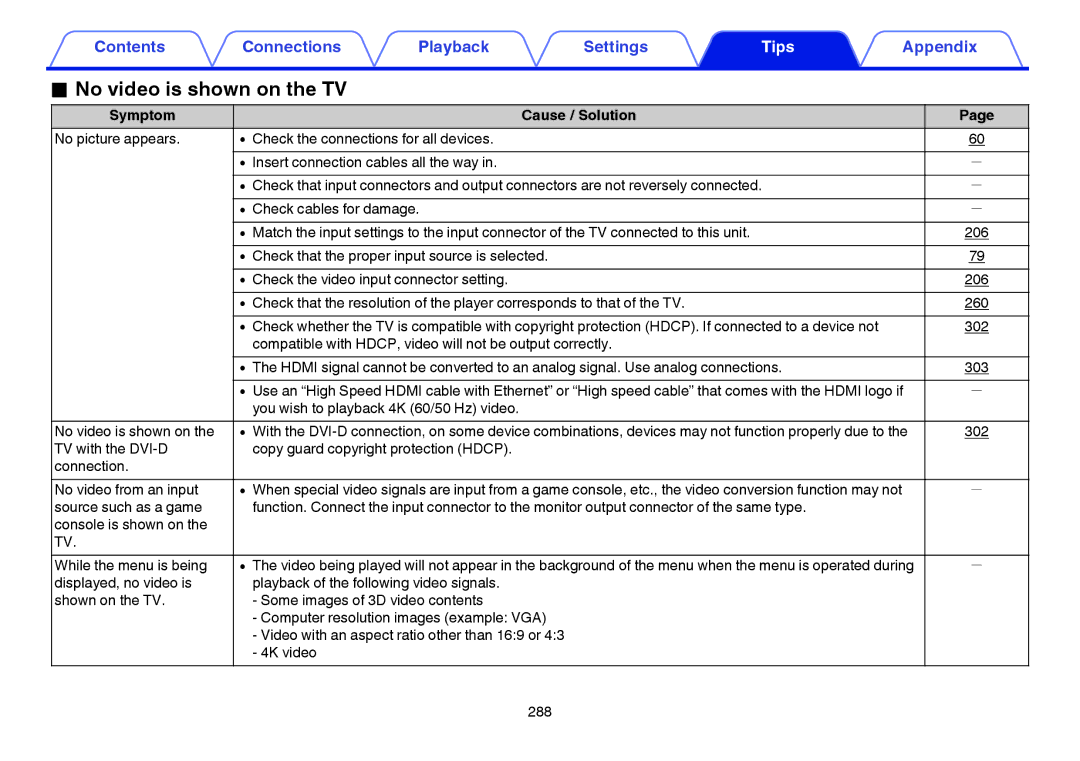
No video is shown on the TV
289
Menu screen is not displayed on the TV
IPod cannot be played back
USB memory devices cannot be played back
No connection is
305
Device cannot be played
Bluetooth cannot be played back
Internet radio cannot be played back
List of broadcasting
308
Various online services cannot be played
Music files on PC or NAS cannot be played back
Hdmi control function does not work
Cannot connect to a wireless LAN network
Cannot connect to
249
Points
298
Resetting factory settings
Game DSX
About Hdmi
Auto Lip Sync
Hdmi Pass Through
Hdmi Control
ARC Audio Return Channel
Supported video signals
Supported audio formats
Channel Linear Channel, 32 kHz 192 kHz, 16/20/24 bit
Channel 5.1-channel, 2.8224 MHz
Hdmi signal
Video conversion function
Input signal Output signal
Playing back a USB memory devices
Compatible formats
Bit rate
MP3
Playing back a Bluetooth device
About Bluetooth communications
Maximum number of playable files and folder
Media USB memory device
Specifications of supported files
Playing back a file saved on a PC or NAS
Playable broadcast station specifications
Playing back Internet Radio
Personal memory plus function
Last function memory
Sound modes and channel output
310
Sound modes and surround parameters
Z1 z5 Sound modes and surround parameters v p
Z4, z6 z9 Sound modes and surround parameters v p
DSX
313
Types of input signals, and corresponding sound modes
DTS-HD Mstr DTS-HD HI RES
315
316
Explanation of terms
Audyssey
Audyssey Dynamic EQ
Audyssey Dynamic Surround Expansion A-DSX
Audyssey Dynamic Volume
Dolby
Audyssey LFC Low Frequency Containment
Audyssey MultEQ XT32
Dolby Speaker Technology Dolby Enabled Speakers
Dolby Digital
Dolby Digital Plus
Dolby Surround
DTS
Dolby TrueHD
DTS 96/24
DTS Digital Surround
DTS-HD
Alac Apple Lossless Audio Codec
Flac Free Lossless Audio Codec
MP3 Mpeg Audio Layer-3
Mpeg Moving Picture Experts Group, MPEG-2, MPEG-4
WMA Windows Media Audio
Sampling frequency
Speaker impedance
Network
ISF
Dlna
Wi-Fi
WPA Wi-Fi Protected Access
WPA2 Wi-Fi Protected Access
WPS Wi-Fi Protected Setup
Media player
Network Names Ssid Security Set Identifier
Modem
ITunes
Pairing
Others
App Store
Hdcp
Trademark information
329
Specifications
Power amplifier Rated output
Output connectors
Audio section
Analog Input sensitivity/Input impedance
Distortion
Rated output Digital Output
Digital input
Video section
Tuner section
Wireless LAN section
Radio frequency
No. of channels
Bluetooth section
General
Weight 30 lbs 7oz 13.8 kg
Index
Numerics
Pairing a Bluetooth device
Sound mode
314
179
200
List of preset codes
CBL/SAT group
Registrable input source button
340
341
342
Audio group
343
344
TV group
AOC
346
KTV
347
DVD group
348
Blu-ray group
License
Boost
Expat
FastDelegate
351
352
Libogg
Libvorbis
Tremolo
Tremor
OMersenne Twister
Zlib
CURL
Ares
License information for the software used in the unit
Holdings Inc 10354 00AM