MiVOICE Business and 5000 Communications Platforms
Trademarks
Iii
Wireless Handset User Guide
Call Operator Config Assistant Reverse Transfer
Automatic Call after Alarm
Vii
Viii
About Your Phone
Mitel 5604 Wireless Handset User Guide
LED
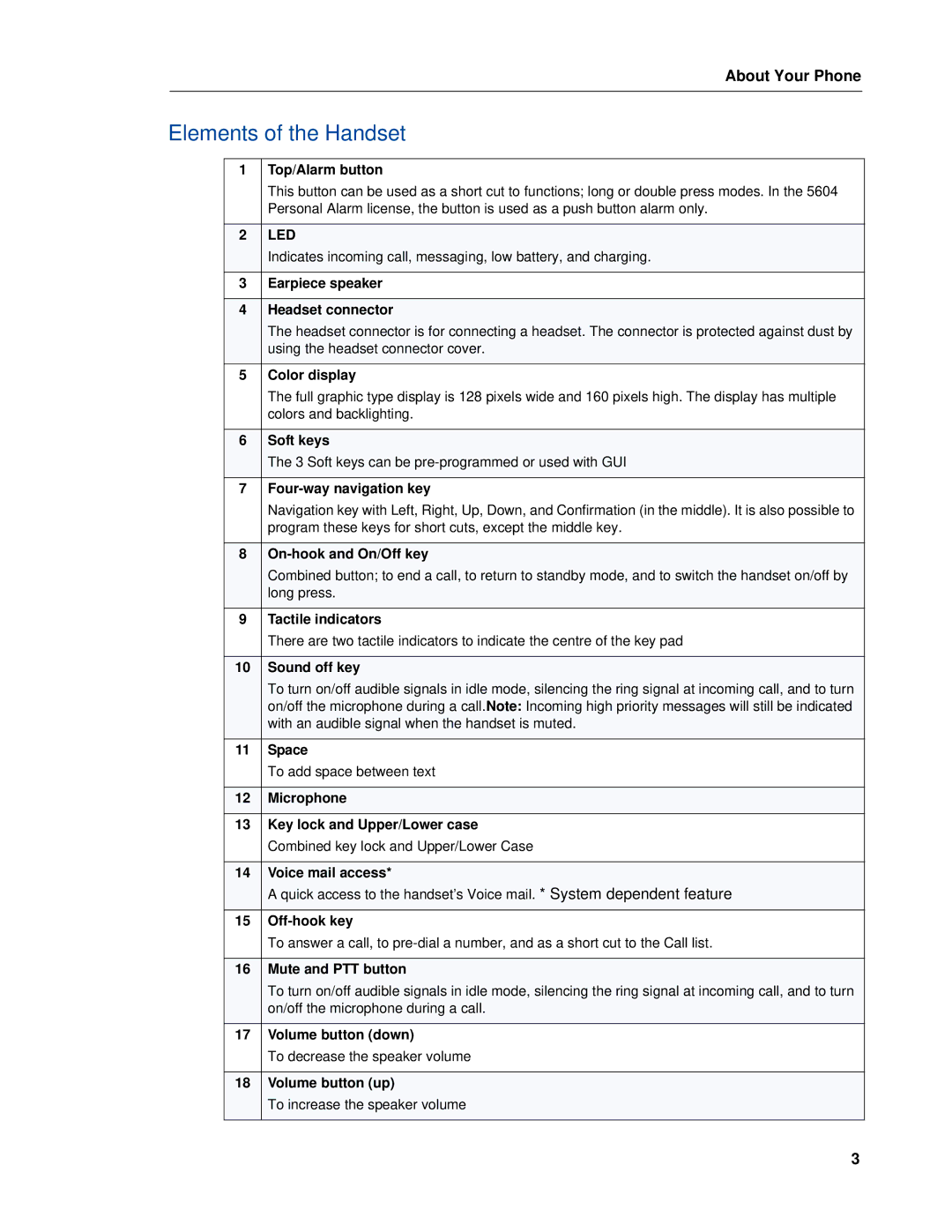
Elements of the Handset
Features and Functions
Rack Charger
Contacting Emergency Services
Chargers
Desktop Charger
Dont Cradle the Handset
Tips for your Comfort and Safety
Exposure to Radio Frequency Signals
Frequency Range
Dect Handset
Environmental Requirements
Chemical Resistance
Icons
Icons and Text in the Display
About Your Phone
System dependent
Keys and Buttons
Multifunction Button
Volume Button
Hot Keys
Alphanumeric Keys
Standby Mode, and Number Input Mode
Text Input Mode
Headset
Log on a Handset
Switch the Handset On/Off
Customizing Your Phone
Log a Shared/Hot Desk Phone On/Off
Log off a Handset
Turn On/Off the Audible Signal
Lock/Unlock the Keypad in Idle Mode
Lock/Unlock the Keypad
Lock/Unlock the Keypad during a Call
Lock/Unlock the Handset
Using the Loudspeaking Function
Pre-Dial
Making and Answering Calls
Call List
Make a Call
Dial a Name from the Central Phonebook
Dial a Number from the Call List
Dial the Sender of a Message
Dial a Number from the Local Phonebook
End a Call
Answer a Call
Dial a Number from the Company Phonebook
Answer a Call
Open Messaging during a Call
Adjust the Volume during a Call
During a Call
Open Contacts during a Call
Declining a Call with a Predefined Message
Lock/Unlock the Keypad during a Call
Start a New Call during a Conversation
Mitel 5604 Wireless Handset User Guide
Call Handling for MiVoice Business
Accessing Features
Retrieve a Held Call
Hold
Transfer
Method
Conference
Answer Call Waiting
Call Park
Callback
Calls
Advanced Features for MiVoice Business
Do Not Disturb
Call Forward
Call Pickup
Loudspeaker
Direct
Group
Call Handling for the Mitel 5000 CP
Call Handling for the Mitel 5000 CP
Conference
Advanced Features for the 5000 CP
Reverse Transfer
Config Assistant
Call Operator
Receive a Message
Incoming Message for 5604 Services License
Messaging
Message List
Call the Sender of the Message
Reply to a Message
Delete a Messages
Forward a Message
Save a Number
Write and Send a Message
Forward message
Unsent Messages
Open a Sent Message
Delete/Delete All
Delete Message
Review Inbox Content while Reading a Message
Send a Message to Another Destination
Accept/Reject a Message
Receive a Message with Request for Answer
Message Queuing and Message Priority
Message Queuing and Priority
Message Priority and Call Priority
Interactive Messaging
Message Indication Repetition
Interactive Message
Calling the Message Sender
Colored Messaging
Calling while Reading a Text Message
Calling a Different Party
Message Templates
Answering a Text Message with a Predefined Message
Templates Menu
Send Mobile Data with a Prefix
Mobile Data
Send Mobile Data
Procedure Call
Check the Voice Mail Inbox
One Key Voice Mail Access
Voice Mail
Receive a Voice Mail
Test Alarm
Alarm Operation
Push-button Alarm
Acoustic Location Signal
Alarm with Data
Automatic Call after Alarm
Customizing the Menu Tree
Menu Tree
Contacts
Profile
Messaging
Services
Short cuts
Connections
Settings
Additional In Call Functions
Call
System
Headsets
Navigate the Menu
Connections Menu
Navigate the Menu
Subscribe to Other System
Rename System
Unsubscribe System
Priority
Switch off While Charging
End Call When put In Charger
Charger
Change Profile While Charging
Mute Handset While Charging
Loudspeaking Handsfree While Charging
Log Off Handset While Charging
Call List
Calls Menu
Delete an Entry from the Call List
Missed Calls
Call Time
Send a Message
Accept a PTT Invitation Voice Style
Push to Talk
PTT Voice Style Calls Handset initiated
Reject a PTT Invitation Message Style
Reject a PTT Invitation Voice Style
PTT Message Style System/Application Initiated
Accept a PTT Invitation Message Style
Call a PTT Group
Short Cuts Menu
Define a Soft Key
Define a Navigation Key
Define a Hot Key
Add a Service
Services Menu
Define the Multifunction or Alarm1 Button
Reply to Sender
Edit a Service
Delete a Service
Inbox
Call a Number in Text
Write a New Message
Call a Sender
Sent Messages
Activate a Profile
Profiles Menu
Add a New Profile
Create a Profile based on Another Profile
Edit a Profile
Delete a Profile
Add a New Contact
Contacts Menu
Call a Contact
Add a Contact
Add from the Call List
Edit a Contact
Delete a Contact
View Last Search Result
Central Phonebook
Search by Name
Search by Number
Set Message Alerts for Mail
Settings Menu
Sound and Alert Settings
Adjust the Ringer Volume
Set the Key Sound
Turn the Vibrator On/Off
Automatic Key Unlock
Keypad Lock Settings
Activate the Automatic Key Lock
Deactivate the Automatic Key Lock
Change the PIN Code
Phone Lock Settings
Activate the Phone Lock
Deactivate the Phone Lock
Contrast
Display Settings
Screen Saver
Brightness
Set a Date Format
Time and Date Settings
Set a Time Format
Answering Behaviour
Answering
Change Text Size for Messages
Answering Key
Change the Owner ID
Change the Menu Language
Clear Lists in Charger
Admin Menu
Advanced Functions
System Handling
Software Upgrade and Additional Features
Handset Updates via Charging Rack
Update Completed while in Charger