(Continued)
■To recall stations that have been stored in memory (PTY search)
You can search a desired stations by specifying the programme type (news, sports, traffic programme, etc. ... see page
(ASPM is convenient for storing stations in memory.)
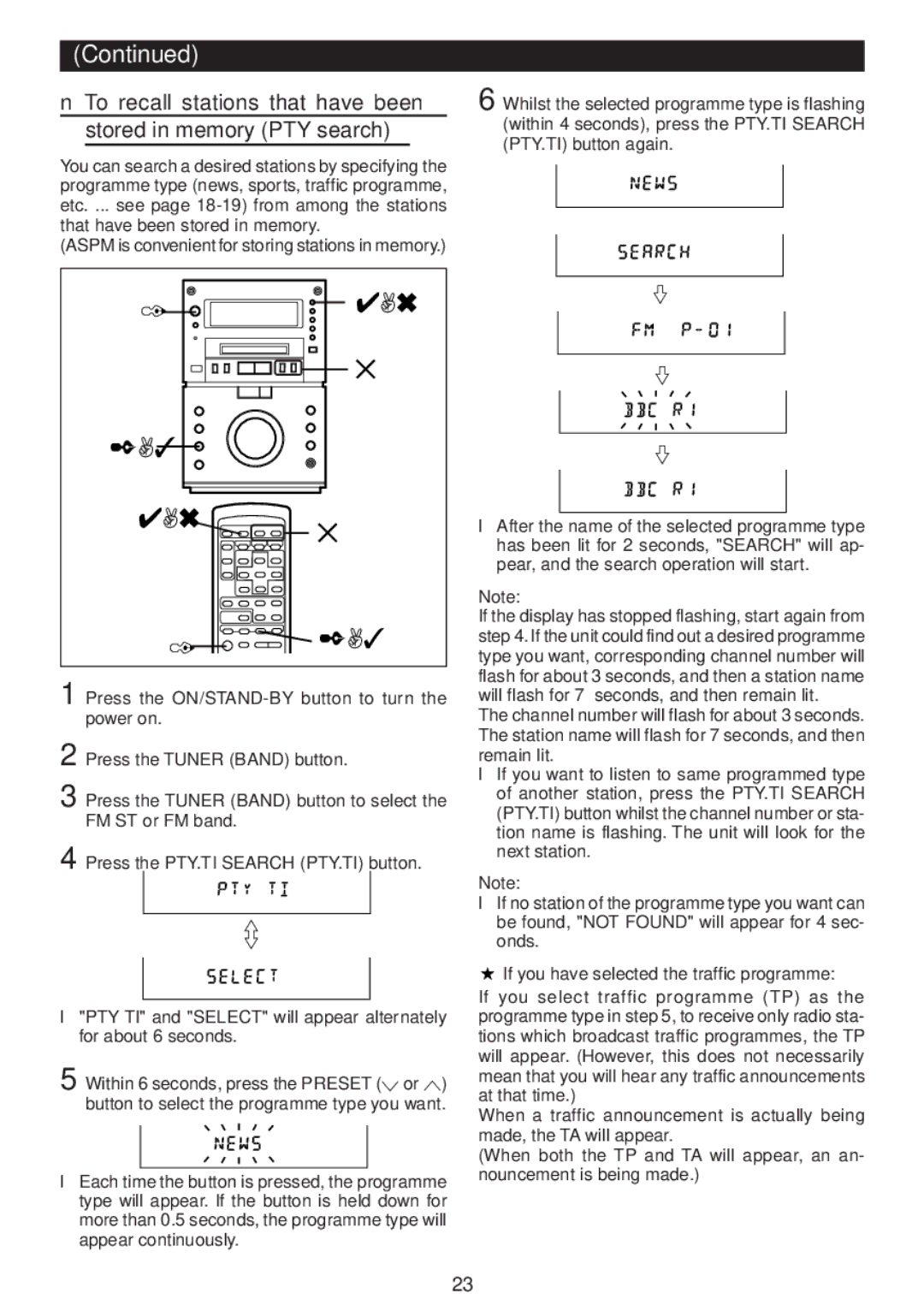
6 Whilst the selected programme type is flashing (within 4 seconds), press the PTY.TI SEARCH (PTY.TI) button again.
DISC TOC |
|
|
TRACK |
|
|
MEMORY |
|
|
RANDOM | kHz | REC |
TOTAL | ||
REMAIN | MHz SLEEP | |
|
|
|
DISC TOC |
|
|
TRACK |
|
|
MEMORY |
|
|
RANDOM | kHz | REC |
TOTAL | ||
REMAIN | MHz SLEEP | |
1 
 4,6
4,6
5
2,3 |
|
4,6 | 5 |
|
1 


 2,3
2,3
1 Press the
2 Press the TUNER (BAND) button.
3 Press the TUNER (BAND) button to select the FM ST or FM band.
4 Press the PTY.TI SEARCH (PTY.TI) button.
●"PTY TI" and "SELECT" will appear alternately for about 6 seconds.
5 Within 6 seconds, press the PRESET (X or W) button to select the programme type you want.
DISC TOC |
|
TRACK |
|
MEMORY |
|
RANDOM | kHz REC |
TOTAL | |
REMAIN | MHz SLEEP |
●Each time the button is pressed, the programme type will appear. If the button is held down for more than 0.5 seconds, the programme type will appear continuously.
●After the name of the selected programme type has been lit for 2 seconds, "SEARCH" will ap- pear, and the search operation will start.
Note:
If the display has stopped flashing, start again from step 4. If the unit could find out a desired programme type you want, corresponding channel number will flash for about 3 seconds, and then a station name will flash for 7 seconds, and then remain lit.
The channel number will flash for about 3 seconds. The station name will flash for 7 seconds, and then remain lit.
●If you want to listen to same programmed type of another station, press the PTY.TI SEARCH (PTY.TI) button whilst the channel number or sta- tion name is flashing. The unit will look for the next station.
Note:
●If no station of the programme type you want can be found, "NOT FOUND" will appear for 4 sec- onds.
If you have selected the traffic programme:
If you select traffic programme (TP) as the programme type in step 5, to receive only radio sta- tions which broadcast traffic programmes, the TP will appear. (However, this does not necessarily mean that you will hear any traffic announcements at that time.)
When a traffic announcement is actually being made, the TA will appear.
(When both the TP and TA will appear, an an- nouncement is being made.)
23