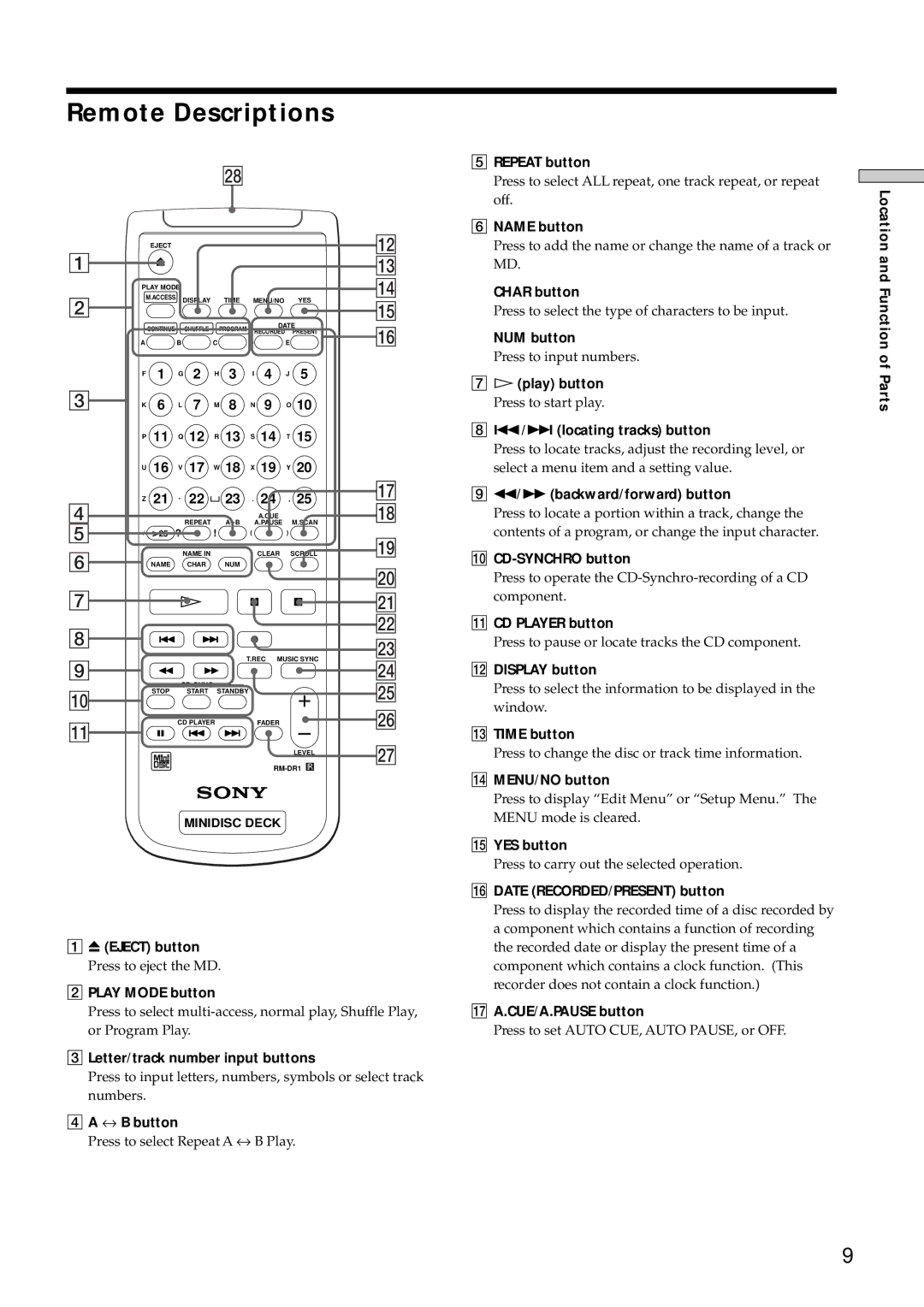
Remote Descriptions
|
|
|
|
|
|
| wk |
|
|
|
|
|
|
| EJECT |
|
|
|
|
|
|
|
|
| qs |
1 |
|
|
|
|
|
|
|
|
|
|
| qd |
| PLAY MODE |
|
|
|
|
|
|
| qf | |||
2 | M.ACCESS | DISPLAY |
| TIME | MENU/NO |
| YES |
| ||||
|
|
|
|
| qg | |||||||
|
|
|
|
|
|
|
|
|
|
| ||
|
| CONTINUE |
|
| SHUFFLE |
| PROGRAM |
| DATE |
| qh | |
| A |
| B | C | D |
| E |
| ||||
|
|
|
|
|
|
|
| RECORDED PRESENT |
| |||
| F | 1 |
| G | 2 | H | 3 | I | 4 | J | 5 |
|
3 | K 6 |
| L 7 | M 8 | N 9 | O 10 |
| |||||
| P | 11 |
| Q 12 | R | 13 | S | 14 | T | 15 |
| |
| U | 16 |
| V | 17 | W 18 | X | 19 | Y | 20 |
| |
| Z | 21 |
| - | 22 |
| 23 | . | 24 | , | 25 | qj |
4 |
|
| qk | |||||||||
|
|
|
| REPEAT |
| A B |
| A.CUE | M.SCAN | |||
5 |
| >25 |
|
|
| A.PAUSE |
| |||||
/ | ? |
| ! |
|
|
|
|
| ql | |||
6 |
|
|
| NAME IN |
|
|
| CLEAR | SCROLL | |||
| NAME |
|
| CHAR |
| NUM |
|
|
|
|
| |
|
|
|
|
|
|
|
|
|
|
|
| w; |
7 |
|
|
|
|
|
|
|
|
|
|
| wa |
8 |
|
|
|
|
|
|
|
|
|
|
| ws |
|
|
|
|
|
|
|
|
|
|
| wd | |
|
|
|
|
|
|
| T.REC MUSIC SYNC | |||||
9 |
|
|
|
|
|
| wf | |||||
|
|
|
|
|
|
|
|
|
|
| ||
|
|
|
|
|
|
|
|
| wg | |||
q; |
| STOP |
|
| START | STANDBY |
|
|
|
| ||
|
|
|
|
|
|
|
| |||||
|
|
|
|
|
|
|
|
|
|
| wh | |
qa |
|
|
| CD PLAYER |
|
| FADER |
|
| |||
|
|
|
|
|
|
|
|
|
|
| wj | |
|
|
|
|
|
|
|
|
|
| LEVEL | ||
|
|
|
|
|
|
|
|
|
| |||
|
|
|
|
| MINIDISC DECK |
|
|
| ||||
1 Z (EJECT) button
Press to eject the MD.
2PLAY MODE button
Press to select
3Letter/track number input buttons
Press to input letters, numbers, symbols or select track numbers.
4A ↔ B button
Press to select Repeat A ↔ B Play.
5REPEAT button
Press to select ALL repeat, one track repeat, or repeat off.
6NAME button
Press to add the name or change the name of a track or MD.
CHAR button
Press to select the type of characters to be input.
NUM button
Press to input numbers.
7H (play) button
Press to start play.
8./> (locating tracks) button
Press to locate tracks, adjust the recording level, or select a menu item and a setting value.
9m/M (backward/forward) button
Press to locate a portion within a track, change the contents of a program, or change the input character.
0
Press to operate the
!Á CD PLAYER button
Press to pause or locate tracks the CD component.
!ª DISPLAY button
Press to select the information to be displayed in the window.
!£ TIME button
Press to change the disc or track time information.
!¢ MENU/NO button
Press to display “Edit Menu” or “Setup Menu.” The MENU mode is cleared.
!° YES button
Press to carry out the selected operation.
!¤ DATE (RECORDED/PRESENT) button
Press to display the recorded time of a disc recorded by a component which contains a function of recording the recorded date or display the present time of a component which contains a clock function. (This recorder does not contain a clock function.)
!¦ A.CUE/A.PAUSE button
Press to set AUTO CUE, AUTO PAUSE, or OFF.
Location and Function of Parts
9