Changing basic settings in the settings menu
Adjusting sound and balance (AUDIO)
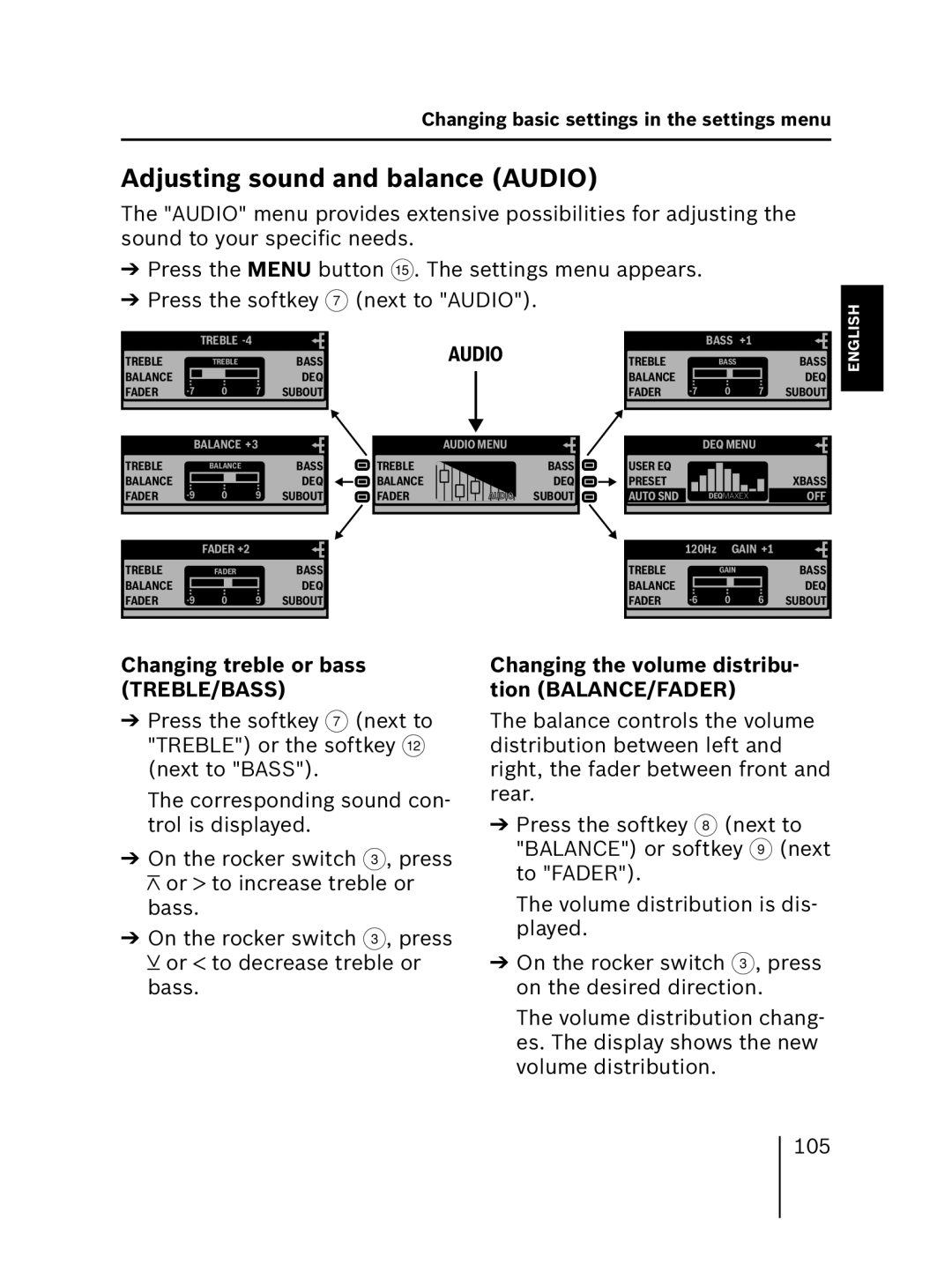
The "AUDIO" menu provides extensive possibilities for adjusting the sound to your specific needs.
➔Press the MENU button ?. The settings menu appears.
➔Press the softkey 7 (next to "AUDIO").
DEUTSCH
TREBLE |
| TREBLE |
| BASS | |
| TREBLE |
| |||
BALANCE | 0 |
| 7 | DEQ | |
FADER |
| SUBOUT | |||
|
|
|
|
|
|
|
|
|
|
| |
TREBLE | BALANCE +3 | BASS | |||
| BALANCE |
| |||
BALANCE | 0 |
| 9 | DEQ | |
FADER |
| SUBOUT | |||
|
|
|
|
|
|
| AUDIO |
| AUDIO MENU |
TREBLE | BASS |
BALANCE | DEQ |
FADER | AUDIOAUDIO SUBOUT |
TREBLE |
| BASS +1 |
| BASS | |
| BASS |
| |||
BALANCE | 0 |
| 7 | DEQ | |
FADER |
| SUBOUT | |||
|
|
|
|
|
|
| DEQ MENU |
|
USER EQ |
|
|
PRESET |
| XBASS |
AUTO SND | DEQMAXEX | OFF |
FRANÇAIS ENGLISH
TREBLE |
| FADER +2 |
| BASS |
| TREBLE | 120Hz | GAIN +1 | BASS | ||
| FADER |
|
|
| GAIN |
| |||||
BALANCE |
|
|
| DEQ |
| BALANCE | 0 |
| 6 | DEQ | |
FADER | 0 | 9 | SUBOUT |
| FADER |
| SUBOUT | ||||
|
|
|
|
|
|
|
|
|
|
|
|
ITALIANO
Changing treble or bass (TREBLE/BASS)
➔Press the softkey 7 (next to "TREBLE") or the softkey < (next to "BASS").
The corresponding sound con- trol is displayed.
➔On the rocker switch 3, press  or
or  to increase treble or bass.
➔On the rocker switch 3, press  or
or  to decrease treble or bass.
Changing the volume distribu- tion (BALANCE/FADER)
The balance controls the volume distribution between left and right, the fader between front and rear.
➔Press the softkey 8 (next to "BALANCE") or softkey 9 (next to "FADER").
The volume distribution is dis- played.
➔On the rocker switch 3, press on the desired direction.
The volume distribution chang- es. The display shows the new volume distribution.
NEDERLANDS
105