Chapter 34
HowMessagingto Use the
Telephone Outbox
Displaying, editing, deleting, and
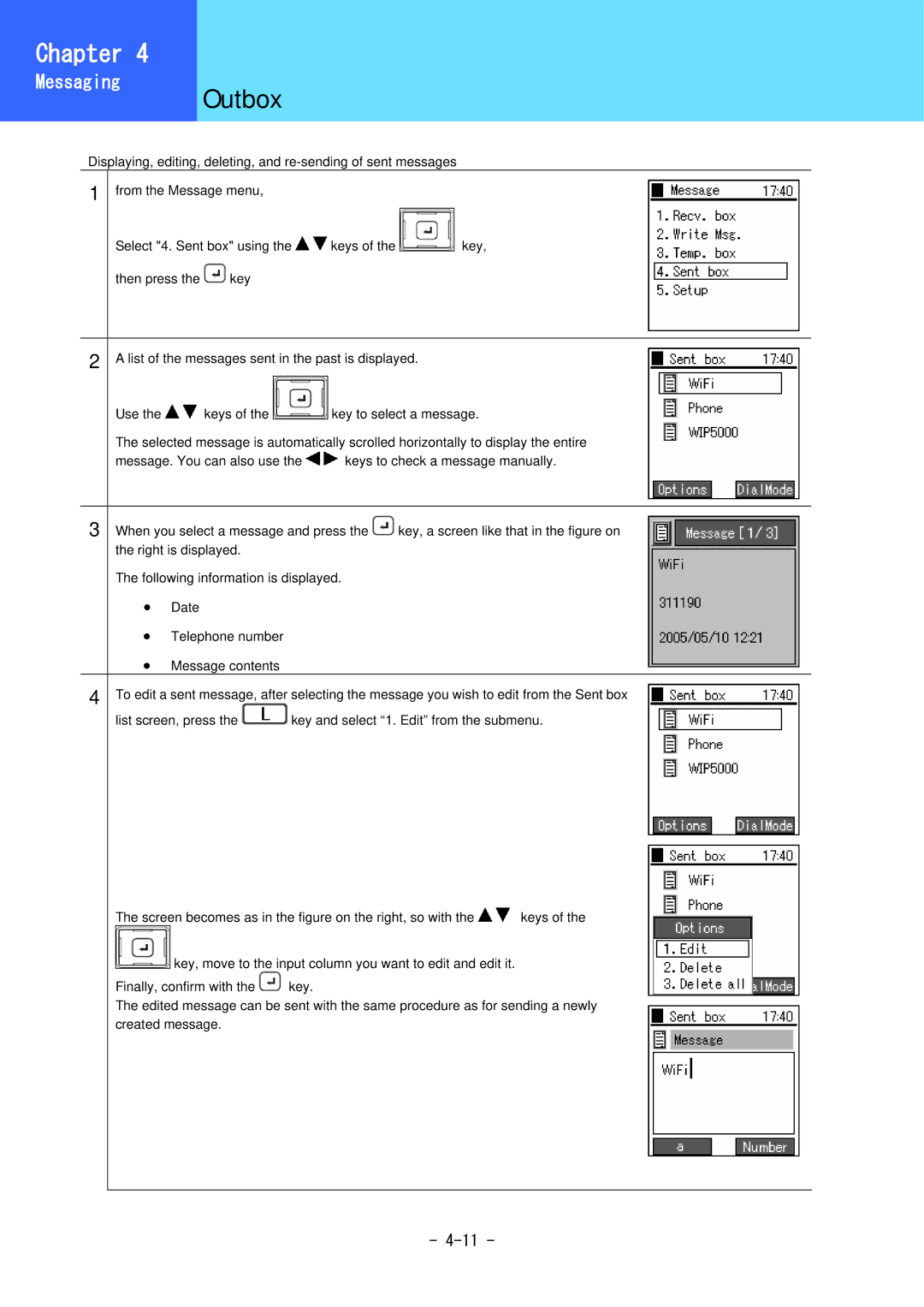
1 from the Message menu,
Select "4. Sent box" using the 
 keys of the
 key,
key,
then press the  key
key
2 A list of the messages sent in the past is displayed.
Use the 
 keys of the
 key to select a message.
The selected message is automatically scrolled horizontally to display the entire
message. You can also use the 
 keys to check a message manually.
3 When you select a message and press the  key, a screen like that in the figure on the right is displayed.
The following information is displayed.
•Date
•Telephone number
•Message contents
4 To edit a sent message, after selecting the message you wish to edit from the Sent box | |
list screen, press the | key and select “1. Edit” from the submenu. |
The screen becomes as in the figure on the right, so with the 
 keys of the

 key, move to the input column you want to edit and edit it.
Finally, confirm with the  key.
key.
The edited message can be sent with the same procedure as for sending a newly created message.
-