HP LaserJet 2410/2420/2430
Page
HP LaserJet 2410, 2420, and 2430 printers
Copyright and license
Table of contents
Page
Windows NT 4.0, Windows 2000, Windows XP, or
Downloading the new firmware from the HP Web site
HP traditional print drivers for Windows
Effects tab features
Graphics Settings
Paper tab features
Job Storage Mode
HP Traditional Postscript 3 Emulation Driver features
Product image
Job Storage tab
HP PCL 6, HP PCL 5e, and PS emulation unidriver features
147
Access to print drivers
Advanced tab features
Paper/Quality tab features
Help system
Finishing tab features
Job Storage tab features
Installing the Windows printing-system components
305
Engineering Detail
System requirements
Xiv
Purpose and scope
1Features of the HP LaserJet 2410, 2420, and 2430 printers
HP LaserJet 2410, 2420, and 2430 printers
HP LaserJet 2410, 2420, and 2430 printers
Software features
Printing system and installer
Printing-system software CD
Installer features
HP LaserJet print drivers
Print-driver version numbers for Windows operating systems
HP PCL 5e, PCL 6, and PS emulation drivers
Finishing Effects Paper Job Storage Basics
Click Settings
Click Properties
Macintosh and Macintosh-compatible printing system
Additional driver availability
Driver Autoconfiguration
Update Now
HP Driver Preconfiguration
HP LaserJet documentation
HP LaserJet 2400 Series User Guide
3Documentation availability
HP Driver Preconfiguration User Guide
LJ24X0INSTALL-NOTEXXWW.HTM
HP Device Installer Customization Wizard
HP Jetdirect Administrators Guide
HP Embedded Web Server Guide
CUSTOMIZATIONREADMEXXWW.RTF
HP LaserJet software CD, Windows partition
In-box file layout
HP LaserJet software CD, Macintosh partition
Availability and fulfillment
In-box CDs
CD AS Asia
4CD AM Americas and Europe
5CD WE Western Europe and Arabic
6CD NE Northern Europe and Russian
7CD EE Eastern Europe
8CD AS Asia
Zhcn Zhtw
Printing-system software
Web deployment
Standalone drivers
Other operating systems
Software component availability
Software description
Supported operating systems
Driver Configuration
Bidirectional communication
Enterprise AutoConfiguration
1EAC availability in Microsoft Windows and Microsoft Share
2EAC availability in Novell Netware environments
TCP/IP HP TCP/IP MS1 IPX/SPX HP
HP Driver Preconfiguration
HP Driver Diagnostic Printer Check tool
Lockable features
3Operating systems that support HP Driver Preconfiguration
Continuous export
HP Printer Access Tool
Euro character
HP Embedded Web Server and HP Toolbox
HP Embedded Web Server
HP EWS frame
Information tab
Links to off-product solutions
Device Status screen
Configuration
1Information tab Device Status screen
Settings tab
2Information tab Configuration
Configure device
3Settings tab Configure Device screen
Alerts
4Settings tab Alerts screen
Security
5Settings tab Security screen
Networking tab
Configuration section
Security section
Diagnostics section
Network settings
HP Toolbox
HP Toolbox requirements
Installing HP Toolbox
Uninstalling HP Toolbox
Troubleshooting tab
To view the HP Toolbox
HP Toolbox Frame
Top banner Status tab
Toolbox Status tab
Troubleshooting tab
Print Quality Tools
Maintenance
Error Messages
10Troubleshooting tab Interpreting control-panel messages
Paper Jams
11Troubleshooting tab Paper Jams
Supported Media
12Troubleshooting tab Supported Media
Printer Pages
13Troubleshooting tab Printer Pages
Alerts tab
Set up Status Alerts Administrative Settings
Documentation tab
15Documentation tab Install Notes
Linking to the HP Embedded Web Server
16Status tab with Device Settings button
Other Links
HP Web Jetadmin
4Availability of remote management and status tools
5HP Web Jetadmin support
Compatible operating systems
Remote firmware update
Bluetooth
Determining the current level of firmware
Remote firmware update by using FTP through a browser
Downloading the new firmware from the HP Web site
Windows operating systems
Remote firmware update through a local Windows port
Macintosh operating systems
Windows 98 or Windows Me
Lpt1
Remote firmware update for Unix systems
Remote firmware update through a Windows network
Windows NT 4.0, Windows 2000, Windows XP, or Windows Server
Remote firmware update by using Fetch Mac OS 9.x only
Click Select File
Remote firmware update by using the LPR command
Remote firmware update through HP Web Jetadmin
Printer messages during the firmware update
6Update messages
7Troubleshooting a firmware update
Troubleshooting a firmware update
8Troubleshooting a firmware update failure
Printing print-ready documents from a command line
Print-ready file printing by using FTP through a browser
Your print-ready file prints
Print-ready printing by using a local Windows port
Print-ready file printing in a Windows network
Print-ready file printing by using Fetch Mac OS 9.x only
Print-ready file printing in Unix systems
Print-ready file printing by using the LPR command
Click Download
9Driver support for job stream output feature
Driver-feature comparison in various operating systems
Job stream output
PJL/PJL Encoding
Job tracking
10Printer Job Language PJL and PJL encoding
11Driver support for job tracking
13Driver support for bidirectional communication features
12Driver support for connectivity features
Connectivity
Bundle support
14Driver support for HP Driver Preconfiguration
15Bundle support
Installable options
17Driver support for installable options
Tray and paper assignment
16Tray and paper assignment
UI features
Help features
18Driver support for UI features
19Driver support for Help features
Paper Sizes
Quick Sets
Media Types
23Driver support for job storage features
Job storage
Print-quality and resolution
24Print-quality and resolution features
Reordering Options
25Driver support for reordering options
Resizing options
Other document options
26Resizing options
27Other document options
28Driver support for watermarks feature
Watermarks
29Driver support for alternate source/paper type feature
30Driver support for printing destination feature
Alternative source/paper type
Printing destination
Finishing Options
Font support
31Driver support for finishing options
32Font support
Postscript-specific features
33Driver support for postscript-specific features
TrueType font download option
Software description
HP traditional print drivers for Windows
Access to print drivers in Windows NT
Access to print drivers
Document Defaults... driver tabs
Help system
Access to print drivers in Windows 98 and Windows Me
Properties driver tabs
Whats this? Help
Context-sensitive Help
Incompatible Options messages
Bubble Help
Finishing tab features
Print Task Quick Sets group box Document Options group box
Print Task Quick Sets
Print Quality group box
Default Print Settings User Guide Print Settings
Default Print Settings
Effects tab, Fit to Page group box
User Guide Print Settings
Document Options
Correct Order for Rear Bin
Print on Both Sides
Automatically printing on both sides
Manually printing on both sides
Select the Print on Both Sides Manually check box
Flip Pages Up
2Page orientation
Book and Booklet Printing
Booklet Printing
Printing a Booklet
Pages per Sheet
Printing a Book
Pages per sheet
Print Page Borders
Document preview image
Order
Print Quality group box
Print Quality Details for the HP Traditional PCL 6 Driver
Font Settings
Current Setting
Output Settings
Resolution
Resolution Enhancement technology REt
Scale Patterns Wysiwyg
Print all Text as Black
Graphics Settings
300 dpi 600 dpi
Effects tab features
Print Task Quick Sets group box Fit to Page group box
Fit To Page group box
Watermarks group box
Print Document On
Scale to Fit
Normal Size
First Page Only check box
Watermarks drop-down menu
None Confidential Draft
First Page Only
Font Attributes
Current Watermarks Watermark Message Message Angle
Current Watermarks
Watermark Message
Message Angle
Document preview image
Font Attributes
Paper tab features
12 Paper tab
Print Task Quick Sets group box Paper Options group box
Paper Options
Size is
Use Different Paper/Covers
Source Is
Automatically select Manual Feed in Tray
Type is
Custom
14Custom Paper Size dialog box
118 HP traditional print drivers for Windows
Save, Delete, or Rename
3Name drop-down menu text strings
Custom width and height control limits
Custom size width and height controls
4PCL 6 custom media sizes
Paper and envelope icons
Dynamic measurement units
Close
5Close dialog box text strings
Front Cover First Other Pages Last Back Cover
First
Front Cover
Add a Blank or Preprinted Cover check box
Other Pages
17 Other Pages options
Last
Back Cover
19 Back Cover setting
Product image
Job Storage tab features
Under Other Options, click More
Job Storage Mode group box
Job Storage tab
Proof and Hold Private Job
Print Task Quick Sets group box
Job Storage Mode
Status group box
Off Proof and Hold Private Job
Off
Job notification
Using a PIN for Private Job
Private Job
User Name
Using Job Storage features when printing
Job Name
Releasing a Job Storage print job
Basics tab features
Deleting a Job Storage print job
Orientation group box
About button
Orientation
Copies
About
22About This Driver dialog box
NT Forms tab features
Properties tabs
Configure tab features
Configuring the trays
24 Configure tab
Printer Model
Duplexing Unit
Paper Handling Options
6Printer model bundles
Mopier Enabled
Mopier mode and collation
7Driver Mopier mode and collation settings
Allow Manual Duplexing
More configuration options
Optional Paper Sources
HP 500-Sheet Input tray
Other Options
Storage
Fonts
26Configure Font Cards dialog box
Alternative letterhead mode
Include types in application source list
Ignore Application Collation
Printer memory
Allow Scaling from Large Paper
Automatic configuration
Printer image
HP Traditional Postscript 3 Emulation Driver features
Setup tab Advanced tab Job Storage tab
Access to print-driver settings in Windows 98 and Windows Me
General Ports Scheduling Sharing Security Device Setting
Setup tab features
Whats this Help
Advanced tab features
28 Advanced tab
Paper/Output
Layout N-up Option PostScript Options Printer Features
Graphic
Layout Option
PostScript Options
Printer Features
Collate
EconoMode
Fit to
Watermark Style
Watermark pages per sheet Watermark Font
Watermark Intensity
Print Watermark
Job Storage Mode group box Job Identification group box
29 Job Storage tab
156 HP traditional print drivers for Windows
Job Identification
User Name text box Job Name text box
User Name
Job Name
158 HP traditional print drivers for Windows
Device Settings tab
160 HP traditional print drivers for Windows
Form to Tray Assignment
Postscript Configure
Font Substitution Table
Available PostScript Memory
Output Protocol
Job Timeout
Wait Timeout
Send Ctrl-D Before Each Job
Send Ctrl-D After Each Job
Mopier Mode Job Storage Tray Printer Memory
Mopier Mode
Duplex Unit for 2-sided Printing
Job Storage
HP Traditional Postscript 3 Emulation Driver features 165
166 HP traditional print drivers for Windows
HP unidrivers
HP PCL 6, HP PCL 5e, and PS emulation unidriver features
Incompatible Print Settings messages
1An Incompatible Print Settings message
2The default appearance of the Advanced tab
Copy Count
Copy Count setting
Collated
Advanced Printing Features
Printer Features
Graphic options
Print Optimizations
Send TrueType as Bitmap
Graphics Mode
REt
Paper/Quality tab features
Layout Options
3Paper/Quality tab
Finishing tab, Document Options
Effects tab, Resizing Options
Paper/Quality tab, Paper Options
Type new Quick Set name here
4Paper Options group box
5Custom Paper Size dialog box
Units
Paper size
2PCL 6 custom media sizes
Automatically select Printer Auto Select Manual Feed in Tray
Front Cover
6Front Cover options
First Page options
8Other Pages options
Last Page options
10 Back Cover setting
Print Quality
HP PCL 6, HP PCL 5e, and PS emulation unidriver features 191
11 Effects tab
Print Task Quick Sets group box Resizing Options group box
Actual Size
Document preview image
13Watermark Details dialog box
Current watermarks
HP PCL 6, HP PCL 5e, and PS emulation unidriver features 197
14 Finishing tab
HP PCL 6, HP PCL 5e, and PS emulation unidriver features 199
Manually printing on both sides
HP PCL 6, HP PCL 5e, and PS emulation unidriver features 201
Left Edge Binding Right Edge Binding
Booklet layout
3Page orientation
HP PCL 6, HP PCL 5e, and PS emulation unidriver features 203
16Page-order preview images
HP PCL 6, HP PCL 5e, and PS emulation unidriver features 205
17 Job Storage tab
HP PCL 6, HP PCL 5e, and PS emulation unidriver features 207
Require PIN
HP PCL 6, HP PCL 5e, and PS emulation unidriver features 209
Device Settings
Installable Options options
Form to Tray Assignment
Font Substitution Table
19Font Substitution Table
External Fonts
Click the Device Settings tab
Installing external fonts
Removing external fonts
Postscript options
Convert Gray Text to PostScript Gray
Add Euro Currency Symbol to PostScript Fonts
Convert Gray Graphics to PostScript Gray
Installable Options
Tray
4Driver Mopier mode and collation settings
Postscript Passthrough
About tab
22 About tab
Installing the Windows printing- system components
Supported Windows operating systems
System requirements
1Default fonts
Default fonts
Basic fonts
CGTR45W.TTF
2Additional PS emulation fonts
Font support 227
Windows installation
Font support 229
Installation instructions
Installing from the printing-system CD
Detailed Windows installation
Installing from a network or from downloaded files
Using the Back and Cancel buttons
Modifying a pre-existing installation
Typical Installation dialog box sequence
Installation instructions 233
2Choose Setup Language dialog box
3Preparing to Install dialog box
Welcome dialog box
6HP Software License Agreement dialog box
7Printer Connection dialog box
Model dialog box
240 Installing the Windows printing-system components
10Connection Type dialog box
242 Installing the Windows printing-system components
12Print Job Management dialog box
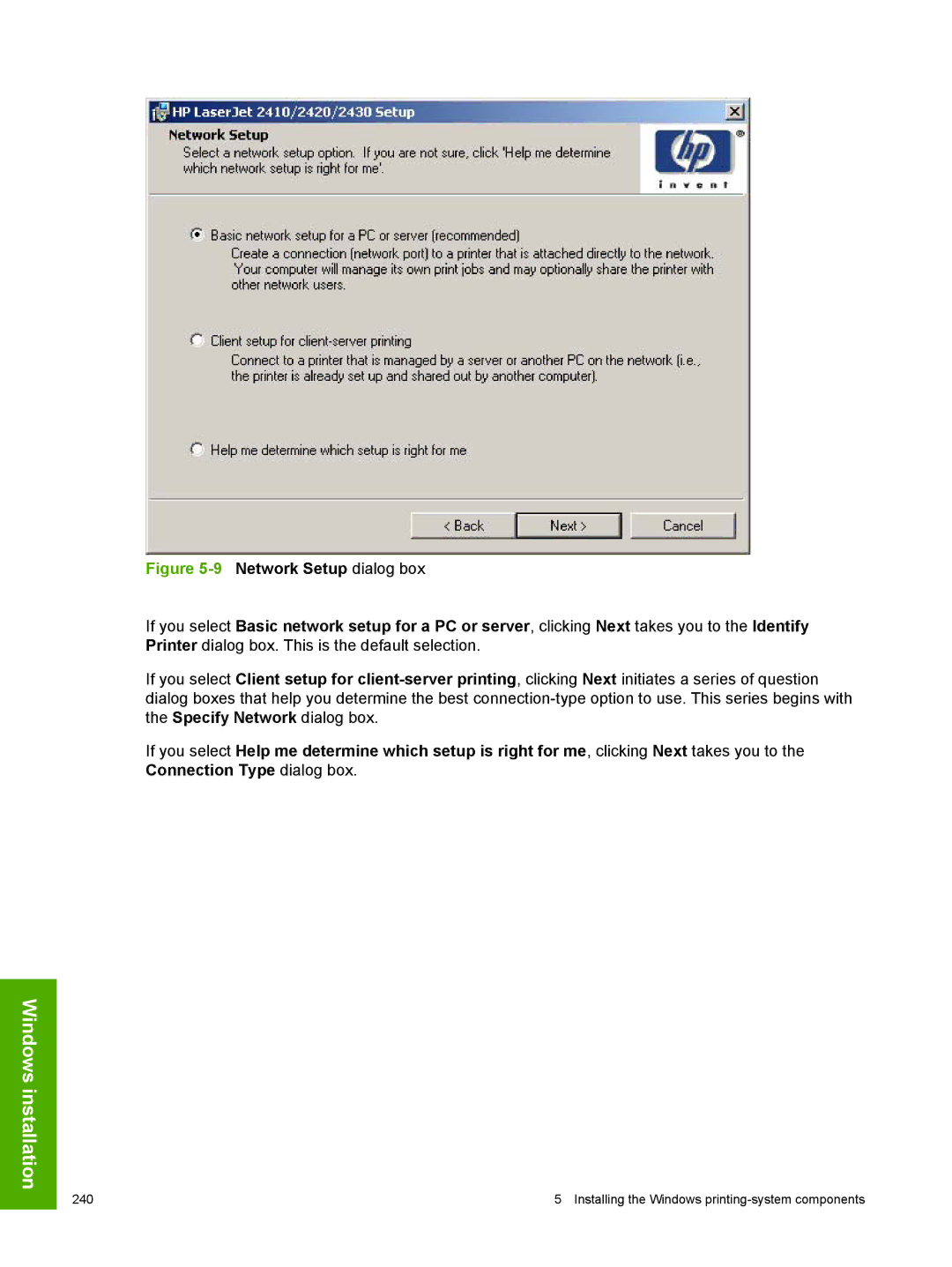
13Recommended Network Setup dialog box
Installation instructions 245
15Specify Printer dialog box
Hardware Address MAC IP Address IP Hostname IPX Address
16Printer Found dialog box
248 Installing the Windows printing-system components
18Set Network Protocol dialog box
19Installation Type dialog box
20 Features dialog box
Clicking Next takes you to the Printer Sharing dialog box
22Printer Sharing dialog box
23Client Driver Support dialog box
24Printer Location and Comment dialog box
25Ready to Install dialog box
Custom Installation
26 Finish dialog box
Installing print drivers by using the Add Printer feature
Installer Customization Wizard for Windows
Running the installer customization wizard
To run the installer customization wizard
Dialogs
260 Installing the Windows printing-system components
29 Language dialog box
30Printer Port dialog box
31Specify Printer dialog box
32 IP Settings dialog box
33 Model dialog box
34 Features dialog box
Installation instructions 267
36Driver Configuration dialog box
37Printer Name dialog box
38Printer Sharing dialog box
39Client Driver Support dialog box
40Printer Location and Comment dialog box
41Custom Installer Location dialog box
42Change Current Destination Folder dialog box
43 Installing dialog box
Distribution
Setting a default printer
278 Installing the Windows printing-system components
Non-Windows installation
Macintosh
Linux
Macintosh component descriptions
HP LaserJet PPDs
PDEs
HP Toolbox
Install notes
Online help
Screen fonts
Font support
Macintosh 283
Non-Windows installation
Macintosh 285
Installing the Macintosh printing system
To set up an AppleTalk networked Printer with Mac OS
Uninstalling the Macintosh printing system
To set up a Printer with Mac OS
To set up an IP/LPR networked Printer with Mac OS
In-box disk layout
Main Install dialog box sequence
Mac OS Classic installation
Click Continue to open the HP LaserJet Installer dialog box
Installing dialog box
HP LaserJet Screen Fonts Installer dialog box sequence
6HP LaserJet Screen Fonts splash screen dialog box
Mac OS X installation
10hp LaserJet 24X0 folder
12Authenticate dialog box
14 License dialog box
Macintosh 295
18 Installing dialog box
Paper-tray configurations
Paper sources and destinations
Paper-source commands
Product Tray number Tray type Standard/optional
Driver features and attributes
3Paper-source commands
4Supported features and attributes by driver
Media types and sizes
Paper sizes Width Height PCL 6
5Supported input media types
Custom paper size support
6Custom paper size support
Media-type commands
7Media-type commands
HP Toolbox
Enabling or disabling HP Toolbox support
304 Engineering Detail
Symbols/Numerics
Index
ROM
Index 307
308
CD-ROM
310
Index 311
312
Index 313
314
Index 315
316
Page
Hewlett-Packard Development Company, LP