Hardware Maintenance Service for Service Level a
Page
Contents
Check Procedures
Diagnostic Aids
System Backup Battery
Electrical input Operating Requirements
Safety Inspection Guide
Parts/Test Point Locations
Parts Catalog
Appendix A. FRU Number List
Appendix B. Online Support
Index
Voltage Supply Switch Settings
Voltage Supply Range Voltage Switch Setting
Safety Information
To Connect To Disconnect
Do not
Para Conectar
Para Desconectar
Cuidado
Cuidado
Page
Xiv
Page
Xvi
Connexion Déconnexion
Xviii
Page
Vorsicht
Kabel anschließen Kabel lö sen
Achtung
Instrumenten betrachten und den Strahlungsbereich meiden
Xxii
Pericolo
Per collegare Per scollegare
Attenzione
Xxiv
Attenzione
Xxvi
Page
Xxviii
Instrucciones de Conexió n Desconexió n
Peligro
Page
Laser Compliance Statement
Categorie
Trademarks
HelpCenter
Preface
Appendix A, FRU Number Index contains part
Numbers listed in numerical order
Xxxiv
General Information
Introduction
Product Overview
Processor
Memory
External Port
Diskette Drive
Hard Disk Drive
Power Management
DVD-ROM Drive
Multimedia
Power Supply
Internal Cabling
Monitor Not included with some models
Keyboard
Mouse
Hardware Interfaces
Interface
USB
Cmos Reset
Power-On Password
Flash Bios Update Procedure
BIOS-contained Model Number and Serial Number
Type ADMICFG.EXE/ type 01 05 Type
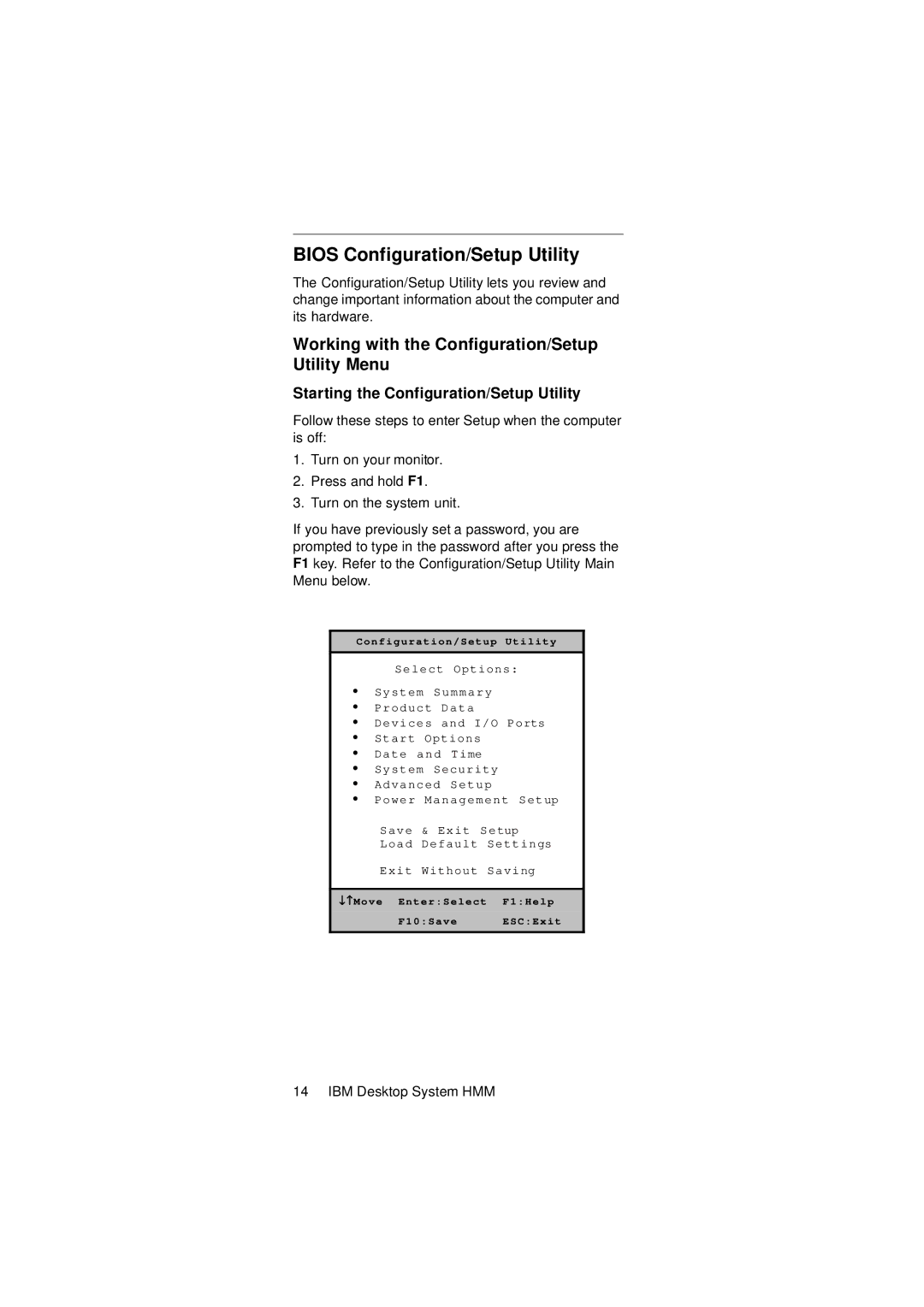
Bios Configuration/Setup Utility
Working with the Configuration/Setup Utility Menu
Changing Parameter Settings
Keys Function
Save & Exit Settings
Viewing System Information, and Product Data
Devices and I/O ports
Onboard Parallel Mode
ECP Mode Use DMA
Onboard Serial Port
Onboard Parallel Port
IDE Prefetch Mode
MPU-401 --Enabled
USB Mouse Support
Onboard Sound
Startup Options
Setting a Power-On Password
Keyboardless Operation
Changing the Power-On Password
Delete Power-On Password
Advanced Setup
Video Bios Shadow
CPU Internal Cache
External Cache
Power Management Setup
HDD Power Down
Doze Mode
Suspend Mode
PM Control by APM
Video Off Method
Activity Monitor
Primary Intr
Power On by PCI Card
RTC Alarm Resume
Modem Ring Resume
Date Month
Page
Specifications
Operating Requirements
Check Procedures
Index of Symptoms, Messages, Error Codes, or
Start
Read the Following
Insert diagnostics diskette in the diskette drive
005
007
009
Index of Symptoms, Messages, Error Codes, or Beeps
Page
Post Error Codes and Messages List
Bios Error Codes Action/FRU Messages
Post Error Codes and Messages List
Post Error Codes and Messages List
Post Error Codes and Messages List
Bios Error Beeps List
Bios Error Beeps Action/FRU
Error Symptoms List
Error Symptoms Action/FRU Processor / Processor Fan
System Board and Memory
Error Symptoms Action/FRU
Diskette Drive
Check Procedures
Hard Disk Drive
CN6 HDD
Error Symptoms Action/FRU CD/DVD-ROM Drive
Date and Time on
Video and Monitor
Diagnostic Program
Parallel/Serial Ports
Joystick
Keyboard
Error Symptoms Action/FRU Power Supply
Other Problems
Troubleshooting
Factory-Installed Storage Devices
003
Select Utility from the menu
005
Page
Factory-Installed Modem Card
002
Select Program, then select Accessories, Hyper Terminal
Select an on-line service station, dial and connect to it
Start Microsoft Windows Select the Start icon
Modem adapter functions normally End
Audio Not Supported by Diagnostics Program
Select Settings, then select Control Panel
004
006
008
Page
CD/DVD-ROM Drive
Replace system board End
Replace CD/DVD-ROM drive End IBM Desktop System HMM
Memory
Follow the screen instructions to run the Memory test
Keyboard
Keyboard is functioning normally End
Try with a known good keyboard
Replace the system board End
Mouse
Test right left button and check if right left button works
Test mouse cursor movement
Mouse is functioned normally End
Try with a known good mouse
010
Replace the mouse End
011
Power Supply
Disconnect the power cord from the back of the system unit
Pin-hole side view
Replace the on/off switch cable assembly
Replace the power supply End Check Procedures
Monitor
Is the Screen READABLE? YES, Read AHEAD. NO, GO to Step
Undetermined Problems
Dimm
Page
IBM Desktop System HMM
Diagnostic Aids
Introduction
Power-On Self Test
Page
Diagnostic Diskette
Using the Diagnostic Diskette
Using Diagnostic Program from Recovery CD
Diagnostics Program Features
Submenu Selections
Diagnostic Program Main Menu Selections
Repair Information
Removals and Replacements
Handling ESD-Sensitive Parts
Identifying the Parts of the System Unit
Bay
Adapter card connectors
Power supply
Adapter cards
Adapter card slots
Cover
Page
Bay Panels
Bay 1- 5.25-In. Bay Internal or External Access
Page
Page
Front Panel
Power Supply
Adapter Cards
MemoryDIMM
AMD K7 Duron Processor
Page
System Backup Battery
Indicator LED and Cable
System Board
Page
IBM Desktop System HMM
Parts/Test Point Locations
Parts/Test Point Locations
Introduction
System Board Jumpers Connectors
System Board Jumper Setting
System Board Connector Functions
Jumper/Settings Function
CN6
Power Supply Connectors and Voltages
Power Supply Output Pin Assignment
Pin Voltage Cable Color
+5Vdc Green Ground Black No connect Red
RJ-45 connector is used Accton Parts/Test Point Locations
Network Cards
Factory-Installed Modem Card Layout
Askey GVC Factory-Installed Modem Card Connector Functions
Function Connect to RJ11 connector Telephone line
Video Cards
Nvidia M64 w/ TV Out, 32MB Nvidia NV10 w/ TV Out, 32MB
D Signal Pin Assignments
Pin Signal
Optional output from monitor IBM Desktop System HMM
In. Hard Disk Drive Jumper Settings
J50 Description
CD-ROM Drive
Lite-on
CD-ROM Front Panel Introduction
CD-ROM Emergency-exit option
CD-ROM Drive Rear Panel Connectors and Jumpers
CD-ROM Drive Rear Panel Connectors and Jumpers
Function Connect to
CD-ROM R/W Drive
CD-ROM R/W Front Panel Introduction
CD-ROM R/W Drive Rear Panel Connectors and Jumpers
DVD-ROM Drive Front Panel and Emergency-Exit
DVD-ROM Front Panel Introduction
DVD-ROM Drive Rear Panel Connectors and Jumpers
DVD-ROM Drive Rear Panel Connectors and Jumpers
Function Connect
Dimm Configurations
System Board Connector Pin Signals
Monitor Port Signals
Serial Port Signals
Pin Signal Name
Parallel Port Signals
Mouse Port Signals
Keyboard Port Signals
Diskette Drive Cable Connector Signals
IDE Cable Connector Signals
Safety Inspection Guide
General Guidelines
Parts Catalog
Parts Catalog
Abbreviations
Country Language Version
System Assembly
Assembly 1 System Uni
Asm
Index Number
IBM Desktop System HMM
Assembly 2 Diskette, Hard Drive and Zip Drive
Assembly 3 CD/DVD-ROM Drive
Assembly 4 Power Cord
Assembly 5 Keyboard and Mouse
FRU Number List
FRU Number Asm-Index
20L2197
Appendix B. Online Support Information
Online Support
Page
Audio Check Procedure
Index
Page
Page